









CData QuickBooks MCP: SQL Access, Connect AI vs. Open-Source
CData's two ways to give AI SQL access to QuickBooks: an open-source, read-only JDBC server, or the commercial Connect AI platform, compared for IT teams.
On this page +
See it live
Ask Kipper about your QuickBooks data.
Invoices, payments, vendor bills and purchase orders.
Schedule free onboardingNo signup. Runs in your browser.
If your team standardizes AI access to business systems around SQL rather than app-specific tool calls, CData is probably already on your radar. It shows up twice in the QuickBooks MCP space, as two genuinely different products that are easy to conflate. One is a free, open-source, read-only server you run yourself. The other is a commercial cloud platform aimed at IT teams connecting QuickBooks alongside hundreds of other sources. This post covers what each one actually is, what it costs, and which fits an IT or data team’s evaluation.
Compared in this post:
- The open-source CData QuickBooks MCP server
- CData Connect AI (the commercial platform)
- How the two compare side by side
- Governing AI access across many data sources
What QuickBooks SQL access means for AI
Most QuickBooks MCP servers, Intuit’s official one included, expose QuickBooks as a set of entity-specific tools: get a customer, list invoices, create a bill. That model fits a developer building a specific integration, but it doesn’t fit a data team’s usual approach, which is standardizing access across many systems behind one query interface. CData’s answer to that is to expose QuickBooks as SQL-queryable tables instead: list the available tables, list a table’s columns, and run a SELECT query, the same shape a data team already uses for a database, a data warehouse, or any other source they connect.
What makes QuickBooks an unusually good fit for that framing is that it already speaks a dialect of SQL. The Accounting API has a query endpoint that accepts statements like SELECT * FROM Invoice WHERE TxnDate > '2026-01-01', with ORDERBY, STARTPOSITION, and MAXRESULTS clauses. It is a deliberate subset, though, and the parts left out are the ones analysis runs on:
- No joins. Each entity is queried on its own. Matching invoices to the customers behind them is two queries and a merge in your own code.
- No aggregate functions. No
SUM, noGROUP BY. QuickBooks returns rows and leaves the arithmetic to you. - Offset paging, with a ceiling. A query returns 100 records unless you raise
MAXRESULTS, which itself caps at 1,000. Past that you incrementSTARTPOSITIONand call again.
So a CData layer isn’t adding SQL to a system that had none. It’s finishing the SQL that QuickBooks half-implements, the joins and the GROUP BY execute in the driver, after every underlying row has crossed the wire and been charged against QuickBooks’ throttle of roughly 500 requests per minute per realmId (limits as of August 2026). That is worth knowing before someone points a dashboard at it: the SQL is a translation convenience, not a faster path to the data.
The open-source CData QuickBooks MCP server
CDataSoftware/quickbooks-mcp-server-by-cdata is a Java MCP server that registers exactly three tools: list the available tables, list a table’s columns, and run a SQL SELECT query against QuickBooks data. It’s explicitly described as read-only. There’s no create, update, or delete tool in the server at all, and CData’s own documentation points teams to its commercial offering if they need write capability.
The shape of it, once connected:
-- Three tools total: list_tables(), list_columns(table), run_query(sql)

SELECT Name, Balance
FROM Customers
WHERE Balance > 1000
ORDER BY Balance DESC
One QuickBooks-specific thing to check before writing anything more interesting than that. Class is QuickBooks’ grouping field, its answer to what other systems call a tracking category, and it is not guaranteed to be populated, or even present. Class tracking is a company preference (Preferences.AccountingInfoPrefs.ClassTrackingPerTxn), off until somebody turns it on, and when it is on the file can be configured to set class per transaction or per line. Department, QuickBooks’ location field, is gated the same way by TrackDepartments. A GROUP BY on class that comes back empty might mean there was nothing to group, or it might mean the company never enabled the field, and those are very different answers to hand somebody. Run list_columns first, for the same reason you’d check any optional field.
The catch is licensing: the MCP server code is free and MIT-licensed, but it runs on top of CData’s QuickBooks JDBC driver, which you register for separately (a trial license to start, or a paid license for production use). So “free server” is accurate but incomplete; the driver underneath it isn’t automatically free.
Choose it when: you’re comfortable running a local Java process, want genuinely read-only access with no write surface at all, and can license the JDBC driver.
Intuit’s Open-Source Alternative
Separately from CData, Intuit maintains an open-source QuickBooks Online MCP server on GitHub. It belongs in the comparison set because it is an official, QuickBooks-specific codebase rather than a SQL-over-JDBC layer or a commercial multi-source platform. That does not make it a CData partner path or an endorsement of either approach; it is a different option teams may evaluate when they want to run a QuickBooks MCP server themselves.
Compared with the CData routes, the Intuit server is the more direct QuickBooks-specific path, while CData’s options are framed around SQL access and broader data-platform governance.
CData Connect AI
CData Connect AI is a different product: a commercial, cloud-hosted MCP platform CData describes as giving AI assistants and agents connectivity, semantic context, and access control across hundreds of enterprise systems, with QuickBooks being one of many possible sources rather than the sole focus. It’s built for IT and data teams that want one governed connection point for AI access across their whole stack, with identity-based security and OAuth/SSO integration, rather than per-application MCP servers to manage individually. Unlike the open-source server, this one writes: alongside query, insert, update, and delete are core operations, and CData’s own QuickBooks + ChatGPT example describes “bidirectional” access with identity passthrough, plus “Source Tools” that scope exactly which actions are allowed per connected system. That’s a materially different access model from the read-only server above, not just a hosted version of it.
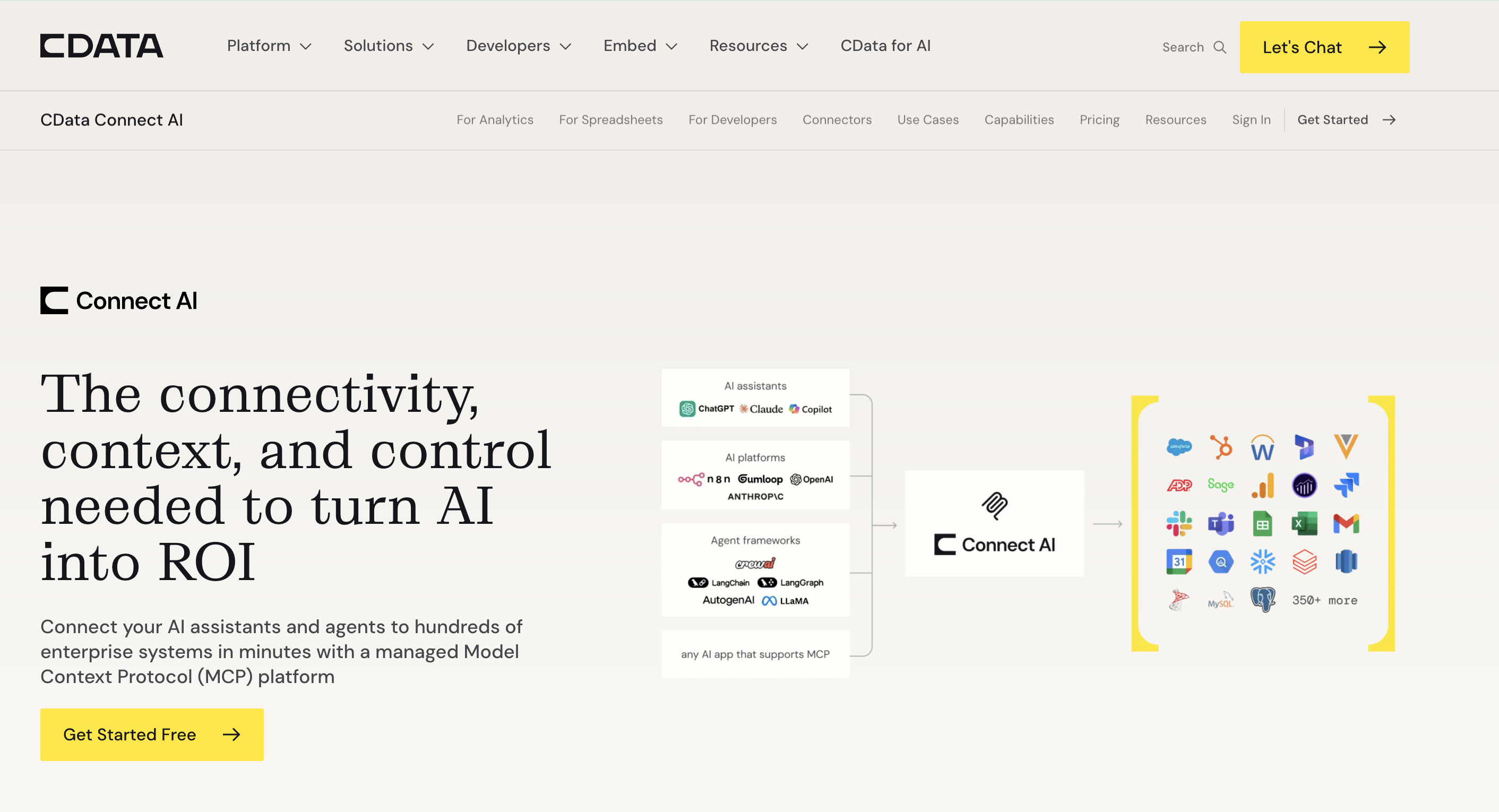
Pricing: Standard is $99/month ($79/month billed annually), including one user and one data source; Growth is $199/month ($159/month billed annually), including access to more source tiers plus derived views; Business is custom, with pooled tool calls and enterprise features like SCIM and premium support. Additional users and data sources beyond each tier’s included amount are billed as add-ons (pricing as of August 2026).
Choose it when: QuickBooks is one source among several you’re standardizing AI access to, you want a managed platform rather than a server you run and patch yourself, and you may need governed write actions, not just queries.
How do the CData options compare?
| Open-source MCP server | CData Connect AI | |
|---|---|---|
| Model | Local Java process, SQL-style tools | Cloud platform, managed MCP endpoint |
| Write access | No, read-only by design | Yes, governed insert/update/delete via IT-scoped Source and Custom Tools |
| Cost | Free server + licensed JDBC driver | $99/mo Standard ($79/mo annual) to $199/mo Growth ($159/mo annual) to custom Business |
| Best for | Teams comfortable running and licensing their own server | IT/data teams standardizing AI access across many sources |
| Scope | QuickBooks only, per install | QuickBooks plus hundreds of other connectors on one platform |
Figures current as of August 2026; re-verify against CData’s own pages before relying on them, as this category changes monthly.
Governing AI access across many data sources
The reason CData reaches an IT team’s shortlist is governance rather than syntax, and the two options answer it differently. The open-source server sidesteps write governance by having no write path at all, and leaves authentication and audit to you, one install per system. Connect AI centralizes both across sources and treats write actions as something to scope rather than something to exclude.
Either way, a SQL surface has one property worth naming plainly: run_query is unbounded by construction. A tool that fetches an invoice can only ever fetch an invoice. A tool that accepts arbitrary SELECT text reaches every table the driver exposes, and the only thing choosing between them is the model composing the string. Underneath, the connection is one realmId and one credential, so there is no per-person answer available here, because the connection has no notion of a person in it at all.
For an analyst writing their own queries, that is the correct trade and rather the point. It stops being correct when the question comes from someone who would never write a query and shouldn’t have to. Kipper’s QuickBooks MCP server is shaped for that second case: read-only by architecture rather than by omitted tools, scoped to supported QuickBooks records instead of an open SELECT, with permissions resolved per person when the query runs and every question and answer logged.
FAQ
What’s the difference between CData’s open-source QuickBooks MCP server and CData Connect AI?
They’re separate products, often confused because both come from CData. The open-source server is a free, read-only Java MCP server that exposes QuickBooks as SQL-queryable tables through three tools, but requires a separately licensed CData JDBC driver underneath. CData Connect AI is a commercial cloud platform: a managed, remote MCP endpoint for natural-language queries across QuickBooks and hundreds of other sources, aimed at IT and data teams standardizing AI access.
Is the CData QuickBooks MCP server free?
The server code itself is MIT-licensed and free. What isn’t free is the CData JDBC Driver for QuickBooks it depends on: you register for a trial or a paid license separately. So the honest answer is free server, licensed driver.
Is CData’s QuickBooks MCP server read-only?
Yes, by design. It exposes exactly three tools (list tables, list columns, run a SQL SELECT query), with no write, update, or delete tools at all. CData’s own documentation points to its commercial offering for read-write capability.
How much does CData Connect AI cost?
As of August 2026: Standard is $99/month ($79/month billed annually) with one user and one data source included; Growth is $199/month ($159/month billed annually) with access to more source tiers and derived views; Business is custom-priced with pooled tool calls and enterprise features. Additional users and data sources are billed as add-ons on top of each tier.
Why would an IT or data team want SQL access to QuickBooks instead of MCP tool calls?
Because SQL is how data teams already think about standardizing access across many systems: one query language and one governance model instead of learning each app’s tool-call API individually. CData’s pitch to this audience is exactly that: QuickBooks becomes one more SQL-queryable source alongside everything else they connect.
Can these CData options write to QuickBooks?
Only one of them. The open-source server cannot: it’s read-only by design, with no write tools registered at all. CData Connect AI can: it supports governed insert, update, and delete actions alongside queries, scoped per source through IT-defined Source Tools and Custom Tools. So the open-source server is the strictly read-only option; Connect AI is not.
Want the full picture across all QuickBooks MCP options? See QuickBooks MCP servers compared, or the ultimate QuickBooks MCP guide.
Prefer tool calls through a managed agent platform? See QuickBooks MCP for AI Agents: Zapier vs. Composio vs. Pipedream.
Want governed answers instead of SQL access? See Kipper’s QuickBooks MCP server.