








30 Questions You Can Ask AI About Your NetSuite Data
Real NetSuite questions sales, service, warehouse, and ops teams ask AI: AR, vendor bills, sales orders, quantity on hand, and class or department lookups.
On this page +
See it live
Ask Kipper about your NetSuite data.
Sales orders, stock on hand, invoices and vendor bills.
Schedule free onboardingNo signup. Runs in your browser.
Once an AI assistant can reach NetSuite, the useful questions are the narrow, factual ones: is this invoice paid, what is on hand for this SKU, which bills are due this week. Those are the questions that pile up in finance’s inbox all day from sales, support, and operations people who do not work in NetSuite directly.
The 30 below are grouped by who asks them. Every one returns specific records from your account, not a general explanation.
Two boundaries worth stating up front, because they decide which half of this post applies to you:
- Kipper answers from a supported NetSuite record layer: customers, invoices, payments, line items, vendors, bills, bill payments, purchase orders, sales orders, quotes, inventory and quantity on hand, bills of materials, credit memos, and vendor credits, grouped by class or department where that’s how your account is set up. The trial balance, profit and loss, balance sheet, and cash flow statement come back through the same connection.
- Oracle’s AI Connector Service, with the MCP Standard Tools SuiteApp, exposes a wider surface (record tools, reports, saved searches, SuiteQL, and two write tools) bounded entirely by the NetSuite role chosen at sign-in.
Everything in the first five sections stays inside the first boundary. The section after them does not.
What can sales reps ask about customer status?
Sales and account reps can check customer status themselves, without pinging finance. These six cover overdue invoices, open balances, and payment history.
- Which of my customers have invoices more than 60 days overdue?
- Has [customer] paid invoice [number]?
- What is [customer]’s current open balance?
- Which invoices for [customer] are still unpaid, oldest first?
- Show payments received from [customer] in [date range].
- Which credit memos were issued to [customer] this quarter?
What comes back: the total, plus the individual records behind it (invoice numbers, dates, amounts, and status), so the answer can be checked against NetSuite.
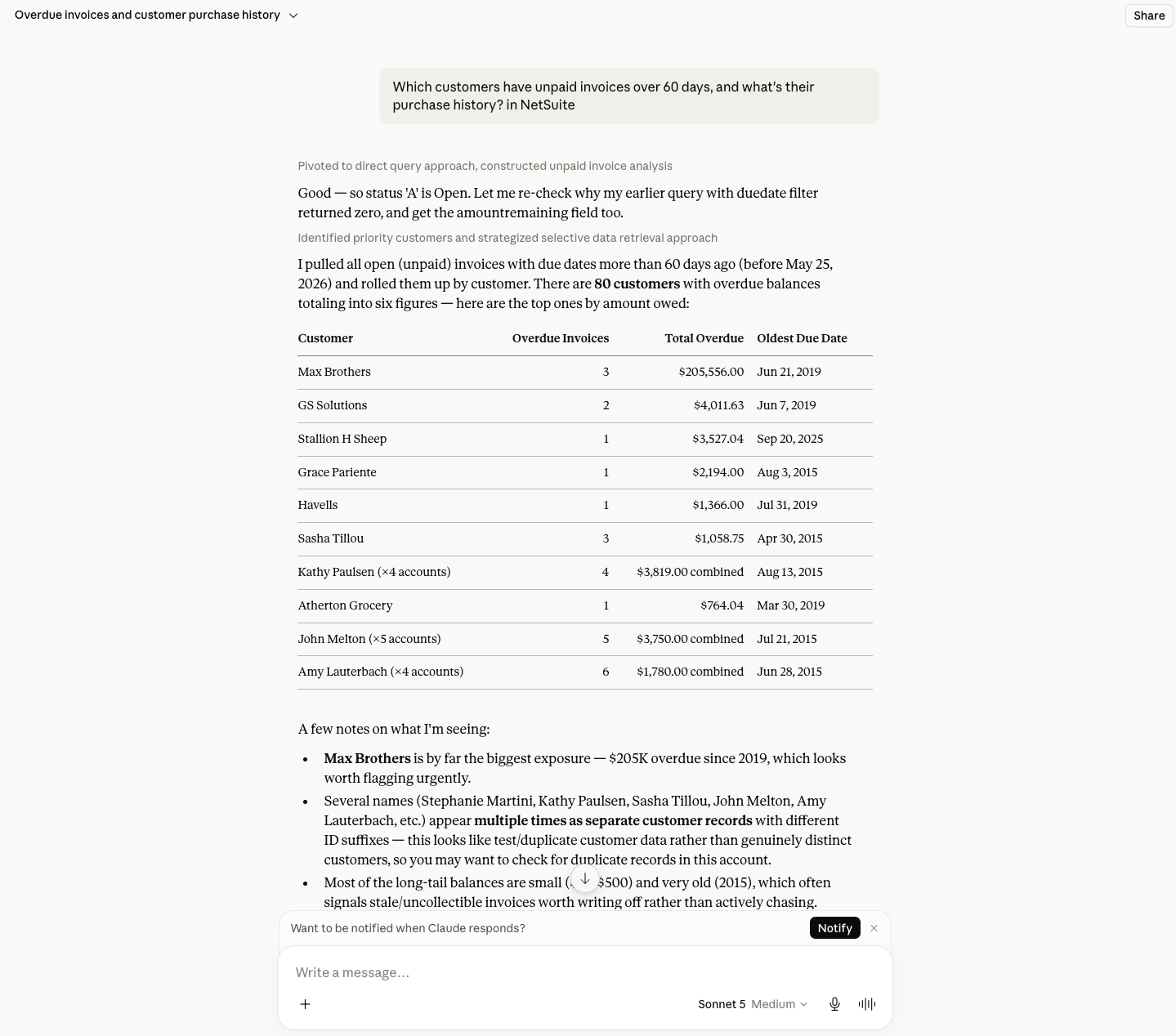 A read-only NetSuite question answered from real records: the figure, and the invoices behind it.
This is the group that feels the change first. The pattern before: message the controller, wait, follow up, get the number after the call it was needed for. The pattern after: ask, get the number, use it.
For procurement and ops: vendors, bills, and purchase orders
Procurement and ops can check vendor bills, payments, and open purchase orders on their own. These six cover the weekly AP questions.
- Which vendor bills are due in the next seven days?
- Which vendor bills are overdue right now?
- Have we paid [vendor]’s most recent bill?
- What did we pay [vendor] in [date range]?
- Which vendor credits are still unapplied?
- Which purchase orders are still open for [vendor]?
What can customer service ask about sales orders and quotes?
Customer service can look up order and quote status without opening NetSuite. These six cover fulfilment and quote conversion.
- What open sales orders does [customer] have?
- What is the status of sales order [number]?
- Which lines on sales order [number] are still unfulfilled?
- Which quotes are still open for [customer]?
- Was quote [number] converted to a sales order?
- Which sales orders were created for [customer] this month?
For warehouse and field staff: inventory and items
Warehouse and field staff can check stock themselves. These six cover on-hand quantity, reorder points, and bills of materials.
- What is the quantity on hand for [item or SKU]?
- What is on hand for [item] at [location]?
- Which items are below their reorder point at [location]?
- What is on the bill of materials for [assembly item]?
- Which open purchase orders include [item]?
- Which open sales orders are waiting on [item]?
These are the questions that cost a warehouse lead a phone call today. They are a strong example of why a governed answer layer helps: a picker can check on-hand quantity twice a day without needing to navigate the NetSuite interface.
For cost-center owners and executives: class, department, and period lookups
Cost-center owners and executives can break activity down by class, department, or period. These six cover the common rollups.
- Which invoices in [department] are still unpaid?
- Which purchase orders are open against [class]?
- What did we invoice this month compared with last month?
- Which invoices issued in [period] are still open?
- What bills were recorded against [department] in [date range]?
- Which of our customers had the largest invoiced amount this quarter?
Class and department are the grouping mechanism NetSuite actually gives you, so a breakdown question is only as good as how consistently those fields are set. If your account uses one and not the other, ask along the one that’s populated.
Copy-ready prompts
Overdue customer invoices
Use Kipper's NetSuite connection only.

Find open customer invoices that are overdue as of today.
Return:

- customer
- invoice number
- invoice date
- due date
- days overdue
- amount remaining

Sort by days overdue, longest first.
Do not create, update, approve, or delete any record.
Customer payment status
Use Kipper's NetSuite connection only.

For [customer name], show:

- most recent invoice
- invoice date
- due date
- total
- amount paid
- amount remaining
- status

If more than one customer matches, list the matches first and ask which one to use.
Do not modify NetSuite records.
Vendor bills due soon
Use Kipper's NetSuite connection only.

List vendor bills due in the next 14 days.
Return:

- vendor
- bill number
- due date
- amount remaining
- status

Sort by due date, soonest first.
Do not approve, pay, edit, or delete anything.
Item availability
Use Kipper's NetSuite connection only.

For item [item name or SKU], show:

- quantity on hand by location
- open sales orders that include this item
- open purchase orders that include this item

Do not modify NetSuite records.
Which questions need a native NetSuite MCP connection?
Reports, saved searches, ad hoc SuiteQL queries, and record writes all need a raw connection rather than Kipper.
Oracle’s MCP Standard Tools SuiteApp lists tools that go past Kipper’s record layer: ns_listAllReports and ns_runReport for standard and custom reports, saved-search tools, ns_runCustomSuiteQL for ad hoc queries, plus ns_createRecord and ns_updateRecord for writes. Those are properties of Oracle’s service and the connected role, not Kipper capabilities.
These sit outside the 30 above, because they aren’t questions Kipper answers. Use them only on a raw connection, with a role you’ve reviewed, and with the data owner’s approval:
- List the reports this role can run, then run [report name] for [period].
- Run saved search [name] and return the first page of results.
- Run a SuiteQL query against [record type] with [filter] and return [fields].
- Return the record types this role can see.
- Show the field IDs available on [record type].
Report availability in the NetSuite UI does not by itself mean the same result comes back through MCP; the role’s report permissions, subsidiary scope, and the report’s own shape all still apply. NetSuite MCP SuiteQL access covers the query behavior; NetSuite MCP permissions explained covers the role design underneath it.
What should Kipper not answer?
Kipper should not answer NetSuite questions about journal-entry workflows, general-ledger analysis, revenue recognition, individual bank transactions or reconciliation, budget-versus-actual variance, month-end or year-end close, intercompany consolidation or subsidiary rollups, forecasting, or anomaly and discrepancy detection. It also cannot write to NetSuite.
Bank balances, cash position and burn rate are answerable. Runway is not Kipper’s to calculate: it supplies the burn and the current balance, and your AI assistant projects from those and says that is what it has done.
The split is between reading a number and being answerable for it. A report NetSuite has already produced is a lookup, and anyone with the right permission can check it back against the source. Posting the entry, reconciling the account, or closing the period is not a lookup. Open those up across the company and someone eventually acts on a figure nobody owns.
Which three questions should I try first?
- “Which customers have invoices more than 60 days overdue?” Immediate proof the connection works, on a number everyone recognizes.
- “What is the quantity on hand for [your busiest SKU]?” The single question that most often replaces a phone call to finance or the warehouse.
- “Which vendor bills are due in the next seven days?” A clean AP test, and the one ops repeats every week.
If those three come back with real names, numbers, and dates, everything above will work too.
FAQ
What questions can AI answer from NetSuite data? It depends on the connection. Kipper answers record-level questions about customers, invoices, payments, line items, vendors, bills, bill payments, purchase orders, sales orders, quotes, inventory and quantity on hand, bills of materials, credit memos, and vendor credits. It also returns four reports: the trial balance, profit and loss, balance sheet, and cash flow statement. Oracle’s AI Connector Service with the MCP Standard Tools SuiteApp can expose a wider surface (records, reports, saved searches, and SuiteQL) bounded by the NetSuite role selected at sign-in.
Do I need to know SuiteQL or saved searches to ask? Not with Kipper: you ask in plain English and Kipper answers from the supported, permissioned NetSuite record layer. On a raw MCP connection the model picks the tool itself, so precise prompts and a review of what SuiteQL it ran matter more.
Can AI change anything in NetSuite while answering? Kipper cannot create, update, approve, or delete NetSuite records. Oracle’s MCP Standard Tools SuiteApp ships ns_createRecord and ns_updateRecord alongside the read tools, so a raw connection is only read-only if the role is designed that way.
Do the people asking need NetSuite logins? On Oracle’s native path, yes: every person asking connects with their own NetSuite user and role. Kipper uses one admin-authorized connection with permissions set per user or team, extending read-only answers to sales reps and warehouse leads who do not work in NetSuite directly.
Where can my team ask these NetSuite questions? With Kipper, in Slack, Microsoft Teams, and SMS today, plus Claude, ChatGPT, and Gemini through the Kipper MCP beta. A native MCP connection answers inside whichever AI client holds it.
For the full market map, read The Ultimate Guide to NetSuite MCP. For the shortlist of connection routes, see NetSuite MCP Server: 6 Ways to Connect AI to Your Books. To set up a native connection yourself, start with How to Connect NetSuite to Claude Using the NetSuite Connector. To give a whole team governed read-only answers, see Kipper’s NetSuite MCP connector.