








NetSuite MCP Permissions Explained
Plan NetSuite MCP permissions across account prerequisites, OAuth, roles, records, reports, saved searches, SuiteQL, custom records, and Kipper-managed access.
On this page +
See it live
Ask Kipper about your NetSuite data.
Sales orders, stock on hand, invoices and vendor bills.
Schedule free onboardingNo signup. Runs in your browser.
NetSuite MCP permissions start with the NetSuite role, but the role is not the only control. Account features, SuiteApps, OAuth, integration records, tool visibility, AI-client policy, and execution logs all matter.
Use this guide before setting up ChatGPT, Claude, Codex, or a local NetSuite MCP bridge. For the risks behind these controls, see is it safe to connect AI to your accounting system?
How does the NetSuite MCP permissions model work?
Permissions stack in layers, and a request has to clear every layer to succeed:
| Layer | What it controls | Owner |
|---|---|---|
| Account prerequisites | Whether the AI Connector Service path can run | NetSuite administrator |
| OAuth and integration setup | Which client can authenticate and where callbacks go | NetSuite administrator and AI-client admin |
| MCP connection permissions | Whether a role can use the AI Connector Service | NetSuite administrator |
| Tool permissions | Which MCP tools appear and can run | SuiteApp/tool design plus role permissions |
| Record permissions | Which records and fields can be read or changed | NetSuite role owner |
| AI-client controls | Which app, connector, or MCP server users can access | ChatGPT, Claude, Codex, or workspace admin |
| Kipper permissions | Which approved users can ask governed finance questions | Kipper admin and customer admin |
Do not fix every failed prompt by broadening the NetSuite role. Identify the layer that failed first.
What does the account need before you start?
Account-level prerequisites are different from role permissions.
Confirm the account has the features and SuiteApps required by the path you are using:
| Prerequisite | Type | When it applies |
|---|---|---|
| NetSuite AI Connector Service availability | Product availability | Always; confirm in your account before designing roles. |
| Server SuiteScript | Account feature | Always. One of the two features Oracle lists for the service. |
| OAuth 2.0 | Account feature | Always. Carries the authorization flow. |
| REST Web Services | Account feature | Whenever you install the MCP Standard Tools SuiteApp. |
| MCP Standard Tools SuiteApp | SuiteApp | For Oracle’s standard record, report, saved-search, and SuiteQL tools. |
| Companion SuiteApp | SuiteApp | Optional. Adds Oracle’s prompt library; no additional data access. |
| Custom tool package | SuiteApp/SDF | Only if your developers publish bespoke tools. |
None of these are role permissions. Enabling a feature never grants anyone access; it only makes a capability available for a role to be granted separately.
How does authentication work?
OAuth decides how the user authorizes the AI client or bridge.
Document:
- Which client is connecting: ChatGPT Apps, Claude connector, Codex, local bridge, or custom MCP app.
- Whether an integration record is automatically created or manually configured.
- Redirect URI or callback port where applicable.
- Client ID and public-client behavior where applicable.
- Which NetSuite user signs in.
- Which NetSuite role is selected during authorization.
If a user leaves the company, remove the role assignment and revoke or disconnect the relevant app access.
MCP Connection Permissions
Oracle documents two required setup permissions for every role using the AI Connector Service, plus one conditional third:
| Permission | Required? | Why it matters |
|---|---|---|
MCP Server Connection |
Always | Lets the role connect through the NetSuite AI Connector Service. |
Log in using OAuth 2.0 Access Tokens |
Always | Lets the role sign in through OAuth 2.0 access-token login. |
REST Web Services |
Only for record writes/reads via the SuiteApp | Oracle requires it on the role before that role can create, retrieve, and update NetSuite records through the MCP Standard Tools SuiteApp. |
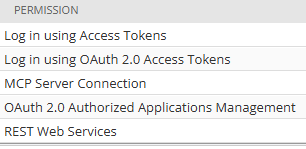 The permission selector includes similarly named OAuth options, so choose the OAuth 2.0 access-token permission exactly.
Two traps live in this table. First, Log in using OAuth 2.0 Access Tokens is not the older, similarly named Log in using Access Tokens; picking the wrong one produces an authorization failure that looks like a NetSuite outage. Second, REST Web Services appears both as an account feature (needed to install the Standard Tools SuiteApp at all) and as this role permission (needed for that role to reach records through it). They are independent switches. Enabling the feature does not grant the permission, and a read-only Q&A role should have the feature enabled account-wide but the permission left off.
 The baseline connection permissions live under Permissions > Setup.
Oracle also blocks Administrator and full-access roles from using the AI Connector Service. Create a dedicated role instead.
Tool Permissions
The MCP Standard Tools SuiteApp ships four tool families. A tool is visible only when the role has the required permissions for it, and execution still respects the role.
| Tool family | Tools | Read/write | Permission area to review |
|---|---|---|---|
| Record tools | ns_getRecord, ns_getRecordTypeMetadata, ns_createRecord, ns_updateRecord |
Read and write | REST Web Services on the role, plus the transaction, list, setup, and custom-record permissions for each record type. |
| Report tools | ns_listAllReports, ns_runReport, plus ns_getSubsidiaries, ns_getAccountingBooks, ns_getAccountingContexts, ns_getNexusIds for filtering |
Read only | Report access and the subsidiary or classification scope the report needs. |
| Saved-search tools | ns_listSavedSearches, ns_runSavedSearch |
Read only | Perform Search, plus visibility of each saved search to the role. |
| SuiteQL tools | ns_runCustomSuiteQL, ns_getSuiteQLMetadata |
Read only | Role access to the records and fields being queried. |
| Custom tools | Account-specific | Depends on the tool | The tool definition, SuiteScript behavior, deployment, and role permissions. |
ns_createRecord and ns_updateRecord are the only write tools in the standard set. If your rollout is meant to be read-only, that is the single thing to verify, and the REST Web Services role permission is the switch that controls it. A useful acceptance test: connect, ask the client to list its available NetSuite tools, and confirm those two names are absent.
Oracle also publishes a separate NetSuite AI Connector Service Companion SuiteApp, a library of prompt samples organized by business function. It installs alongside the Standard Tools and adds prompts, not tools: it grants no additional data access, but it is worth knowing about when auditing what is installed in the account.
Record Permissions
Add only the records the user needs.
Common areas:
- Transactions: invoices, bills, sales orders, payments, credit memos.
- Lists: customers, vendors, items, employees, departments, classes, locations.
- Custom records.
- Subsidiaries and classifications.
For broad Q&A, start with View. Add Create, Edit, Approve, or Full only for a named workflow tested in sandbox.
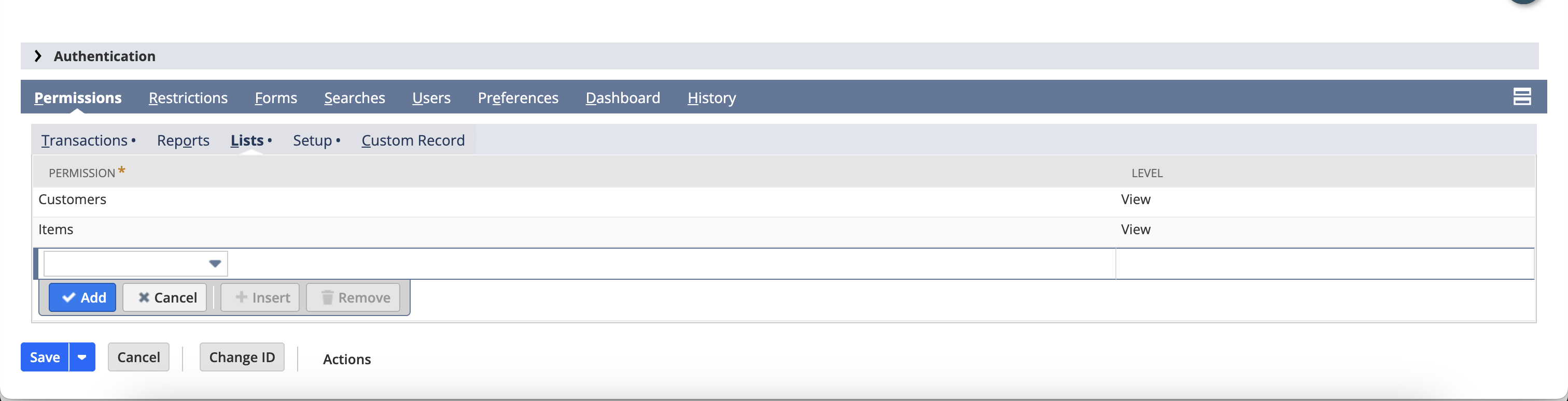 Record permissions decide what the AI client can retrieve or change.
Report and Saved-Search Permissions
Reports and saved searches are useful because they often encode finance logic that already exists in NetSuite.
Review:
- Which reports the role can access.
- Which saved searches are visible to the role.
- Who owns the saved search logic.
- Whether the AI client should run reports directly or ask for a narrower record query.
- Whether report results include subsidiaries, departments, classes, or custom segments the user should not see.
For report-heavy workflows, use NetSuite MCP SuiteQL Access Explained to compare reports, saved searches, record tools, and SuiteQL.
What does SuiteQL access require?
Oracle documents the standard SuiteQL tool as read-only. Read-only is not the same as low-risk.
SuiteQL can still reveal sensitive data if the role can see it. Control:
- Record access.
- Field access.
- Subsidiaries and segments.
- Custom records.
- Query size.
- Whether generated queries need review before execution.
Use SuiteQL for structured retrieval, not as a bypass around reports or saved searches.
Custom Records
Custom records are account-specific. Before exposing them:
- Confirm the record type ID.
- Confirm field IDs.
- Confirm audience, subsidiary, and role restrictions.
- Confirm whether a saved search is safer.
- Test with scrubbed or sandbox data.
What does a least-privilege role look like?
These are starting points, not universal recipes. A NetSuite administrator must adapt them to your account, subsidiaries, custom records, and approval process.
| Role | Intended use | Starting access | Explicit exclusions | Risks |
|---|---|---|---|---|
| Accounts receivable | Customer balances, overdue invoices, payment status | View customers, invoices, payments, credit memos, selected AR saved searches | Vendor bills, payroll, banking, write actions | May expose customer-level revenue or subsidiary data |
| Accounts payable | Vendor bills and upcoming payments | View vendors, bills, bill payments, AP saved searches | Customer revenue, payroll, bank balances, write actions | May expose sensitive vendor terms |
| Inventory or operations | Items, sales orders, purchase orders where used | View items, sales orders, purchase orders, selected inventory reports | GL, payroll, unrelated subsidiaries, write actions | Item cost or margin exposure may be sensitive |
| Executive read-only | High-level finance review | View approved reports, selected saved searches, subsidiary scope as approved | Record edits, broad SuiteQL, raw custom records unless reviewed | Broad visibility can exceed need-to-know |
| Developer or analyst | Sandbox testing and query validation | Sandbox-only role, limited SuiteQL, test records, metadata where needed | Production assignment, write actions unless testing a named workflow | Local configs and generated queries need review |
| Kipper-managed read-only access | Team finance Q&A through Kipper | Approved finance data exposed through Kipper permission sets | Raw NetSuite tool access, direct write actions through Kipper | Kipper permissions must be reviewed alongside the source NetSuite connection |
How do Oracle roles differ from Kipper permissions?
Oracle’s role permissions govern what the NetSuite AI Connector Service and tools can reach inside NetSuite.
Kipper permissions govern what approved Kipper users, teams, or channels can ask through Kipper. They are not the same control plane. In a Kipper rollout, review both:
- The NetSuite connection and source access approved for Kipper.
- The Kipper permission sets that decide which users can ask which finance questions.
The practical difference shows up at scale. Under Oracle’s model, every additional person asking questions is a NetSuite user, a role assignment, and a role you have to review, which is why access tends to stop at the people who already have seats. Kipper’s model separates the two: one NetSuite connection an admin authorizes, then per-user permissions in Kipper for people who never get a NetSuite login, asking from Slack, Microsoft Teams, or SMS. Access is read-only by architecture, and every question and answer is logged. NetSuite plans start at $1,000/month with up to 20 active users included, and additional active users are $25/month (pricing as of August 2026).
Review Kipper’s NetSuite MCP connector, pricing, or book a demo for the managed option.
How should you audit and review access?
Review the role before each expansion, not after it. Check these first:
- Test in sandbox.
- Ask three harmless read-only questions.
- Review which tools were called.
- Review the selected NetSuite role.
- Review integration execution logs.
- Verify outputs in NetSuite.
- Add one narrow permission at a time.
- Re-test after each permission change.
Oracle documents execution logs for AI Connector Service activity, and retention can differ between production and sandbox. Do not rely on chat history alone as the audit trail.
Permission Review Checklist
- Is the role non-administrator?
- Is the role assigned only to approved users?
- Does the role include
MCP Server Connection? - Does the role include
Log in using OAuth 2.0 Access Tokens? - Are account features and SuiteApps documented separately from role permissions?
- Are record permissions View-only unless a write workflow exists?
- Are reports and saved searches intentionally included?
- Is SuiteQL allowed, restricted, or excluded?
- Are subsidiaries scoped deliberately?
- Are custom records included only when needed?
- Is token revocation documented?
- Has the integration record been reviewed?
- Are logs reviewed during the pilot?
Related Reading
- How to Connect NetSuite to ChatGPT Using the NetSuite App
- How to Connect NetSuite to Claude Using the NetSuite Connector
- 6 Ways to Connect AI to Your NetSuite Books
- 30 Questions You Can Ask AI About Your NetSuite Data
- How to Connect NetSuite to Codex Using the NetSuite Plugin
- NetSuite MCP Troubleshooting
- NetSuite MCP SuiteQL Access Explained
- The NetSuite MCP guide
FAQ
What permissions are required for NetSuite MCP?
Oracle documents MCP Server Connection and Log in using OAuth 2.0 Access Tokens as required setup permissions for roles using the NetSuite AI Connector Service. Tool-specific record, report, saved-search, and SuiteQL access depends on the SuiteApp, tools, and use case.
Can I use the Administrator role for NetSuite MCP?
No. Oracle states that the NetSuite AI Connector Service cannot run under Administrator or roles with full permissions to NetSuite features.
Are SuiteQL queries read-only through NetSuite MCP?
Yes. Oracle’s FAQ states that SuiteQL tools support read-only queries only. Role permissions still determine which records and fields those results can reveal.
Does read-only SuiteQL make the whole connection read-only?
No. The MCP Standard Tools SuiteApp also ships ns_createRecord and ns_updateRecord. Those are gated by the REST Web Services role permission plus create or edit rights on the record type, so a role without them is read-only in practice, but that is a role design decision, not a property of the connector.
Is REST Web Services required for NetSuite MCP?
Conditionally, and in two different ways. As an account feature it is required to install the MCP Standard Tools SuiteApp. As a role permission it is required only if that role should create, retrieve, and update records through the SuiteApp. Enabling the feature does not grant the permission.
Sources
- Oracle: Required Features and Permissions
- Oracle: NetSuite AI Connector Service FAQ
- Oracle: Available Tools in the MCP Standard Tools SuiteApp
- Oracle: Report Tools
- Oracle: Saved Search Tools
- Oracle: SuiteQL Tools
- Oracle: NetSuite AI Connector Service Companion SuiteApp
- Oracle: Associated Risks, Controls, and Mitigation Strategies