








NetSuite MCP SuiteQL Access Explained
Understand NetSuite MCP SuiteQL access, read-only query behavior, role limits, records, joins, field IDs, pagination, examples, and safety checks.
On this page +
See it live
Ask Kipper about your NetSuite data.
Sales orders, stock on hand, invoices and vendor bills.
Schedule free onboardingNo signup. Runs in your browser.
SuiteQL is not ordinary SQL pointed at a normal database. It is NetSuite’s query language for NetSuite records and analytics data.
Through NetSuite MCP, SuiteQL matters because Oracle’s MCP Standard Tools SuiteApp includes tools for SuiteQL queries. Oracle’s FAQ says SuiteQL tools support read-only queries only. That makes SuiteQL useful for analysis, but it does not remove the need for role scoping, query review, and sandbox testing.
For role planning, start with NetSuite MCP Permissions Explained. For setup failures, use NetSuite MCP Troubleshooting.
What SuiteQL Is
SuiteQL lets you query NetSuite data with SQL-like syntax over NetSuite’s analytics data model. Oracle documents SuiteQL through SuiteAnalytics Connect, the N/query SuiteScript module, and SuiteTalk REST Web Services.
SuiteQL supports SQL-92 syntax and Oracle SQL syntax. Oracle also says you cannot use both syntaxes in the same query. That is why a query that works in PostgreSQL, MySQL, or a data warehouse may not work unchanged in NetSuite.
How SuiteQL Differs From SQL
| Area | SuiteQL behavior |
|---|---|
| Tables | NetSuite record and analytics data names, not your own database tables |
| Fields | NetSuite field IDs and record schema |
| Syntax | SQL-92 or Oracle SQL style, but not mixed in one query |
| Functions | Supported functions only, with NetSuite-specific built-ins |
| Permissions | Results respect the executing NetSuite role |
| Limits | Tool, API, and client limits can apply |
| Values | Internal IDs and display values may differ |
Use SuiteQL when you need structured retrieval. Do not use it as a license to let generated queries run against production without review.
How NetSuite MCP May Expose SuiteQL
Oracle’s FAQ says the MCP Standard Tools SuiteApp comes with tools for records, reports, saved searches, and SuiteQL queries, and that SuiteQL tools support read-only queries only.
Two tools carry SuiteQL specifically:
| Tool | What it does |
|---|---|
ns_runCustomSuiteQL |
Runs a custom SuiteQL query and returns rows. Read-only. |
ns_getSuiteQLMetadata |
Returns metadata for the NetSuite records reachable via SuiteQL; the tool to reach for when you are guessing at table and field names. |
ns_getSuiteQLMetadata is underused. Most SuiteQL failures through MCP are wrong field IDs, and asking the client to check metadata before drafting a query prevents a whole category of them.
The SuiteApp is the source of the standard tools. The selected NetSuite role is the access boundary. The AI client is the caller.
AI prompt
↓
MCP SuiteQL tool
↓
NetSuite role permissions
↓
SuiteQL result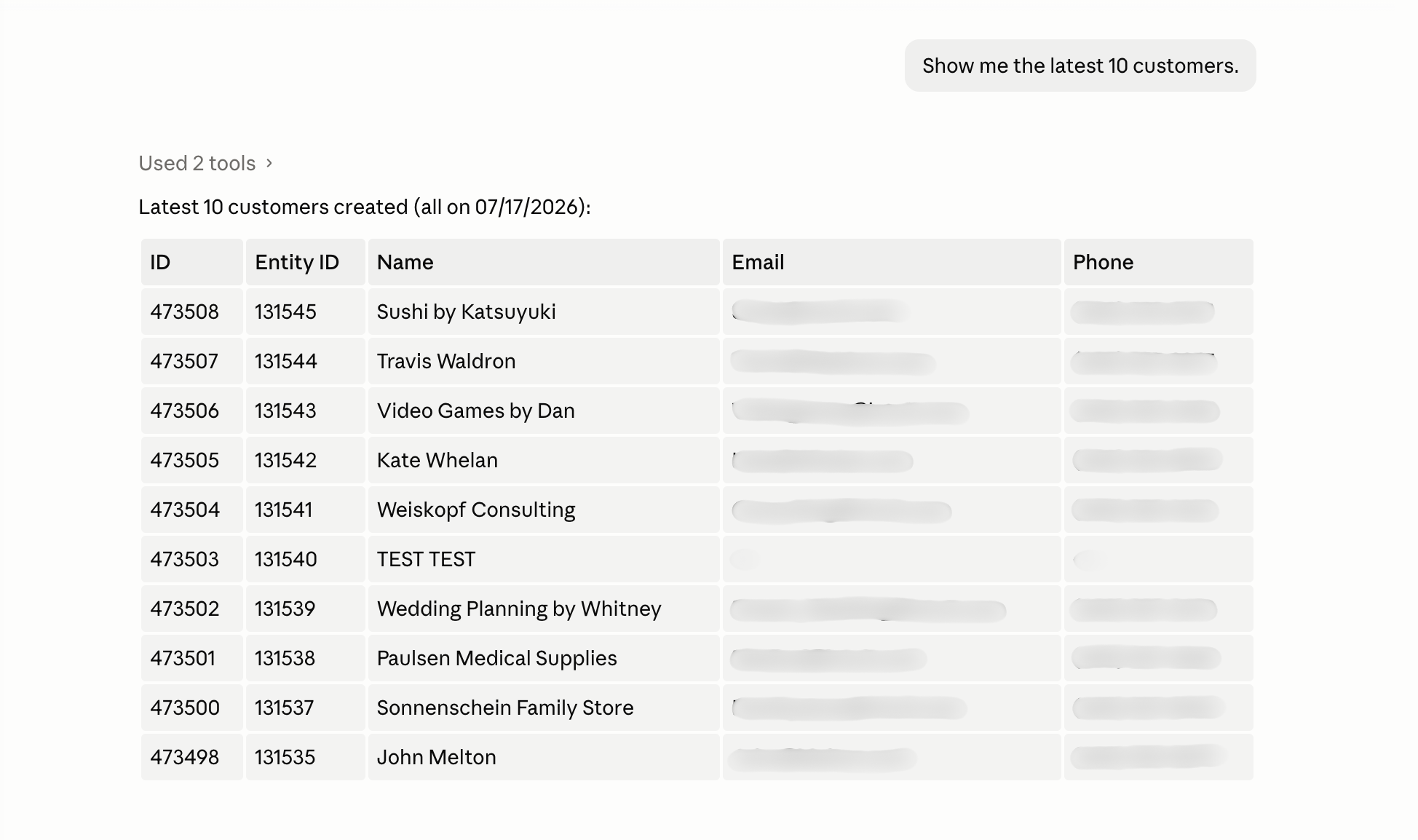 A simple read-only query is the best first proof that the role, toolset, and AI client are all pointed at the same NetSuite account.
SuiteQL vs Other NetSuite MCP Tools
Do not make SuiteQL the default for every finance question. Oracle’s MCP Standard Tools include several tool families, and each one has a better-fit use case.
| Tool type | Best for | Watch out for |
|---|---|---|
Record tools (ns_getRecord, ns_createRecord, ns_updateRecord, ns_getRecordTypeMetadata) |
Reading, or changing, one specific record | The only write path in the standard set; gated by the REST Web Services role permission |
Report tools (ns_listAllReports, ns_runReport) |
Standard or custom reports the role can already access | Parity with the UI report has to be tested per report, not assumed |
Saved-search tools (ns_listSavedSearches, ns_runSavedSearch) |
Trusted operational lists and repeatable filters | Saved-search definitions still need an owner and governance |
SuiteQL tools (ns_runCustomSuiteQL, ns_getSuiteQLMetadata) |
Ad hoc structured retrieval, joins, grouped analysis | Generated queries can be syntactically valid and financially wrong |
For repeatable close, AR, AP, or executive workflows, turn the safest pattern into an approved saved search, report, or custom tool instead of relying on improvised SuiteQL every time.
Is SuiteQL Access Read-Only?
For the standard MCP SuiteQL tools, Oracle’s FAQ says yes: SuiteQL tools support read-only queries only.
That does not mean the whole NetSuite MCP connection is read-only. Other tools may create, read, or update records if the toolset and role allow it. Keep SuiteQL read-only behavior separate from the broader role and tool design.
Role Permissions Affect Results
SuiteQL results depend on the selected role.
If the role cannot view a subsidiary, customer, invoice, department, class, custom record, or field, SuiteQL may return fewer rows, blank values, or permission errors. That is correct behavior, not necessarily a broken query.
When debugging SuiteQL:
- Run a simple query.
- Confirm the same role can see the record in NetSuite.
- Add one join or filter at a time.
- Compare sandbox and production role scope.
Built-In Records and Custom Records
Start with built-in records before querying custom records. Built-in records are easier to validate and are more likely to appear in existing examples.
Custom records need extra care:
- Confirm the record type ID.
- Confirm field IDs.
- Confirm the MCP role can view the custom record.
- Confirm subsidiary or audience restrictions.
- Confirm whether a saved search is safer than direct SuiteQL.
Query Limits and Pagination
Oracle documents that query.runSuiteQL(options) can return a maximum of 5,000 results. For more than that, Oracle points to query.runSuiteQLPaged(options), which pages through a larger result set rather than returning it all at once.
An AI client can have its own limits too. Oracle’s FAQ says AI clients usually support up to about 5,000 rows per call, with token limits and timeout risks for large queries.
Keep first queries small:
SELECT id, entityid
FROM customer
ORDER BY id DESC
Then add filters and pagination based on the actual tool behavior.
Performance Considerations
Avoid “ask everything” prompts.
Use:
- Specific date ranges
- Subsidiary filters
- Record-type filters
- Status filters
- Small result sets
- Aggregations when you need summaries
Generated queries should be reviewed before production use, especially when they include joins, broad date ranges, custom fields, or financial amounts.
Joins, Field IDs, and Display Values
SuiteQL joins depend on NetSuite’s data model. A table or join name that looks obvious may still be wrong.
Watch for:
- Internal IDs versus display names
- Entity fields that differ by record type
- Transaction line data versus transaction header data
- Date fields with similar names
- Currency fields at transaction, subsidiary, or consolidated levels
- Custom field IDs that differ by account
Oracle documents supported SuiteQL functions and built-in functions. Use verified syntax only.
Practical Example Prompts
Ask the AI client to keep the query small and explain the fields it plans to use:
Use NetSuite SuiteQL only.

Draft a read-only SuiteQL query for the latest 10 customers.
Explain each selected field before running it.
Do not query production data unless I approve the exact query.
Use NetSuite SuiteQL only.
Find open sales orders for one named customer in sandbox.
Return order number, status, date, amount, and subsidiary if available.
Do not modify any records.Use NetSuite SuiteQL only.
Find overdue invoices by customer for the last 90 days.
Summarize by customer and return the query used.
Do not run broad unfiltered transaction queries.Example SuiteQL Queries
These examples are starting points. Verify record and field IDs in your NetSuite account before running them.
Latest customers:
SELECT id, entityid, companyname, datecreated
FROM customer
ORDER BY datecreated DESC
Open sales orders:
SELECT id, tranid, entity, status, trandate, foreigntotal
FROM transaction
WHERE type = 'SalesOrd'
  AND trandate >= TO_DATE('2026-01-01', 'YYYY-MM-DD')
ORDER BY trandate DESC
Open sales orders for one subsidiary:
SELECT id, tranid, entity, status, trandate, foreigntotal
FROM transaction
WHERE type = 'SalesOrd'
  AND subsidiary = 1
  AND trandate >= TO_DATE('2026-01-01', 'YYYY-MM-DD')
ORDER BY trandate DESC
Overdue invoices:
SELECT id, tranid, entity, duedate, amountremaining
FROM transaction
WHERE type = 'CustInvc'
  AND amountremaining > 0
  AND duedate < CURRENT_DATE
ORDER BY duedate ASC
Invoices joined to customer names:
SELECT
  t.id,
  t.tranid,
  t.trandate,
  t.duedate,
  t.amountremaining,
  c.entityid,
  c.companyname
FROM transaction t
JOIN customer c ON c.id = t.entity
WHERE t.type = 'CustInvc'
  AND t.amountremaining > 0
  AND t.trandate >= TO_DATE('2026-01-01', 'YYYY-MM-DD')
ORDER BY t.duedate ASC
Inventory items:
SELECT id, itemid, displayname
FROM item
WHERE isinactive = 'F'
ORDER BY itemid ASC
Custom-record lookup:
SELECT id, name
FROM customrecord_your_record_type
ORDER BY id DESC
Custom record filtered by owner or subsidiary-like field:
SELECT id, name, custrecord_owner, custrecord_subsidiary
FROM customrecord_your_record_type
WHERE custrecord_subsidiary = 1
ORDER BY id DESC
Revenue by subsidiary is account-specific. Do not publish a universal query until your finance team verifies which transaction types, posting rules, accounting books, and subsidiaries should count as revenue.
Common SuiteQL Errors
| Symptom | Likely cause | Fix |
|---|---|---|
| Field not found | Wrong field ID | Confirm field ID in NetSuite records or Records Catalog |
| Permission denied | Role cannot view the record or field | Update the MCP role narrowly |
| Too many rows | Query has no filters or pagination | Add date range, status, or subsidiary filter |
| Syntax error | Mixed SQL-92 and Oracle SQL syntax | Use one supported syntax style |
| Wrong totals | Internal value, currency, subsidiary, or transaction logic mismatch | Review accounting logic with finance |
When to Use Search Tools Instead
Use search tools when:
- The team already has a trusted saved search.
- Users need a repeatable operational list.
- Filters are easier to express in NetSuite search.
- The query requires custom segments or accounting logic that finance already maintains.
Use SuiteQL when:
- You need ad hoc structured retrieval.
- You need to join related records.
- You need grouped analysis.
- A saved search does not exist yet.
Use a custom tool when:
- The workflow needs a fixed, tested query.
- The query should hide complexity from users.
- Results need validation, transformation, or approval.
- Write behavior is needed and should be tightly controlled.
When SuiteQL Is Dangerous
SuiteQL is powerful precisely because it can look across records quickly. That is also where mistakes become expensive.
Be careful when a generated query:
- Uses transaction tables without date, status, subsidiary, or type filters.
- Mixes posting and non-posting transactions.
- Treats
amount,foreigntotal,netamount, tax, discount, or currency fields as interchangeable. - Joins header and line records without explaining whether totals are duplicated.
- Uses display names instead of internal IDs for filters.
- Pulls customer, vendor, employee, or payroll-adjacent data for broad audiences.
- Produces financial totals that users may forward as final reporting.
For these cases, use sandbox first, have a NetSuite administrator or finance owner review the query, and consider turning the logic into a managed tool with fixed filters and approval steps.
Security Concerns
- Run first queries in sandbox.
- Keep the role read-only unless a specific workflow requires writes.
- Ask the AI client to show the query before running it.
- Avoid broad transaction queries in production.
- Review execution logs.
- Do not paste customer secrets or credentials into prompts.
- Treat financial query results as reviewable outputs, not audit-ready facts.
Managed NetSuite MCP Option for Teams
Kipper’s managed NetSuite MCP connector is the better fit when the goal is not “let users write SuiteQL” but “let users ask safe finance questions.”
| Concern | Self-managed SuiteQL | Kipper-managed NetSuite MCP |
|---|---|---|
| Query design | Admins and developers review generated queries manually | Approved tools and prompts can hide fragile query details |
| Permissions | NetSuite role controls access | NetSuite role plus Kipper workspace/user controls |
| Repeatable workflows | Saved separately as searches, reports, or custom code | Packaged into governed workflows for finance users |
| Support | Internal NetSuite and AI-client owners | Kipper support for the managed connector layer |
Start with Oracle’s standard tools when you want to validate native capability. Use Kipper when the people who need the answer should never be writing or reviewing a query at all: read-only by architecture, permissions per user or team, every question and answer logged, answered in a Slack channel, in a Teams chat, by text, and in MCP-enabled AI clients. NetSuite plans start at $1,000/month with up to 20 active users included, and additional active users are $25/month (pricing as of August 2026).
Review Kipper’s NetSuite MCP connector, see pricing, or book a demo.
Related Reading
- NetSuite MCP Permissions Explained
- NetSuite MCP Troubleshooting
- How to Set Up a Local NetSuite MCP Bridge
- How to Connect NetSuite to Claude Using the NetSuite Connector
- How to Connect NetSuite to Codex Using the NetSuite Plugin
- NetSuite MCP Connector
- The NetSuite MCP guide
Next Step
Pick one sandbox question, write the SuiteQL query yourself or have the AI draft it, review the exact fields and filters, then run only that query through the MCP tool.
FAQ
Is SuiteQL ordinary SQL?
No. SuiteQL is NetSuite’s query language. Oracle says it supports SQL-92 and Oracle SQL syntax, but you cannot mix both syntaxes in the same query, and NetSuite has its own records, fields, functions, and limitations.
Is NetSuite MCP SuiteQL read-only?
Oracle’s NetSuite AI Connector Service FAQ says SuiteQL tools support read-only queries only. Role permissions still control which data appears in results.
When should I use a search tool instead of SuiteQL?
Use search tools when the user needs a saved-search-like result, a familiar NetSuite filter, or a query that is difficult to express safely in SuiteQL.
Should finance users write SuiteQL directly?
Usually no. Finance users should ask business questions and review the query or approved tool output. Developers, admins, or a managed MCP layer should own reusable SuiteQL patterns.
Which MCP tools run SuiteQL?
The MCP Standard Tools SuiteApp exposes ns_runCustomSuiteQL for running queries and ns_getSuiteQLMetadata for inspecting which records and fields are reachable. Both are read-only; the write tools in the SuiteApp are ns_createRecord and ns_updateRecord, which are unrelated to SuiteQL.
Sources
- Oracle: NetSuite AI Connector Service FAQ
- Oracle: Using SuiteQL
- Oracle: SuiteQL Syntax and Examples
- Oracle: SuiteQL Limitations and Exceptions
- Oracle: query.runSuiteQL(options)
- Oracle: SuiteQL Tools
- Oracle: Available Tools in MCP Standard Tools SuiteApp
- Oracle: Report Tools
- Oracle: Saved Search Tools
- Oracle: Using SuiteQL with SuiteTalk REST Web Services