








NetSuite MCP Troubleshooting
Fix NetSuite MCP setup problems across ChatGPT Apps, Claude, Codex, local bridges, OAuth, roles, tool visibility, SuiteQL, reports, records, and saved searches.
On this page +
See it live
Ask Kipper about your NetSuite data.
Sales orders, stock on hand, invoices and vendor bills.
Schedule free onboardingNo signup. Runs in your browser.
NetSuite MCP failures are easier to fix when you identify the connection path first. A ChatGPT Apps issue, a Claude connector issue, a Codex MCP configuration issue, and a local community bridge issue can look similar while failing in different places.
For setup details, use:
- How to Connect NetSuite to ChatGPT Using the NetSuite App
- How to Connect NetSuite to Claude Using the NetSuite Connector
- How to Connect NetSuite to Codex Using the NetSuite Plugin
- How to Set Up a Local NetSuite MCP Bridge
For role planning, use NetSuite MCP Permissions Explained.
Start Here: Identify the Path
| Path | First place to look | Common failure |
|---|---|---|
| ChatGPT Apps | ChatGPT Apps list, workspace controls, OAuth flow | App unavailable, workspace restriction, stale connection, wrong role |
| Claude connector | Server URL, connector settings, OAuth role choice | Wrong Oracle SuiteApp URL or stale NetSuite session |
| Codex remote MCP | Codex MCP config and /mcp status |
Transport or config mismatch |
| Local bridge | Local package, Node runtime, callback port, env vars | Bridge process cannot start or OAuth callback fails |
| Kipper-managed connector | Kipper workspace, connector health, user permissions | User not granted access or NetSuite role too narrow |
After that, verify the shared NetSuite layer: account features, MCP Standard Tools SuiteApp, integration record, OAuth settings, dedicated role, and record/report/search/SuiteQL permissions.
What should you check first in NetSuite?
| Check | What to verify |
|---|---|
| Account features | Server SuiteScript and OAuth 2.0 are enabled, plus REST Web Services if the MCP Standard Tools SuiteApp is installed |
| SuiteApp | MCP Standard Tools SuiteApp is installed for Oracle standard tools |
| Role type | Dedicated non-admin role, not Administrator or full-access |
| Role setup permissions | MCP Server Connection and Log in using OAuth 2.0 Access Tokens |
| Record-tool permission | REST Web Services on the role only if it should create, retrieve, or update records via the SuiteApp |
| Data permissions | Narrow View/Edit/Create permissions only for records the workflow needs |
| Tool family | Record, report, saved-search, and SuiteQL tools are treated separately |
| Sandbox | First authorization and first tool call tested outside production |
REST Web Services causes more confused debugging than anything else here, because it is both an account feature and a role permission with different jobs. Missing feature blocks installing the Standard Tools SuiteApp. Missing role permission lets the connection succeed and the record tools fail. Enabling the feature does not grant the permission.
Why won’t ChatGPT connect to NetSuite?
Oracle’s instructions say to open Apps on the ChatGPT sidebar. Some ChatGPT builds label that same directory Plugins, with a Plugins/Skills toggle. Either name gets you to the same Oracle-published NetSuite listing, so “I don’t have Apps, only Plugins” is not itself a fault.
| Symptom | Likely cause | Fix |
|---|---|---|
| NetSuite not visible in the directory | Plan eligibility, workspace app policy, or a plan that requires developer mode for MCP connectors | Check the directory under either label, then ask the workspace admin about app policy and developer mode |
| OAuth starts but fails | Wrong role, stale NetSuite session, integration mismatch | Sign out of NetSuite completely, reconnect, and choose the dedicated MCP role |
| Connected but no tools appear | SuiteApp missing, REST Web Services feature off, app cache, role restriction | Install MCP Standard Tools, reconnect the app, and start a new chat |
| Read tools work, record tools fail | Role is missing the REST Web Services permission |
Add it only if this role is meant to retrieve or change records |
| Custom MCP app fails | Developer mode, remote MCP endpoint, or OAuth configuration issue | Follow OpenAI’s custom MCP app guidance and Oracle’s integration requirements |
Why won’t the Claude connector work?
Oracle documents a Claude setup flow that uses the MCP Standard Tools SuiteApp Server URL:
https://<accountid>.suitetalk.api.netsuite.com/services/mcp/v1/suiteapp/com.netsuite.mcpstandardtools| Symptom | Likely cause | Fix |
|---|---|---|
| Claude cannot add the connector | Server URL copied incorrectly | Use the exact account ID and SuiteApp URL format |
| NetSuite authorization fails | Administrator/full-access role or missing role permission | Use a dedicated non-admin role with MCP/OAuth permissions |
| Claude connects but cannot retrieve data | Role lacks record/report/search access | Test the same role in NetSuite and add narrow permissions |
| Report question fails | Report tool access differs from UI access | Try a saved search or SuiteQL query, then verify report support for that role |
Use How to Connect NetSuite to Claude Using the NetSuite Connector for the full connection walkthrough.
Why won’t Codex MCP connect?
Codex reaches NetSuite two ways: the NetSuite entry in its Plugins directory, or an [mcp_servers.netsuite] block in ~/.codex/config.toml. Establish which one you are on before debugging; the failure modes barely overlap.
| Symptom | Likely cause | Fix |
|---|---|---|
| NetSuite not in the Plugins directory | Codex version or account does not list it | Use the config.toml remote MCP route instead |
| Server not listed in Codex | Config file not loaded, invalid syntax, or wrong profile | Check ~/.codex/config.toml, then codex mcp list |
| Server listed but disconnected | Remote transport mismatch or local process failure | Verify streamable HTTP or STDIO settings |
| OAuth never opens | Server lacks auth metadata or local bridge callback cannot bind | Check server logs and callback URL |
| Tools appear but calls fail | NetSuite role or endpoint issue | Reauthorize with the dedicated role and check SuiteApp endpoint |
For Codex-specific setup patterns, use How to Connect NetSuite to Codex Using the NetSuite Plugin.
Why won’t the local bridge start?
A local bridge is different from Oracle’s hosted AI Connector Service. It is a self-managed process that connects a local MCP client to NetSuite’s remote service or to custom NetSuite tooling.
| Symptom | Likely cause | Fix |
|---|---|---|
| Bridge does not launch | Node version, npx path, dependency, or package version issue |
Pin the package version and use an absolute runtime path if needed |
| Env vars are missing | Variables are in the shell but not passed to the MCP process | Put variables in the MCP server config environment block |
| OAuth callback fails | Port conflict or redirect URI mismatch | Change callback port or register the exact redirect URI |
| Works in terminal but not in app | GUI app does not inherit shell PATH/env | Configure absolute paths and env vars in the MCP client |
Security review matters for local bridges. Before using one with production NetSuite, review the maintainer, source, version, OAuth callback behavior, dependency tree, environment variables, and exact tool list.
Why is OAuth or the NetSuite role failing?
| Symptom | Likely cause | Fix |
|---|---|---|
| Redirect URI mismatch | Client callback differs from integration record | Copy the exact callback URI into the NetSuite integration record |
| Incorrect account ID | Production/sandbox suffix copied wrong | Use Setup > Company > Company Information > Account ID |
| Incorrect client ID | Client ID belongs to another integration record | Use the matching integration record for this path |
| Role not available | Role not assigned or stale NetSuite browser session | Assign the role, sign out fully, and retry |
| Role rejected | Administrator/full-access role or missing setup permissions | Use a dedicated non-admin role with required MCP/OAuth permissions |
| Token expired or revoked | Consent revoked, integration disabled, role changed | Reconnect and reauthorize with the dedicated role |
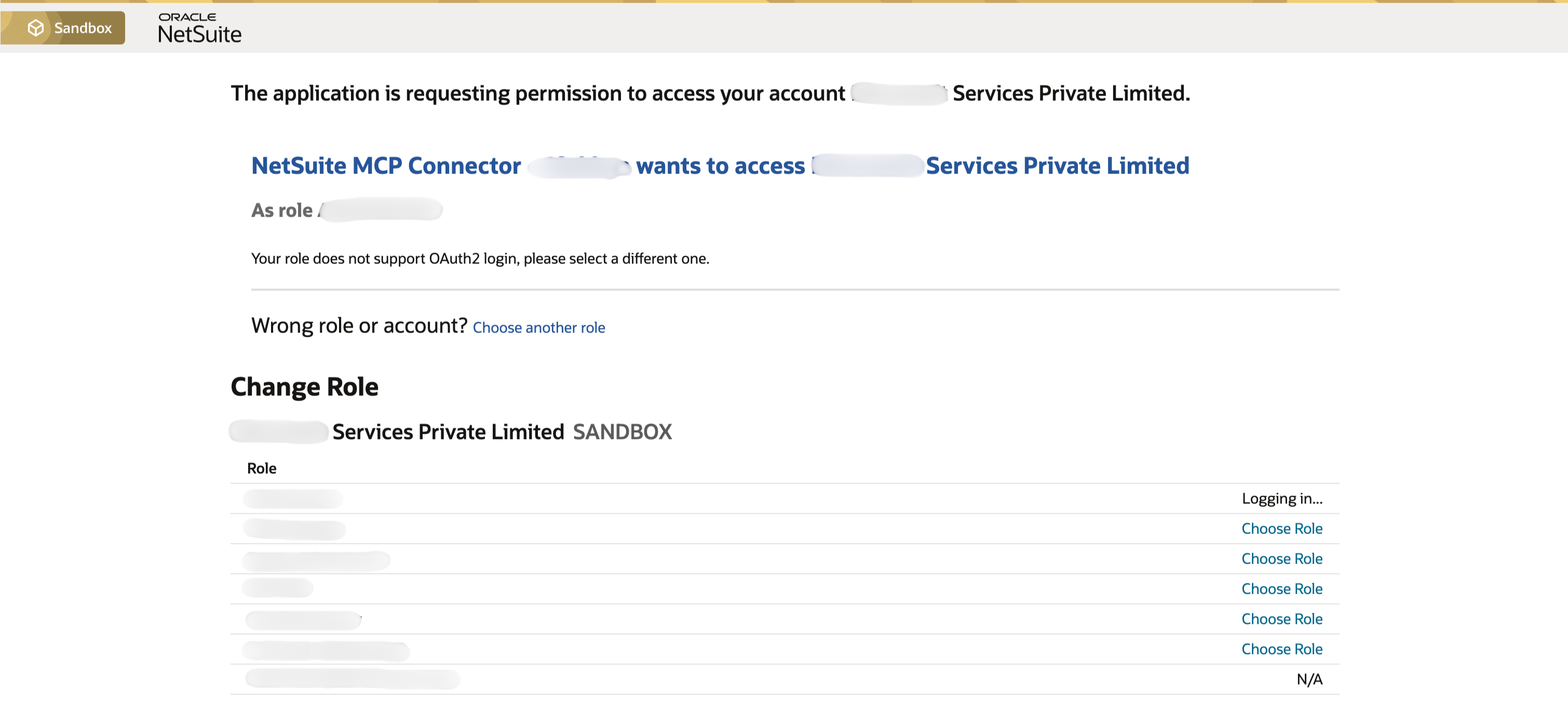 This error usually means NetSuite is trying to authorize with the wrong role or a role missing the required OAuth/MCP setup permissions.
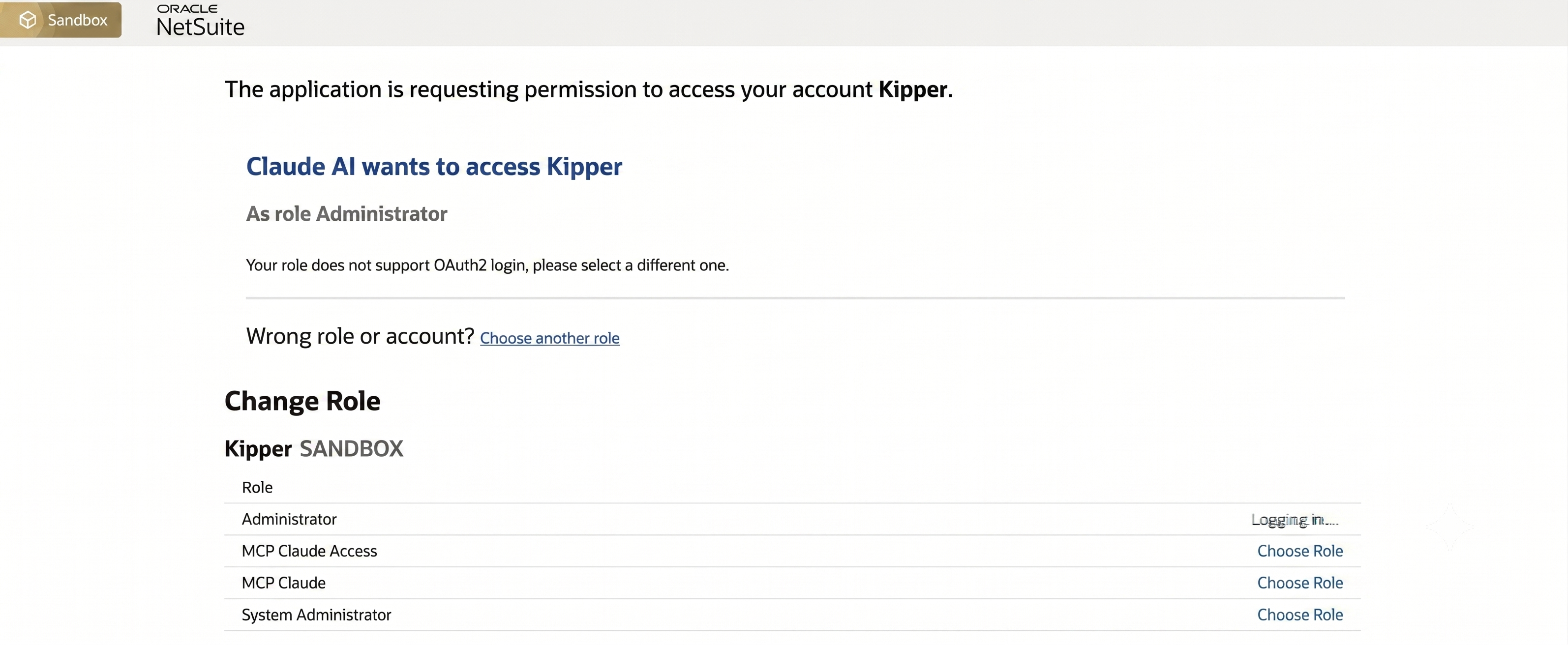 Choose the dedicated MCP role during authorization. If it is missing, check assignment and stale NetSuite sessions before changing permissions.
Why do the tools connect but return no data?
When the AI client says NetSuite is connected but a request fails, separate the tool families.
| Tool family | Common failure | Fix |
|---|---|---|
| Record tools | Role cannot view or edit the record type | Add the narrow transaction/list/custom-record permission |
| Report tools | Role can see UI report but MCP report tool cannot run that report shape | Test a standard report, then use saved search or SuiteQL if safer |
| Saved-search tools | Search is private or role cannot access results | Make the saved search available to the role and test in NetSuite |
| SuiteQL tools | Wrong field, unsupported syntax, too many rows, or permission limit | Simplify query, add filters, verify IDs, or paginate where supported |
For SuiteQL specifics, use NetSuite MCP SuiteQL Access Explained. For the whole topic in one place, see the complete NetSuite MCP guide.
Kipper-Managed Connection Issues
If you use Kipper’s managed NetSuite MCP connector, troubleshoot both layers: the Kipper workspace and the NetSuite role.
| Symptom | Likely cause | Fix |
|---|---|---|
| User cannot access NetSuite tools | User not granted access in Kipper | Add the user or team to the managed connector workspace |
| User sees fewer records than expected | NetSuite role is intentionally narrow | Review role permissions before widening access |
| Workflow output differs from NetSuite UI | Saved search, report, SuiteQL, or record tool logic differs | Compare the approved workflow definition with the NetSuite source |
| Connection health warning | OAuth, role, SuiteApp, or account change | Reauthorize or contact Kipper support with the failing workflow and timestamp |
Most of this page exists because raw MCP setup has a lot of moving parts per user: an account feature, a SuiteApp, an integration record, a role, an OAuth consent, and a client config, each of which can fail on its own. Kipper collapses that into one connection an admin authorizes once, with permissions and audit logging handled centrally, so the failure surface for the twentieth user is not the same as it was for the first.
NetSuite plans start at $1,000/month with up to 20 active users included, and additional active users are $25/month (pricing as of August 2026). See Kipper’s NetSuite MCP connector, pricing, or request a NetSuite demo.
Diagnostic Sequence
Use this order when you are stuck:
- Identify the connection path: ChatGPT Apps, Claude, Codex, local bridge, or Kipper.
- Confirm the NetSuite account ID and sandbox/production target.
- Confirm MCP Standard Tools SuiteApp is installed if you need Oracle standard tools.
- Confirm the integration record and OAuth settings match the client path.
- Confirm the user has a dedicated non-admin MCP role.
- Confirm role setup permissions:
MCP Server ConnectionandLog in using OAuth 2.0 Access Tokens. - Confirm record, report, saved-search, and SuiteQL permissions separately.
- Reconnect the AI client and start a fresh session.
- Run one small read-only test.
- Escalate with the exact client path, account type, role, endpoint, timestamp, and error.
Related Reading
- NetSuite MCP Permissions Explained
- How to Connect NetSuite to ChatGPT Using the NetSuite App
- How to Connect NetSuite to Claude Using the NetSuite Connector
- 6 Ways to Connect AI to Your NetSuite Books
- 30 Questions You Can Ask AI About Your NetSuite Data
- How to Connect NetSuite to Codex Using the NetSuite Plugin
- How to Set Up a Local NetSuite MCP Bridge
- NetSuite MCP SuiteQL Access Explained
- NetSuite MCP Connector
FAQ
Why are no NetSuite MCP tools visible?
The most common causes are a missing MCP Standard Tools SuiteApp, wrong endpoint, wrong role, missing MCP Server Connection permission, stale client cache, or an integration record that is missing the required AI Connector Service configuration.
Why does NetSuite reject my role?
Oracle does not allow the AI Connector Service to run under Administrator or full-access roles. Use a dedicated non-administrator role with MCP Server Connection and Log in using OAuth 2.0 Access Tokens permissions.
Why do SuiteQL queries fail through NetSuite MCP?
Common causes include role restrictions, unsupported SuiteQL syntax, unsupported functions, missing fields, joins that do not match NetSuite records, too many rows, or a query that should be handled by a saved search or report tool instead.
Should I troubleshoot ChatGPT, Claude, Codex, and local bridges the same way?
No. Start by identifying the connection path. NetSuite account, SuiteApp, OAuth, and role issues are shared, but each AI client has different endpoint, app, transport, and admin-control behavior.
Sources
- Oracle: NetSuite AI Connector Service FAQ
- Oracle: Connect to the NetSuite AI Connector Service
- Oracle: Required Features and Permissions
- Oracle: Installing the MCP Standard Tools SuiteApp
- Oracle: Available Tools in MCP Standard Tools SuiteApp
- Oracle: SuiteQL Tools
- OpenAI Help: Apps in ChatGPT
- OpenAI Help: Developer mode and MCP apps in ChatGPT
- OpenAI Codex: Model Context Protocol
- Anthropic: MCP Connector