








How to Connect NetSuite to ChatGPT Using the NetSuite App
Connect NetSuite to ChatGPT using the NetSuite app in ChatGPT, configure the required NetSuite role, and test access safely.
On this page +
See it live
Ask Kipper about your NetSuite data.
Sales orders, stock on hand, invoices and vendor bills.
Schedule free onboardingNo signup. Runs in your browser.
Yes. ChatGPT connects to NetSuite through Oracle’s NetSuite AI Connector Service, using the NetSuite app in ChatGPT’s Apps sidebar. Almost all of the work is on the NetSuite side: two account features (three if you want the standard tools), one SuiteApp, and one dedicated non-administrator role. The ChatGPT half is five clicks.
This is the hands-on setup guide. If you are still deciding whether to allow this at all, read NetSuite’s ChatGPT App: What Finance Teams Still Need to Check first.
What Oracle Actually Documents
Oracle’s connection steps for ChatGPT read as follows:
- In ChatGPT, go to Apps on the sidebar.
- Search for NetSuite and select the NetSuite app.
- Go to Connect and select Sign in to NetSuite.
- Sign in with your NetSuite credentials.
- Select the correct non-administrator role and click Continue.
One thing to expect: the sidebar item may be labeled Plugins rather than Apps in your build, with a Plugins/Skills toggle at the top. OpenAI has moved this directory’s name around, and Codex uses “Plugins” for the same thing. It is the same destination and the same NetSuite entry: an Oracle NetSuite listing described as “Connect ChatGPT to NetSuite.” What it is not is the retired 2023-era ChatGPT plugin store built on ai-plugin.json manifests; that surface never carried NetSuite and is unrelated to MCP.
Oracle’s FAQ also sets out what an AI client has to support before this works at all. ChatGPT meets these; the list matters when someone asks why a different client behaves differently:
| Client requirement | Value |
|---|---|
| Remote MCP | Required |
| MCP protocol version | 2025-06-18 |
| Transport | Streamable HTTP |
| Authorization | OAuth 2.0 Authorization Code Grant with PKCE |
Two availability caveats come straight from Oracle’s own documentation rather than from us: the NetSuite app depends on your ChatGPT plan and workspace policy, and Oracle notes that some ChatGPT plans require developer mode to use MCP connectors. Check both before concluding that the NetSuite side is broken.
What do you need before you start?
Before opening ChatGPT, finish the NetSuite-side setup with an administrator.
| Requirement | Type | Notes |
|---|---|---|
| NetSuite AI Connector Service availability | Account/product availability | Confirm in your NetSuite account and Oracle documentation. |
| Server SuiteScript | Account feature | One of the two features Oracle lists for the AI Connector Service. |
| OAuth 2.0 | Account feature | The second required feature; used for the authorization flow. |
| REST Web Services | Account feature | Required in addition to the two above if you are installing the MCP Standard Tools SuiteApp. |
| MCP Standard Tools SuiteApp | SuiteApp | Provides the standard record, report, saved-search, and SuiteQL tools. |
| Dedicated non-administrator role | Role design | Oracle blocks Administrator and full-permission roles from the AI Connector Service. |
MCP Server Connection |
Role permission | One of the two setup permissions Oracle lists for AI Connector Service roles. |
Log in using OAuth 2.0 Access Tokens |
Role permission | The second required setup permission. Not the similarly named “Log in using Access Tokens.” |
REST Web Services |
Role permission | Only needed if this role should create, retrieve, or update records through the SuiteApp. Leave it off for read-only Q&A. |
| Record/report/search access | Role permissions | Add only what the pilot needs. |
| NetSuite app availability in ChatGPT | ChatGPT plan/workspace | Subject to plan, workspace policy, and developer-mode requirements on some plans. |
REST Web Services is the requirement people most often get wrong, because it appears twice with different meanings. As an account feature it gates installing the MCP Standard Tools SuiteApp. As a role permission it gates whether that role can create, retrieve, or update records through the SuiteApp. Enabling the feature does not grant the permission, and a read-only pilot needs the feature but not the permission.
Step 1: Enable Required NetSuite Features
In NetSuite, go to:
Setup > Company > Enable Features > SuiteCloudEnable Server SuiteScript and OAuth 2.0, which the AI Connector Service requires, plus REST Web Services, which Oracle requires on top of those two in order to install the MCP Standard Tools SuiteApp in the next step. Save.
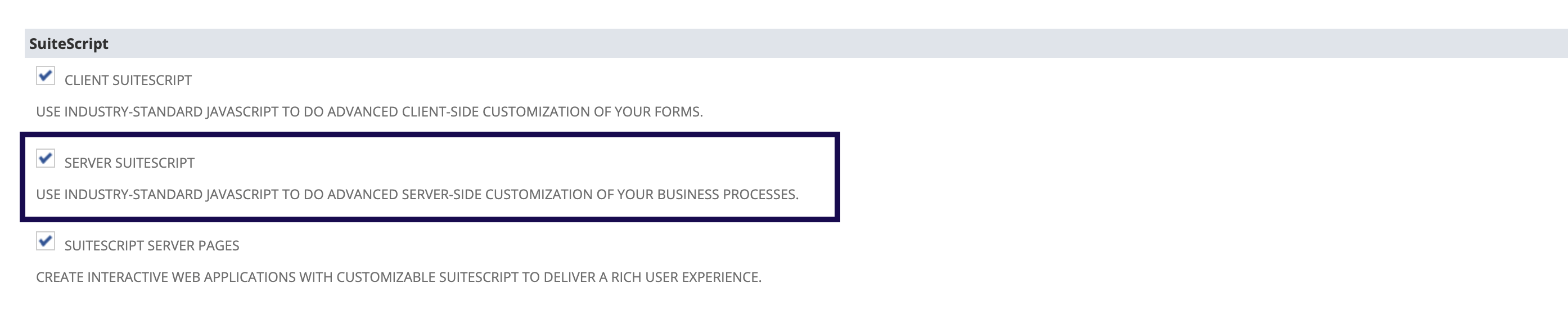 Enable Server SuiteScript in the SuiteScript section of the SuiteCloud subtab.
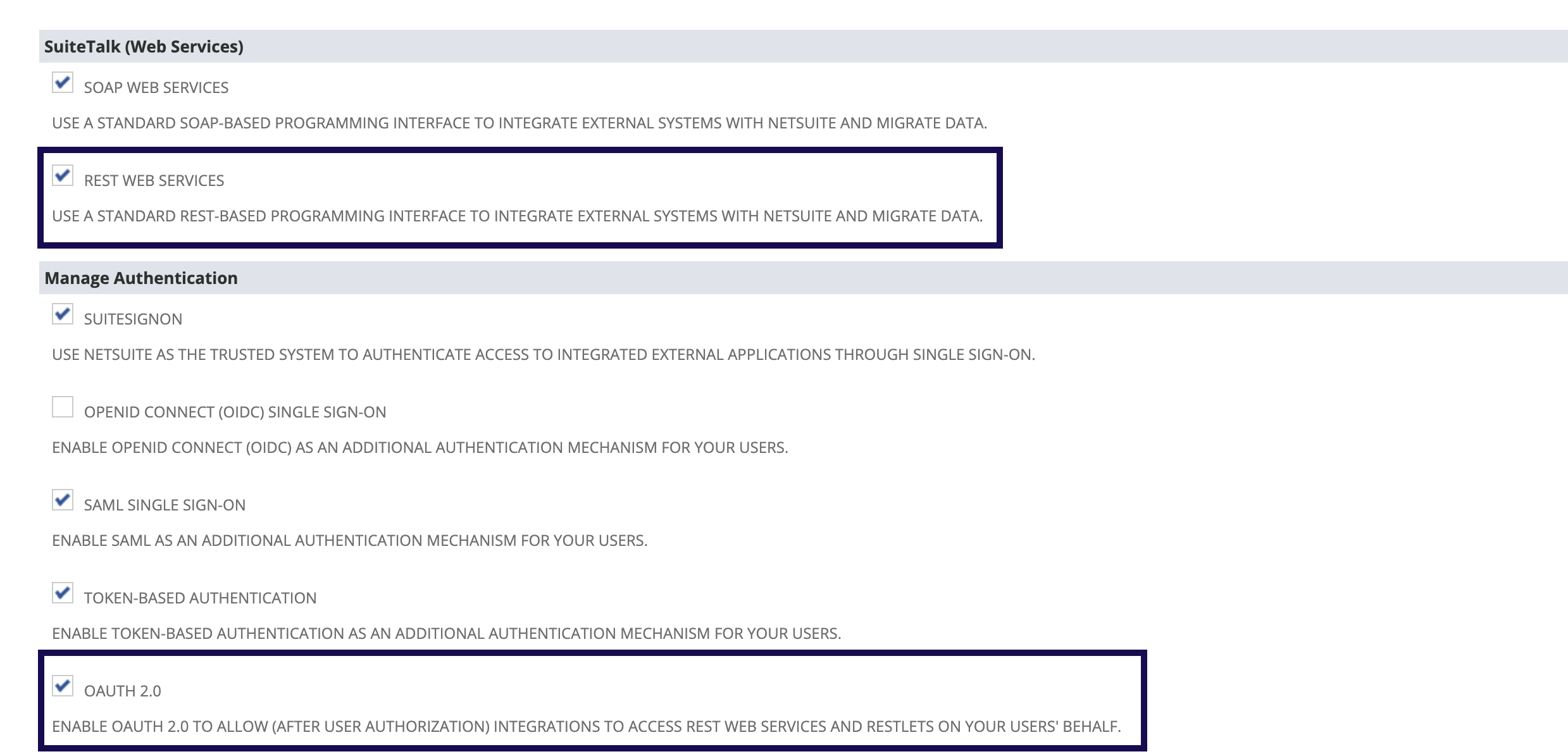 OAuth 2.0 carries the authorization flow. REST Web Services is what lets you install the MCP Standard Tools SuiteApp.
Step 2: Install the MCP Standard Tools SuiteApp
Install Oracle’s MCP Standard Tools SuiteApp from SuiteApp Marketplace.
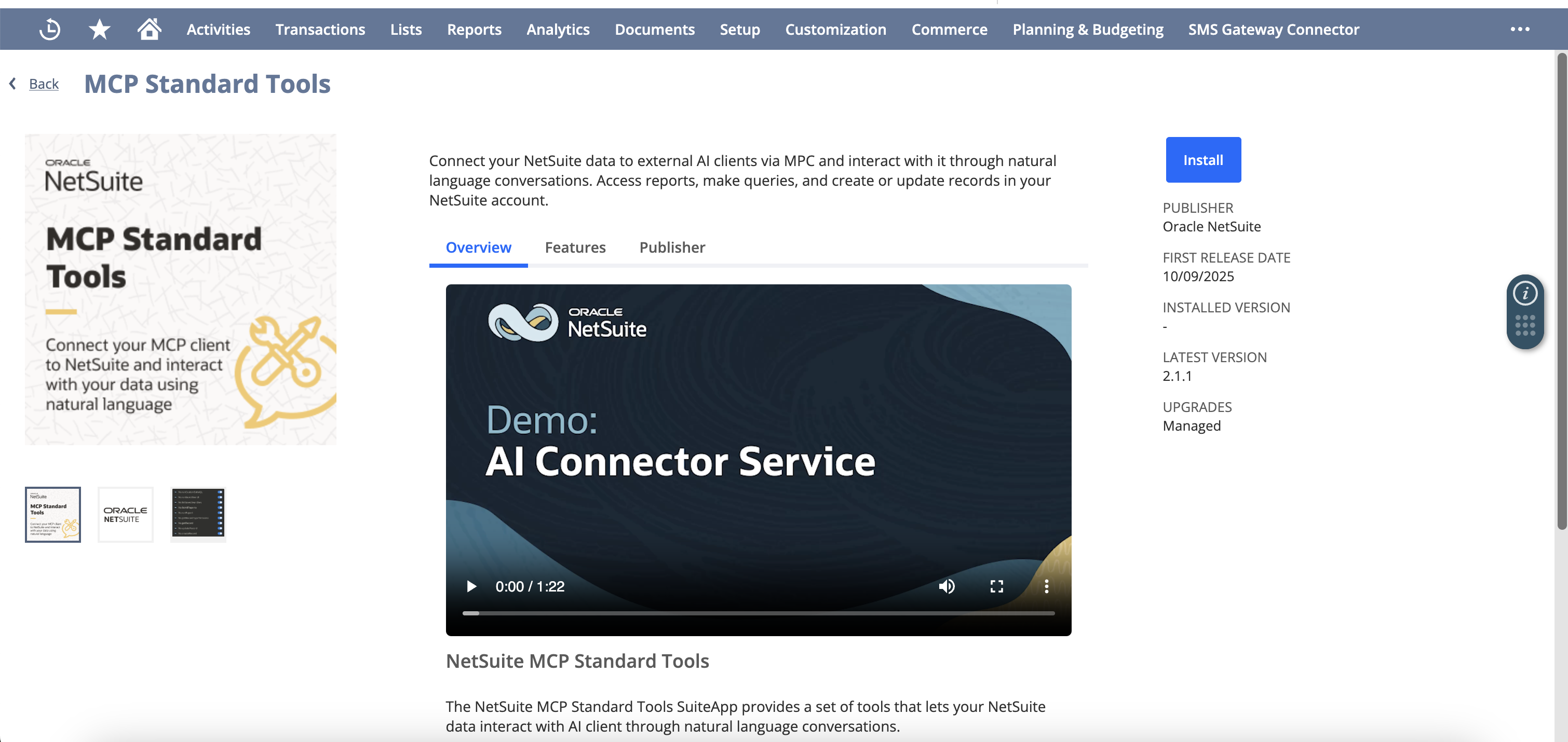 The MCP Standard Tools SuiteApp is Oracle’s standard tool package for records, reports, saved searches, and SuiteQL.
If the SuiteApp is not visible, the fix is on the NetSuite side, usually REST Web Services still being off, or a role that cannot reach SuiteApp Marketplace. Changing ChatGPT settings will not surface it.
Oracle also publishes a separate NetSuite AI Connector Service Companion SuiteApp, a library of prompt samples grouped by business function that installs alongside the Standard Tools. It is optional and adds no tools of its own, but it is a useful starting point if you want your pilot users working from vetted prompts rather than improvising.
Step 3: Create and Scope the NetSuite Role
Create a dedicated role for the ChatGPT pilot. Do not use Administrator. Oracle states that the AI Connector Service cannot run under Administrator or roles with full permissions to NetSuite features.
Under Permissions > Setup, add:
MCP Server ConnectionLog in using OAuth 2.0 Access Tokens
Then add only the specific access needed for the first test:
- Records such as customers, invoices, vendors, items, sales orders, or payments, at View level.
- Reports that the pilot is allowed to run.
- Saved searches that the pilot is allowed to list or run.
- SuiteQL access only if the team is prepared to review generated queries.
- Subsidiary, department, class, location, and custom-record scope.
Leave the REST Web Services role permission off. Without it, the role cannot create, retrieve, or update records through the SuiteApp, which is exactly what you want for a read-only pilot.
 The baseline role needs MCP Server Connection and OAuth 2.0 access-token login before it can authorize the AI Connector Service.
Assign this role to the user who will connect ChatGPT.
Step 4: Connect NetSuite in ChatGPT
Follow Oracle’s documented flow:
- Open ChatGPT and go to Apps on the sidebar, labeled Plugins in some builds.
- Search for NetSuite and select the NetSuite entry published by Oracle NetSuite.
- Go to Connect and select Sign in to NetSuite.
- Sign in with your NetSuite credentials.
- Select the dedicated non-administrator role and click Continue.
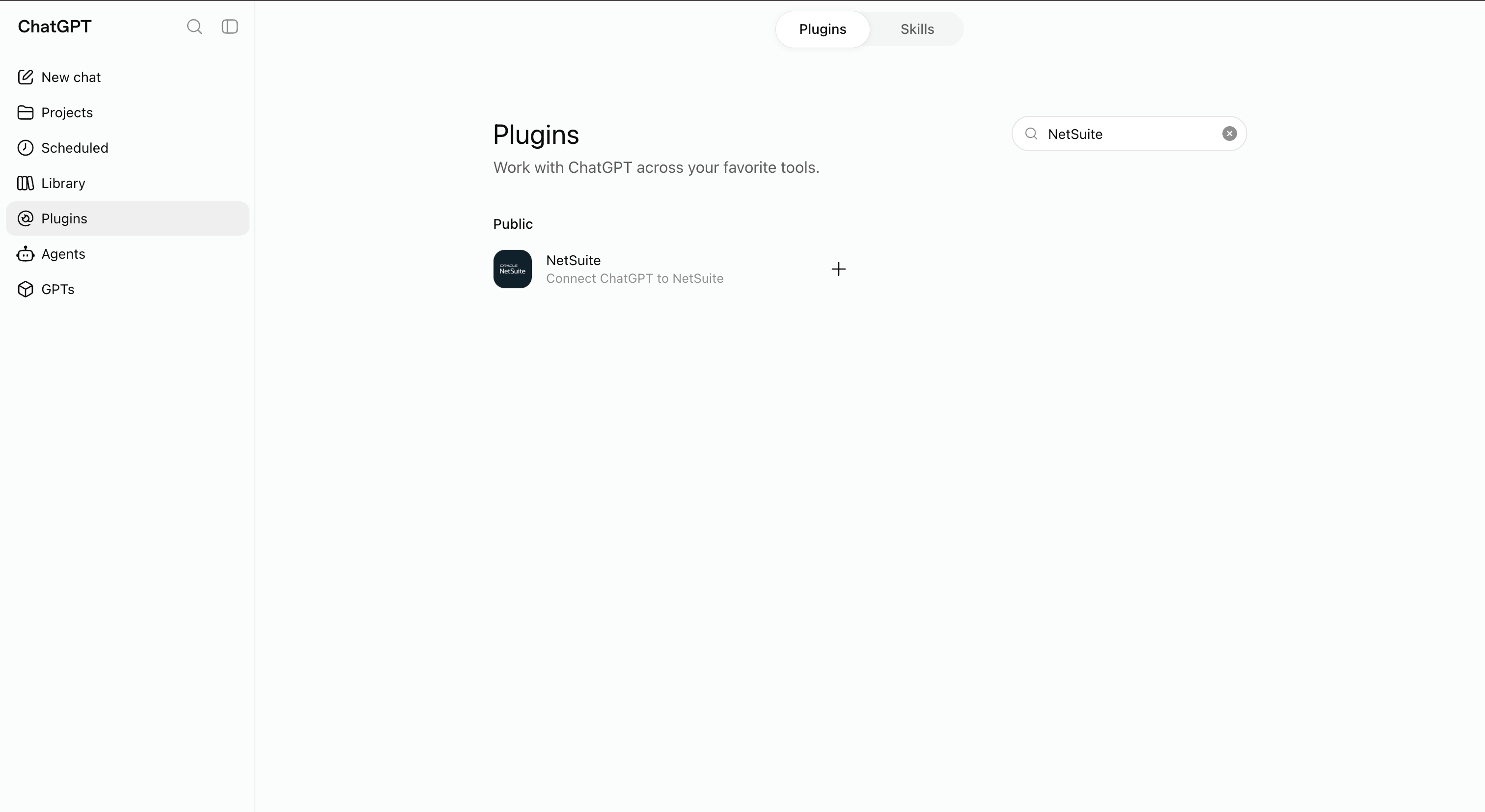 Searching the directory for NetSuite. This build labels the sidebar item Plugins; Oracle’s documentation calls it Apps. Same listing either way; check for the Oracle NetSuite publisher.
If NetSuite does not appear at step 2, stop and check the ChatGPT side before touching NetSuite again: plan eligibility, workspace app policy, and whether your plan is one of the ones Oracle notes requires developer mode for MCP connectors.
Stop if NetSuite offers you Administrator, a full-access role, or anything broader than the pilot role. Administrator will be rejected outright; a broader role will silently succeed and give ChatGPT more than you intended.
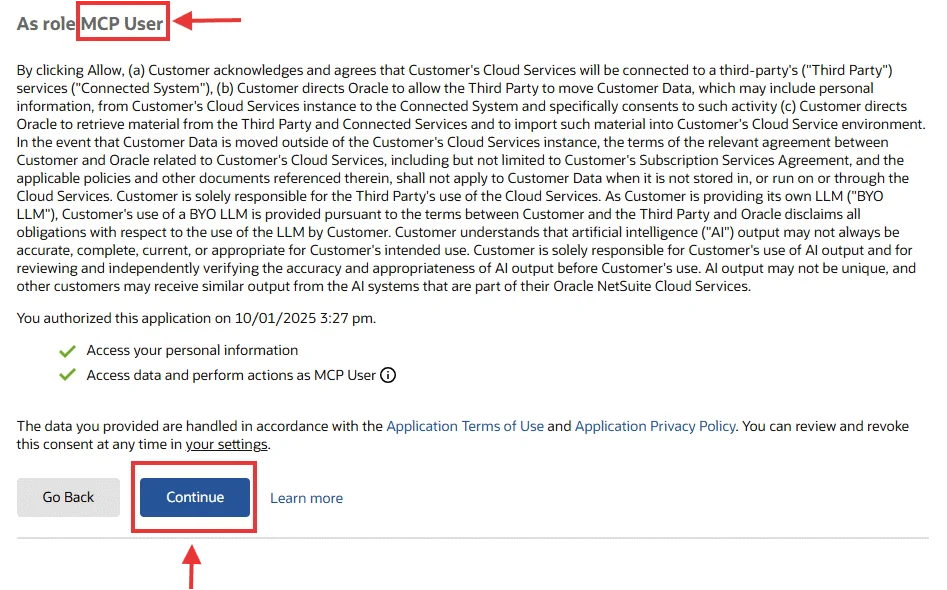 Choose the dedicated MCP role during NetSuite authorization.
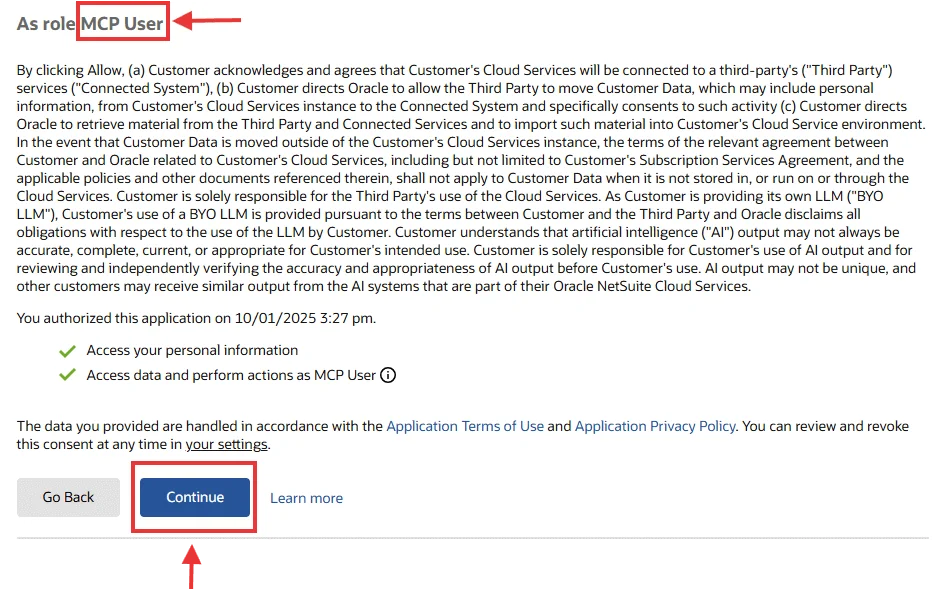 Review the role shown on the NetSuite consent screen before continuing.
Step 5: Test With a Read-Only Question
Start small:
Use the NetSuite app.

List the latest five customers visible to my selected NetSuite role.
Return customer name, internal ID, and date created if available.
Do not create, update, delete, approve, submit, or send any records.
Then test one finance question:
Use the NetSuite app.
List overdue invoices visible to my role.
Return customer, invoice number, due date, amount due, and subsidiary if available.
Do not modify any record.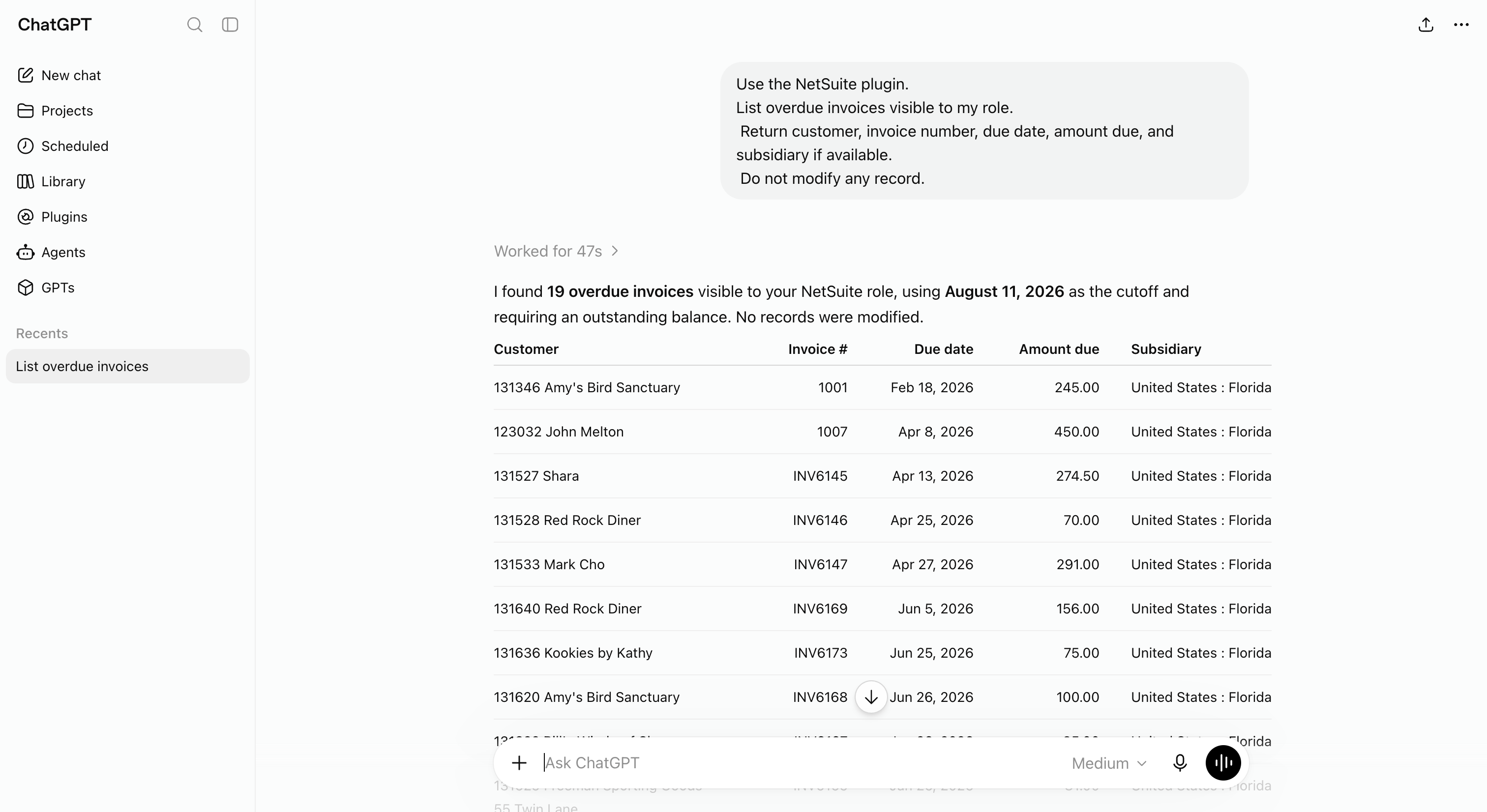 Use a narrow, read-only query that an administrator can verify in NetSuite.
If ChatGPT gives general advice instead of account data, check whether the app is connected, the correct role was selected, and the role can see the requested records.
Five Different Things People Call “NetSuite in ChatGPT”
These paths get conflated constantly, usually by someone following instructions written for a different one:
| Path | What it is | Use when |
|---|---|---|
| The NetSuite app in ChatGPT | Oracle’s documented standard connection, covered above | A business user wants ChatGPT connected to NetSuite with no code. |
| Custom MCP app / developer mode | A workspace-reviewed custom MCP app pointed at your own endpoint | Your organization builds or vets its own MCP app. |
| Custom Oracle tools | SuiteScript/SDF tools exposed through the AI Connector Service | NetSuite developers need bespoke tools beyond the Standard Tools set. |
| Local bridge | A self-managed local MCP process that reaches Oracle’s hosted service | A technical user needs Claude Code, Codex, Cursor, or another local client. |
| Kipper | A managed finance-answer layer over an approved NetSuite connection | The audience is a whole team rather than one configured ChatGPT user. |
For the fourth row see the local NetSuite MCP bridge guide; for Codex specifically, the Codex guide separates remote MCP configuration from bridge testing.
Is there a managed option for teams?
The steps above give one ChatGPT user a governed NetSuite connection. Repeating them for a sales floor, a support desk, or a warehouse is a different problem: every person needs a NetSuite seat and a role, every role needs reviewing, and nothing in the standard route records what was asked and answered.
Kipper takes the other approach. An admin connects NetSuite once, then approved people ask questions without a NetSuite login of their own: read-only by architecture, permissions set per user or team, and every question and answer logged. The same connection answers in Slack, Microsoft Teams, and SMS as well as MCP-enabled AI clients, which matters when the people asking “is this invoice paid?” are not the people who would ever open ChatGPT’s app settings.
NetSuite plans start at $1,000/month with up to 20 active users included, and additional active users are $25/month (pricing as of August 2026). For the ChatGPT route, see the NetSuite ChatGPT connector; for the hosted option more broadly, Kipper’s NetSuite MCP connector. Compare every route in the NetSuite MCP guide, see pricing, or request a NetSuite demo.
What if it doesn’t work?
| Symptom | First check | Next link |
|---|---|---|
| NetSuite app is not visible in ChatGPT | Plan eligibility, workspace app policy, developer-mode requirement | Governance review |
| NetSuite role is rejected at sign-in | Administrator/full-access role, or missing setup permissions | NetSuite MCP permissions |
| Connection succeeds but no tools appear | SuiteApp not installed, REST Web Services feature off, role permissions, stale session | NetSuite MCP troubleshooting |
| Reports or saved searches fail | Report/saved-search access on the role, or the report shape itself | Reports, searches and SuiteQL compared |
| ChatGPT tries to create or update a record | The role holds REST Web Services plus create/edit record permissions |
NetSuite MCP permissions |
Related Reading
- NetSuite’s ChatGPT App: What Finance Teams Still Need to Check
- How to Connect NetSuite to Claude Using the NetSuite Connector
- 6 Ways to Connect AI to Your NetSuite Books
- 30 Questions You Can Ask AI About Your NetSuite Data
- How to Connect NetSuite to Codex Using the NetSuite Plugin
- NetSuite MCP Permissions Explained
- NetSuite MCP Troubleshooting
- The NetSuite MCP guide
FAQ
Can ChatGPT connect to NetSuite?
Yes. Oracle documents a ChatGPT Apps path for connecting to the NetSuite AI Connector Service with the MCP Standard Tools SuiteApp. Availability depends on NetSuite account access, ChatGPT plan or workspace settings, and administrator policy.
Is this the same as a local NetSuite MCP bridge?
No. The standard ChatGPT Apps route is a product connection flow to Oracle’s hosted NetSuite AI Connector Service. Local bridge workflows are developer setups for MCP clients that need a separate local process or remote endpoint.
Does ChatGPT get access to every NetSuite record?
No. Access depends on the selected NetSuite role, tool visibility, record permissions, subsidiary restrictions, report and saved-search access, SuiteQL permissions, and ChatGPT workspace controls.
Can ChatGPT write to NetSuite?
It can only perform actions exposed by the tools and allowed by the selected NetSuite role. The MCP Standard Tools SuiteApp includes ns_createRecord and ns_updateRecord, and Oracle requires the REST Web Services role permission before a role can create, retrieve, or update records through the SuiteApp. For broad finance Q&A, leave that permission off and keep record access at View.
Do I need ChatGPT developer mode to connect NetSuite?
Not for the standard NetSuite app route. Oracle’s FAQ notes that some ChatGPT plans require developer mode to use MCP connectors, so if the NetSuite app is unavailable on your plan, that is the setting to check with your workspace administrator before assuming the NetSuite side is misconfigured.
Sources
- Oracle: Connect to the NetSuite AI Connector Service
- Oracle: Required Features and Permissions
- Oracle: NetSuite AI Connector Service FAQ
- Oracle: MCP Standard Tools SuiteApp
- Oracle: Available Tools in the MCP Standard Tools SuiteApp
- Oracle: NetSuite AI Connector Service Companion SuiteApp
- Oracle: Associated Risks, Controls, and Mitigation Strategies
- OpenAI Help: Connectors and apps in ChatGPT
- OpenAI Help: Developer mode and MCP apps in ChatGPT