








NetSuite's ChatGPT App: What Finance Teams Still Need to Check
Evaluate NetSuite's ChatGPT connection from a finance-governance lens: apps, MCP, roles, reports, SuiteQL, limits, and when a managed layer helps.
On this page +
See it live
Ask Kipper about your NetSuite data.
Sales orders, stock on hand, invoices and vendor bills.
Schedule free onboardingNo signup. Runs in your browser.
Oracle’s NetSuite AI Connector Service gives ChatGPT a documented way to work with NetSuite through MCP. For teams evaluating AI access to ERP data, that is a meaningful step.
It is not the whole governance answer.
The setup guide lives here: How to Connect NetSuite to ChatGPT Using the NetSuite App. This article has a different job: helping finance, IT, and security reviewers understand what the NetSuite ChatGPT route is, what it is not, and where a managed layer such as Kipper’s NetSuite MCP connector may fit.
What Oracle’s NetSuite ChatGPT Connection Is
Oracle documents a standard ChatGPT path for the NetSuite AI Connector Service:
- Open Apps in ChatGPT.
- Search for NetSuite and select the NetSuite app.
- Go to Connect and select Sign in to NetSuite.
- Sign in with your NetSuite credentials.
- Choose the correct non-administrator NetSuite role and continue.
That connection uses NetSuite’s AI Connector Service and the MCP Standard Tools SuiteApp. The SuiteApp exposes tools for records, reports, saved searches, and SuiteQL queries, subject to the user’s NetSuite role and the tools installed in the account.
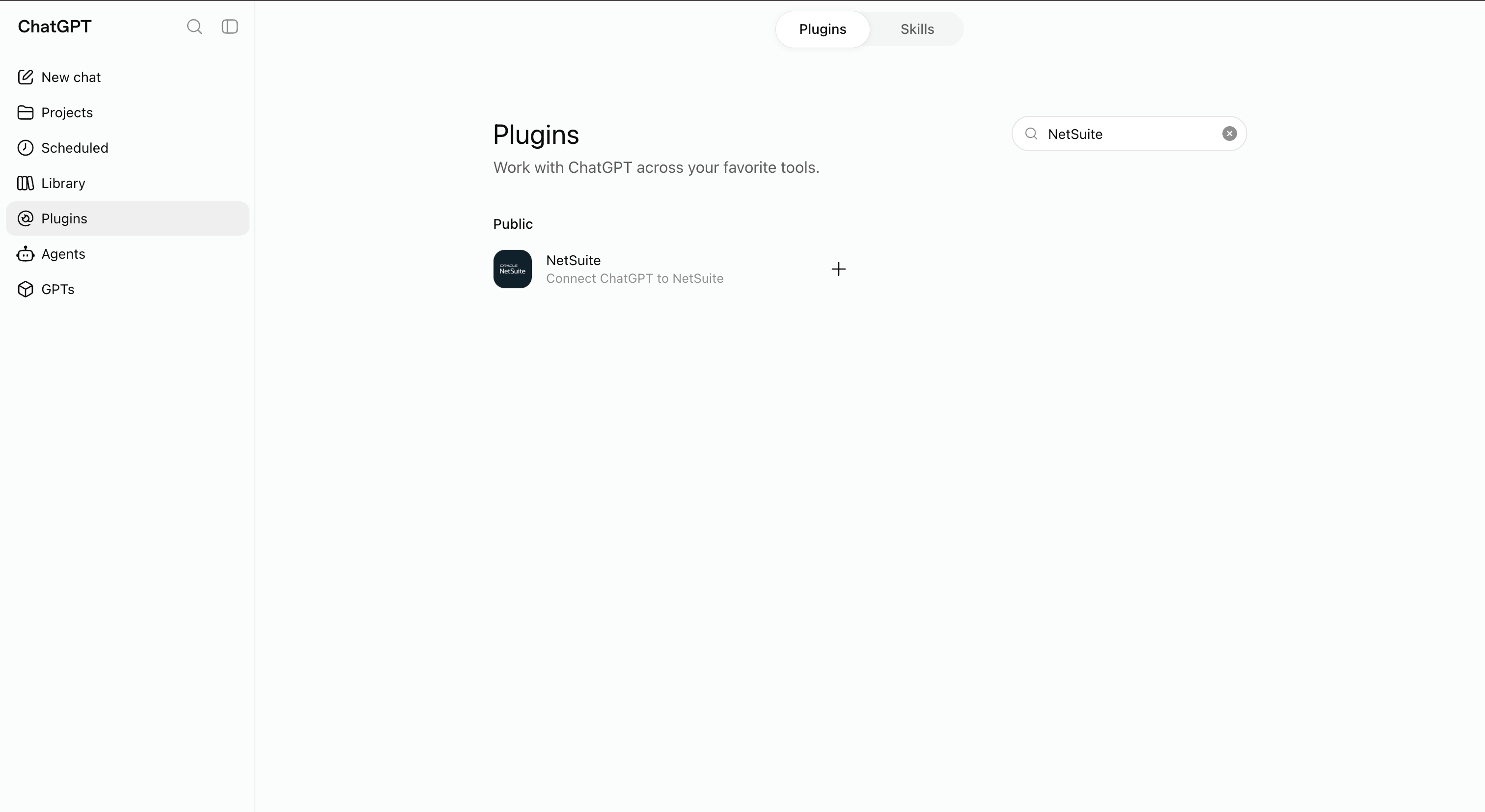 In ChatGPT, the NetSuite app appears in the apps/plugins directory depending on the workspace UI. It is the entry point for Oracle’s documented ChatGPT route.
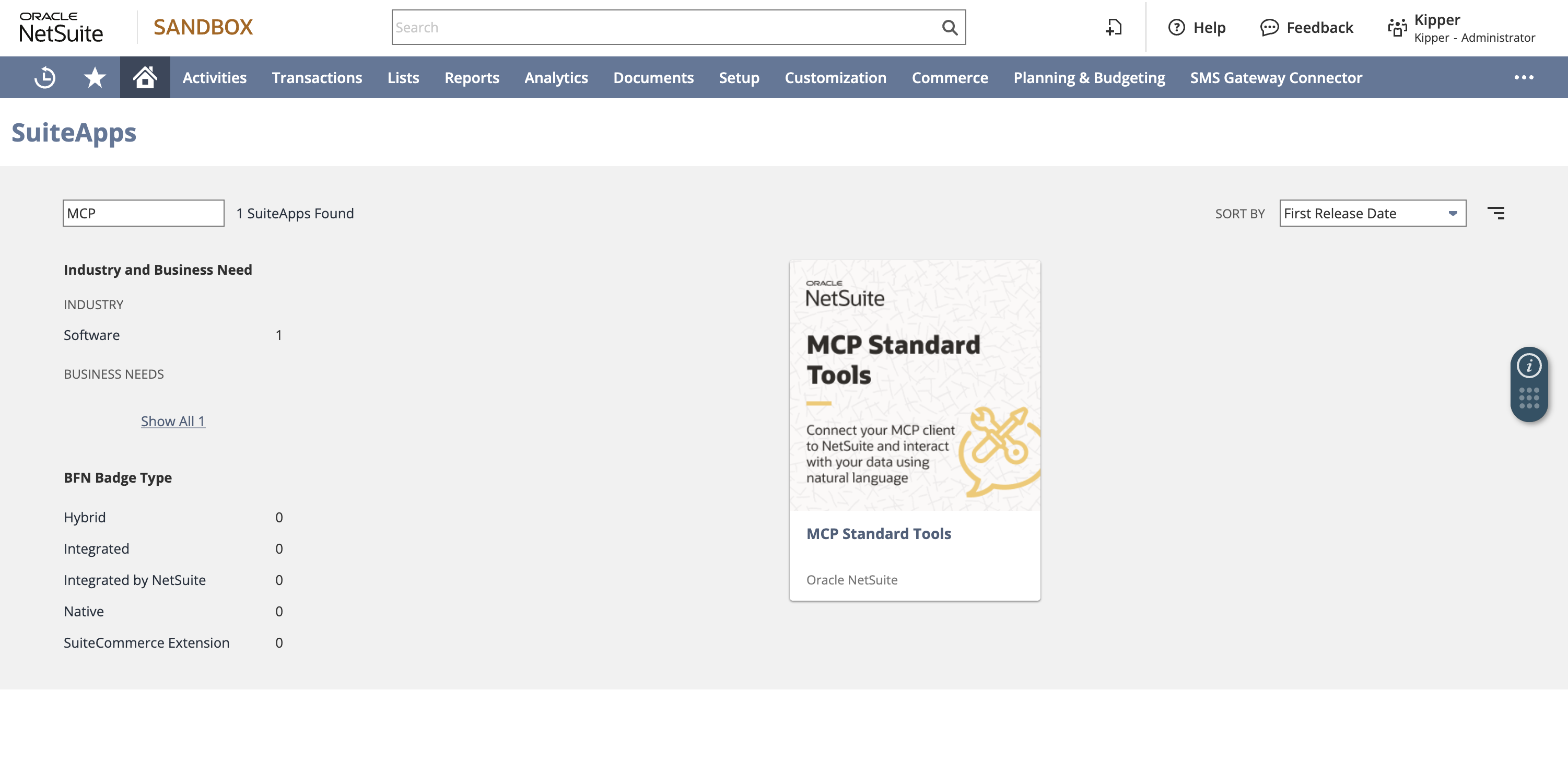 The ChatGPT connection depends on the MCP Standard Tools SuiteApp being installed in NetSuite; make sure reviewers distinguish it from the deprecated MCP Sample Tools SuiteApp.
A note on vocabulary, because it will come up in your review. Oracle’s documentation says to open Apps in ChatGPT; the ChatGPT UI labels that same directory Plugins in some builds, and Codex uses “Plugins” too. Those are one destination and one Oracle-published NetSuite listing. What none of them are is the retired 2023-era ChatGPT plugin store built on ai-plugin.json manifests, which predates MCP entirely and never carried NetSuite. If a reviewer raises “didn’t OpenAI kill plugins?”, that is the distinction to give them.
What Oracle Documents, and What It Doesn’t
First-party documentation supports these points:
| Area | Documented statement |
|---|---|
| NetSuite route | Oracle documents connecting ChatGPT to NetSuite through the AI Connector Service. |
| ChatGPT entry point | Oracle’s steps start from Apps on the ChatGPT sidebar. |
| Tool surface | The Standard Tools SuiteApp ships record, report, saved-search, and SuiteQL tools. |
| Write capability | ns_createRecord and ns_updateRecord exist; Oracle gates them behind the REST Web Services role permission. |
| Role boundary | Tools run within the user’s NetSuite role permissions. |
| Admin restriction | Oracle blocks Administrator and full-permission roles from the AI Connector Service. |
| Client requirements | Compatible clients need remote MCP, streamable HTTP, MCP protocol version 2025-06-18, and OAuth 2.0 Authorization Code Grant with PKCE. |
| Plan caveat | Oracle notes that some ChatGPT plans require developer mode to use MCP connectors. |
What the documentation does not support, and what you should therefore not put in a rollout plan as settled:
- That every ChatGPT plan and workspace exposes the NetSuite app.
- That every NetSuite account has the same AI Connector Service availability.
- That a report visible in the NetSuite UI returns an identical result through
ns_runReportfor the connected role. - That the connection is read-only. It is read-only only if you design the role that way.
- That row volumes behave like a report export. Oracle’s FAQ puts typical AI-client limits around 5,000 rows per call, with token limits and timeouts on large queries.
Six Things That Get Called “The NetSuite ChatGPT Connector”
Reviews stall when two people mean different things by the same phrase. These are distinct, with distinct approval implications:
| Name | What it actually is | Who approves it |
|---|---|---|
| NetSuite app in ChatGPT | Oracle’s documented standard route, backed by the Standard Tools SuiteApp | NetSuite admin plus ChatGPT workspace admin |
| Custom MCP app / developer mode | A workspace-built MCP app pointed at an endpoint you control | Whoever owns app review in your ChatGPT workspace |
| Oracle custom tools | SuiteScript/SDF tools published through the AI Connector Service | NetSuite developers, with a manually configured integration record |
| Companion SuiteApp | Oracle’s optional prompt library; adds prompts, not tools or access | NetSuite admin |
| Local bridge | A third-party local MCP process reaching Oracle’s hosted service | Security review of a third-party dependency |
| Kipper | A managed answer layer over one approved NetSuite connection | Procurement, plus the NetSuite admin who authorizes the connection |
Only the first row is the thing most people mean. The fifth is the one most likely to arrive unreviewed on a developer’s laptop.
Known Limitations
| Limitation | Practical effect |
|---|---|
| Administrator role blocked | Every connection needs a purpose-built role, so role design is unavoidable work, not an optional hardening step. |
| Row and token limits | AI clients typically handle around 5,000 rows per call. Large extracts time out rather than paginate quietly. |
| Report parity is not guaranteed | ns_runReport runs reports the role can access; matching a UI report exactly still needs testing per report. |
| One role per connection | The connection sees what that one role sees. Different access for different people means different roles and different connections. |
| Per-user NetSuite seats | The connected identity is a NetSuite user, so broad rollout is a licensing question before it is a technical one. |
| Audit trail is NetSuite-side | Execution logs record tool calls; they are not a record of what a person asked or what answer they were shown. |
| Plan and workspace gating | Availability depends on the ChatGPT plan, workspace app policy, and on some plans developer mode. |
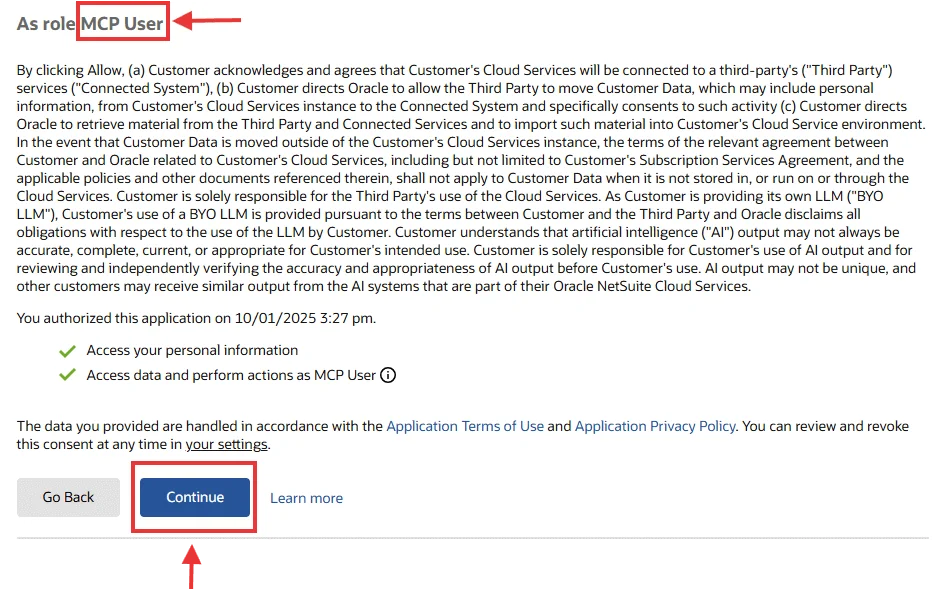 The consent screen is only the visible approval step; the real risk boundary is still the role and permissions behind it.
Oracle-Native Route Versus Managed Route
| Question | Oracle NetSuite AI Connector Service | Kipper managed NetSuite connector |
|---|---|---|
| Primary owner | NetSuite admin, IT, or developer | Finance/ops team with Kipper onboarding |
| Main job | Connect an AI client to NetSuite tools | Provide governed finance answers to teams |
| Permission boundary | NetSuite role, tool permissions, OAuth, client controls | Kipper permission sets plus the approved NetSuite connection |
| Write exposure | Depends on role and tools | Kipper is designed as a read-only finance-answer layer |
| Best fit | Technical teams configuring Oracle’s official connector directly | Teams that want controlled answers without maintaining MCP setup for each user |
| Where to evaluate | NetSuite MCP guide | NetSuite ChatGPT connector and pricing |
Kipper does not replace Oracle’s NetSuite role model or official connector documentation. It sits above the finance data connection as a managed question-and-answer layer for business users.
The managed route answers NetSuite questions through Slack, ChatGPT, Claude, Gemini, and text message over the same read-only connection, rather than raw tools for one technical user.
The Governance Questions to Ask
Before rolling NetSuite into ChatGPT broadly, answer these:
| Area | Question to answer |
|---|---|
| Role | Which NetSuite role will users authorize with? |
| Records | Which customers, vendors, transactions, items, subsidiaries, and custom records can that role see? |
| Reports | Which standard or custom reports can the role access through MCP tools? |
| Saved searches | Which saved searches are visible and who maintains them? |
| SuiteQL | Are generated SuiteQL queries allowed, and who reviews broad queries? |
| Writes | Do any enabled tools and role permissions permit create, update, approve, submit, or delete actions? |
| Workspace | Who can install, approve, or connect apps in ChatGPT? |
| Logs | Where will admins review NetSuite execution logs and AI-client activity? |
 A purpose-built role should include only the connector permissions it needs, starting with MCP Server Connection and OAuth 2.0 access token login.
 Record and transaction permissions decide what ChatGPT can actually retrieve or change through the connector.
If any answer is “we are not sure,” keep the pilot in sandbox or restrict the role before production use.
What Finance Teams Often Need Beyond a Raw Connector
A raw connector can answer useful NetSuite questions, especially for a technical user who understands records, reports, saved searches, and role scope.
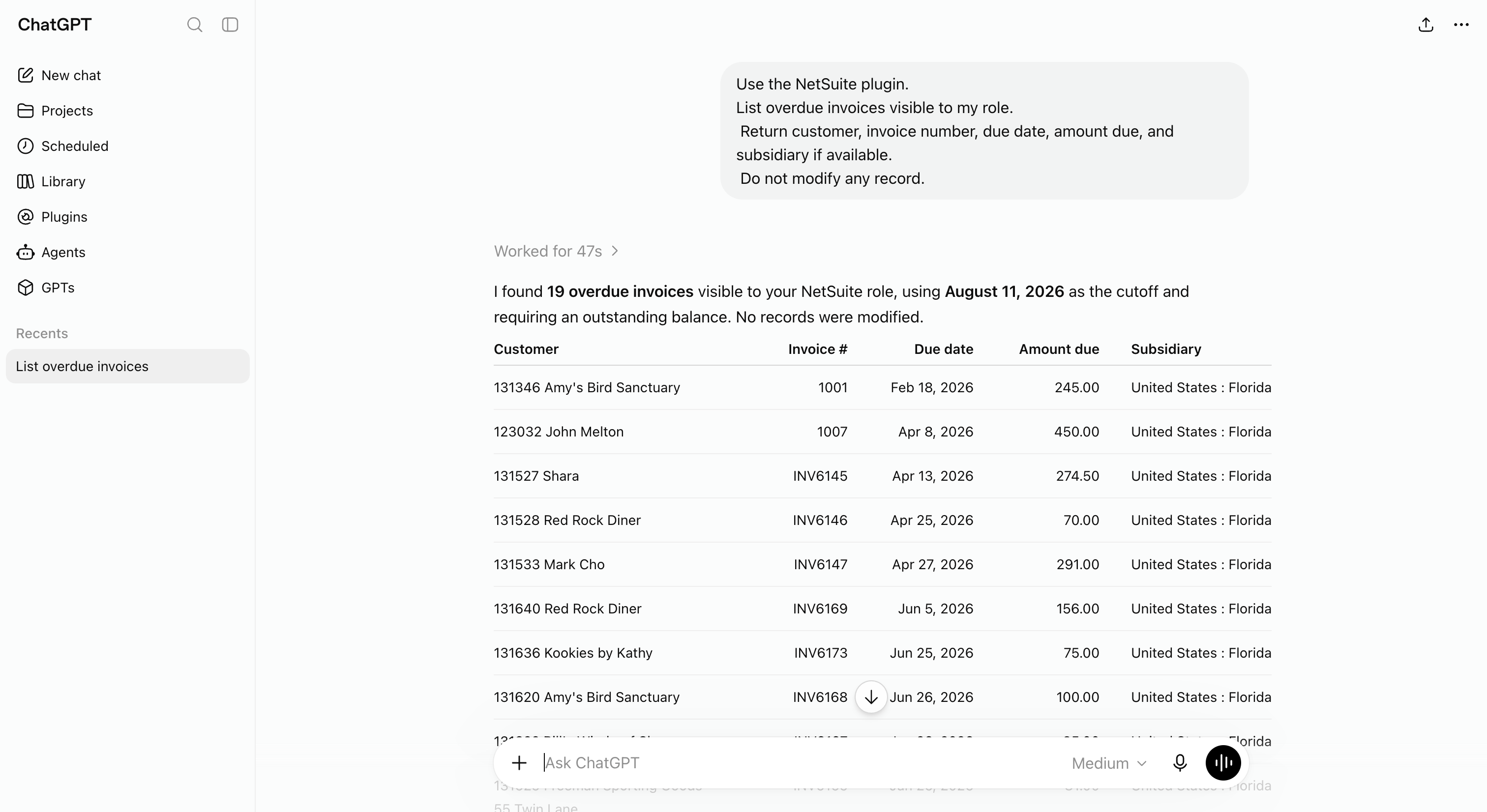 A raw connector can return useful finance answers, but teams still need to validate role scope, report behavior, and audit requirements.
Finance teams often need a different operating model:
- Business-friendly question patterns.
- Permission sets that map to departments and teams.
- Read-only access for broad Q&A.
- Audit trails for questions and answers.
- A way to answer inside Slack, Teams, SMS, ChatGPT, Claude, or Gemini from the same governed connection.
- A clear owner for onboarding, support, and review.
That is where a managed layer can help. It should not be positioned as “more official” than Oracle’s connector. It is a different product shape for a different audience.
Reports, Saved Searches, Record Tools, and SuiteQL
Oracle’s MCP Standard Tools SuiteApp can cover several kinds of NetSuite access. They are not interchangeable:
| Tool family | Tools | Best for | Main risk |
|---|---|---|---|
| Reports | ns_listAllReports, ns_runReport, plus filter helpers for subsidiaries, accounting books, contexts, and nexuses |
Familiar finance outputs the role can already run | Parity with the UI report has to be tested per report |
| Saved searches | ns_listSavedSearches, ns_runSavedSearch |
Repeatable operational lists already maintained in NetSuite | Filter logic is opaque to business users, and search ownership drifts |
| Record tools | ns_getRecord, ns_getRecordTypeMetadata, ns_createRecord, ns_updateRecord |
Looking up, or changing, specific records | The only write path in the standard set; gated by REST Web Services on the role |
| SuiteQL | ns_runCustomSuiteQL, ns_getSuiteQLMetadata |
Ad hoc structured queries and joins across accessible records | Read-only, but a wrong join produces a confident, wrong financial total |
For more detail, use NetSuite MCP SuiteQL Access Explained and NetSuite MCP Permissions Explained.
Managed NetSuite MCP Option for Teams
Kipper is worth evaluating when the buyer is not trying to build a raw MCP program. Typical signs:
- Finance and operations users need answers, not tool traces.
- The team wants read-only access for broad Q&A.
- Admins want an audit trail of questions and answers.
- Users should not need individual NetSuite navigation knowledge.
- The same approved finance data should be available across work tools, from Slack and Microsoft Teams to an AI client.
The commercial shape is different too. Oracle’s route bills through NetSuite seats, which is why it tends to stay with the 30-odd people who already have one. Kipper is priced for the other direction: NetSuite plans start at $1,000/month with up to 20 active users included, and additional active users are $25/month, built for the sales, service, and warehouse staff who currently ask finance instead (pricing as of August 2026).
Review Kipper’s NetSuite MCP connector, compare options in the NetSuite MCP guide, check pricing, or book a Kipper demo.
Related Reading
- How to Connect NetSuite to ChatGPT Using the NetSuite App
- How to Connect NetSuite to Claude Using the NetSuite Connector
- 6 Ways to Connect AI to Your NetSuite Books
- 30 Questions You Can Ask AI About Your NetSuite Data
- How to Connect NetSuite to Codex Using the NetSuite Plugin
- NetSuite AI Connector Service: What It Is and What It Costs
- NetSuite MCP Permissions Explained
- The NetSuite MCP guide
FAQ
Can ChatGPT connect to NetSuite?
Yes. Oracle documents a standard ChatGPT Apps route for the NetSuite AI Connector Service using the MCP Standard Tools SuiteApp. Availability still depends on your NetSuite account, ChatGPT plan or workspace, administrator settings, and the NetSuite role selected during sign-in.
Is NetSuite’s ChatGPT app the same as Kipper?
No. Oracle’s route connects ChatGPT to NetSuite through NetSuite’s AI Connector Service and role model. Kipper is a managed finance-answer layer for teams that want governed, read-only answers in work tools without maintaining raw MCP setup for every user.
Does ChatGPT get every NetSuite report?
It gets the reports the connected role can run. Oracle’s MCP Standard Tools include ns_listAllReports and ns_runReport, which cover standard and custom reports, but the role’s report permissions, subsidiary scope, and the report’s own shape all still apply. Availability in the NetSuite UI does not by itself guarantee the same result through MCP.
Is NetSuite’s ChatGPT app read-only?
Not by default. The SuiteApp ships with ns_createRecord and ns_updateRecord alongside the read tools. Oracle gates those behind the REST Web Services role permission, so a role without that permission and without create/edit record access is read-only in practice. That is a role design decision, not a property of the connector.
Does Kipper replace Oracle’s NetSuite AI Connector Service?
No. Oracle’s AI Connector Service is the official NetSuite MCP layer. Kipper is a managed finance-answer product that helps teams ask governed questions from approved NetSuite data inside the work tools they already use.
Sources
- Oracle: Connect to the NetSuite AI Connector Service
- Oracle: Required Features and Permissions
- Oracle: MCP Standard Tools SuiteApp
- Oracle: Available Tools in the MCP Standard Tools SuiteApp
- Oracle: NetSuite AI Connector Service Companion SuiteApp
- Oracle: NetSuite AI Connector Service FAQ
- Oracle: Associated Risks, Controls, and Mitigation Strategies
- OpenAI Help: Connectors and apps in ChatGPT