
NetSuite AI Connector Service: What It Is and Who It's For
NetSuite AI Connector Service explained: Oracle's official MCP integration, what it requires, who it reaches, and where a read-only layer fits.
On this page +
The NetSuite AI Connector Service is Oracle’s official way to connect your own AI assistant to NetSuite. It is a protocol-driven service built on the Model Context Protocol (MCP), so a client like ChatGPT, Claude, or Codex can read NetSuite records, run reports, and query data, all under the same role-based permissions that govern the NetSuite screen.
That is the plain answer, and it is worth stating clearly because the name is doing a lot of work that most search results leave vague. It is not a chatbot bolted onto NetSuite, and it is not the same thing as NetSuite’s built-in AI features. It is the connection layer between an outside AI and your ERP.
What it does not change is who can use it. Like every route into NetSuite, it authenticates as a NetSuite user with a NetSuite role, which means it needs a NetSuite seat. That single fact is the real question behind most “NetSuite AI” searches, so this post covers what the service is, what NetSuite’s other AI does, what all of it requires, and where people without a NetSuite login fit.
NetSuite’s AI is moving quickly and ships on the 2026.x release cadence. The specifics below are accurate as of August 2026; check Oracle’s linked docs if you are reading later.
What is the NetSuite AI Connector Service?
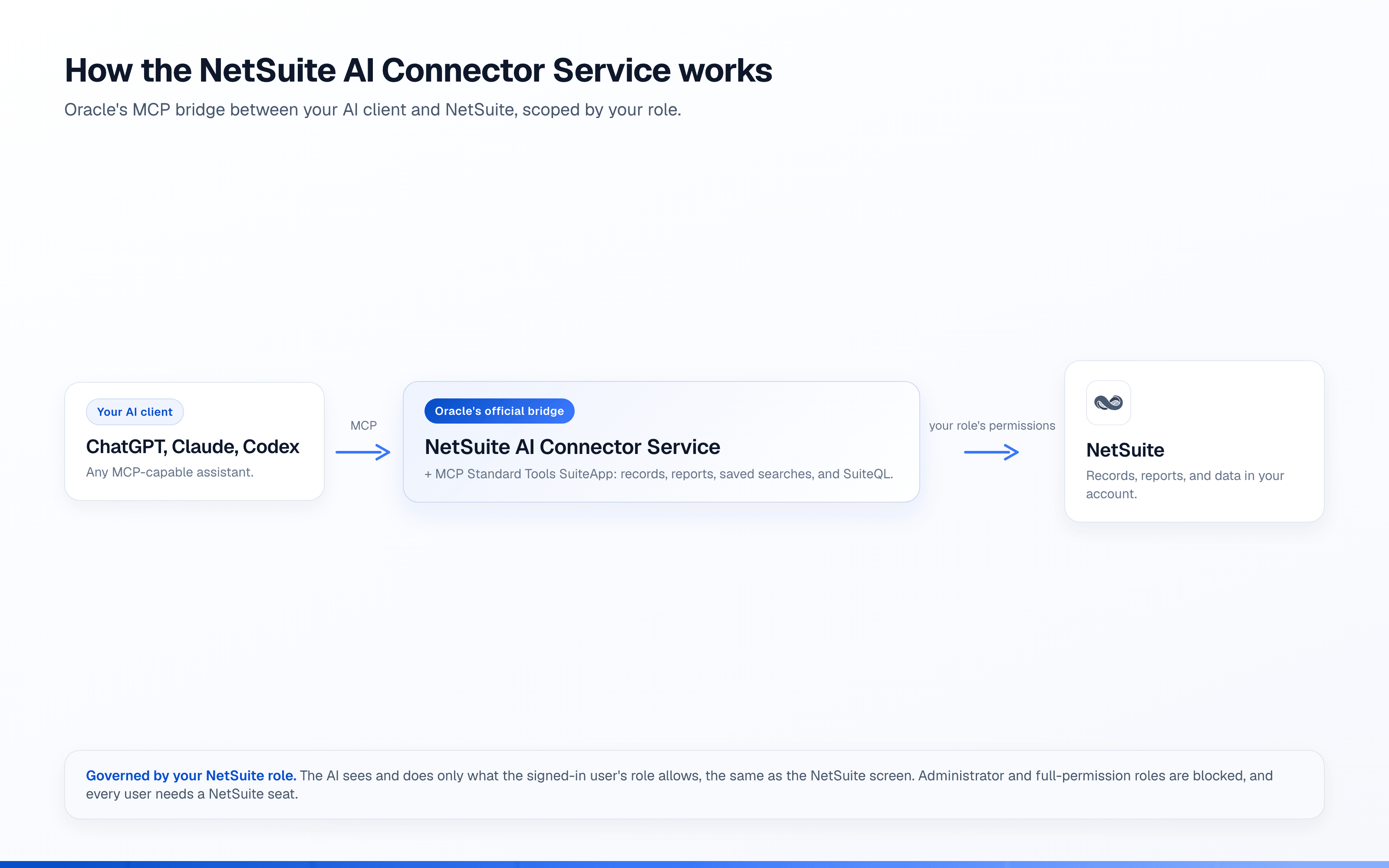
Oracle describes the NetSuite AI Connector Service as a secure, protocol-driven way to connect your own AI to NetSuite using MCP. In practice it has two moving parts:
- The AI Connector Service itself, the MCP endpoint your AI client connects to.
- The MCP Standard Tools SuiteApp, which exposes the actual tools: working with records, running reports and saved searches, and executing SuiteQL queries.
The part Oracle is proudest of, rightly, is the governance. The SuiteApp uses the same role-based access controls as the NetSuite UI, so a connected AI, and the person driving it, can only see and do what that NetSuite role already allows. Roles need the MCP Server Connection permission, and a role with write access through REST can take record actions, not just read. Oracle also blocks the Administrator and other full-permission roles from the connector, which is a sensible default rather than a limitation. There is a companion SuiteApp too, a repository of ready-made prompts tuned for NetSuite.
If you want the setup and the full menu of ways to connect AI to NetSuite, we cover them in the NetSuite MCP guide and, for the ChatGPT route specifically, in our NetSuite ChatGPT app review. This post is about what the service means for your team and your budget, not the click-by-click.
NetSuite’s other AI: the features built into the product
“NetSuite AI” is a broader phrase than the connector service, and the features people find useful are mostly the ones built directly into NetSuite for licensed users. Oracle’s AI portfolio includes three that come up most:
- Text Enhance is generative writing inside NetSuite’s text fields: draft, rewrite, summarize, or expand content without leaving the record.
- Bill Capture uses machine learning to read vendor invoice documents and create draft bills, which saves data entry in accounts payable.
- SuiteAnalytics Assistant turns plain-English questions into reports and dashboards, so you can ask for a view instead of building a saved search by hand.
These are genuinely useful, and if your goal is fewer hours spent on accounting work inside NetSuite, they are the right tools. They are also the clearest example of the pattern that runs through everything here: they live inside NetSuite, for people who are signed in to NetSuite.
What the NetSuite AI Connector Service costs you
Oracle does not publish a simple sticker price for the AI Connector Service, and the cost that matters is not really the service anyway. It is the access model underneath it.
Every one of these routes, the connector service, Text Enhance, Bill Capture, SuiteAnalytics Assistant, works through a NetSuite user account with a NetSuite role. And a NetSuite user is a NetSuite user: provisioned with a role, trained on the screens, working in the system as part of the job. That is the right setup for finance and operations, and it is why companies keep NetSuite logins to the people who need them. Out of a thousand employees, it is common for only a few dozen to hold NetSuite access, and for the other nine hundred that is the correct answer. They do not need an ERP. They need one number, once.
Oracle’s own tools authenticate every person as a NetSuite user. That fits the controller and AP clerk who already work in NetSuite. Sales reps, support agents, and warehouse leads who need a quick operational answer are a different audience: they generally do not work in the system directly.
There is setup to account for as well. The connector needs the MCP Standard Tools SuiteApp installed, roles configured with the right permission, and an administrator to review which roles can connect and act. Oracle’s FAQ also notes practical limits on AI-client responses, on the order of a few thousand rows per call with token and timeout limits on large queries, so it behaves like a governed API, not a bulk export.
What it requires, versus a read-only external layer
The two approaches solve different problems, and the requirements make the difference obvious.
| NetSuite AI Connector Service | Read-only external layer | |
|---|---|---|
| Who it’s for | NetSuite users working in the system | Approved teams that need read-only operational answers |
| Access model | The user’s NetSuite role (read and, where permitted, write) | Read-only by architecture, permissions set per person |
| Setup | Install the MCP Standard Tools SuiteApp, configure roles, admin review | Connect NetSuite once; users just ask |
| Where you ask | Your MCP client (ChatGPT, Claude, Codex) | Slack, Teams, SMS, and AI clients |
| Connection model | Each person authenticates with a NetSuite user and role | One admin-authorized connection with permissions per person |
The connector is the right tool when a technical or finance user with a NetSuite role wants their own AI assistant wired directly into the ERP, with the option to take actions. A read-only layer is the right tool when the people with questions do not have NetSuite logins, should not have them, or would never learn the interface if they did. Neither replaces the other. A company can run Oracle’s connector for its NetSuite users and a read-only layer for everyone else.
Where people outside the day-to-day NetSuite workflow fit
This is the gap Oracle’s tools leave open: extending governed answers to people outside the day-to-day NetSuite workflow.
The people outside NetSuite still need answers from it. An account manager wants to know whether a customer paid invoice 1042 before a renewal call. A support agent is fielding a billing question. A warehouse lead is checking the quantity on hand for a SKU, or which bills for a vendor are still unpaid. Today those questions land in finance’s inbox, and someone with a seat looks them up by hand.
A hosted, read-only layer is built for exactly that. It connects to NetSuite once, stays read-only, scopes what each person can see, logs every question, and answers in the tools people already use rather than sending them into NetSuite.
Where Kipper fits
Kipper is one option in that category. It is a hosted, read-only layer for NetSuite, QuickBooks, and Xero: it cannot write to NetSuite at all, which is an architectural fact rather than a setting; permissions are set per person or team; and every question and answer is logged. It answers NetSuite questions in Slack, in Microsoft Teams, and by text message, and its MCP beta brings the same governed access to NetSuite records inside Claude, ChatGPT, and Gemini.
On NetSuite it reads customers, invoices, payments, vendors, bills, purchase orders, inventory including quantity on hand, sales orders, quotes, and bill of materials, and it can filter or group by Class, Department, and Subsidiary. It runs against a synced copy of your data rather than live API calls, which is what lets it answer a question comparing two date ranges in a single step. Kipper’s NetSuite plans start at $1,000/month for 20 users, with a 14-day free trial (pricing as of August 2026).
Try it below, on a sample NetSuite data set.

Interactive · sample NetSuite data
The honest limits: Kipper cannot take a single action in NetSuite, it does not close the books, reconcile, or forecast, and it is a paid subscription. For AI that works inside NetSuite, Oracle’s own tools are the answer. Kipper is for the questions everyone else in the company has about the data in NetSuite.
Which NetSuite AI approach fits?
Skip the feature lists and ask one question: does the person with the question have a NetSuite login?
If yes, start with Oracle’s own tools: the built-in features (Text Enhance, Bill Capture, SuiteAnalytics Assistant) for work inside NetSuite, and the AI Connector Service if they want their own AI assistant wired into the ERP with the ability to act. If no, changing the AI does not solve it, because the connector still needs a NetSuite role. You need a read-only model scoped per person. None of this displaces a seat. Everyone who works in NetSuite still needs one, and the connector service makes those seats more useful. This is about the people who were never going to be in the system at all.
Not sure what your team would even ask? 30 questions you can ask AI about your NetSuite data is a useful test set for comparing options side by side.
FAQ
What is the NetSuite AI Connector Service?
It is Oracle’s official service for connecting an external AI assistant to NetSuite over the Model Context Protocol. Through the MCP Standard Tools SuiteApp, a client like ChatGPT or Claude can work with records, reports, saved searches, and SuiteQL, all scoped by the signed-in user’s NetSuite role.
Is the NetSuite AI Connector Service free?
Oracle does not publish a standalone price. Every user of the connector needs a NetSuite account with an appropriate role, because the connector authenticates each person directly as that NetSuite user.
What does the AI Connector Service require?
The MCP Standard Tools SuiteApp installed in your account, a NetSuite role with the MCP Server Connection permission, and an administrator to review which roles can connect. Oracle blocks Administrator and other full-permission roles from the connector by design.
Can I use NetSuite in ChatGPT or Claude?
Yes. Oracle documents connecting ChatGPT (and other MCP clients) to NetSuite through the AI Connector Service. What the assistant can see and do is governed by the NetSuite role selected at sign-in. Our NetSuite ChatGPT app review walks through that route in detail.
Does NetSuite have AI besides the connector service?
Yes. NetSuite ships built-in AI for licensed users, including Text Enhance for generative writing in fields, Bill Capture for reading vendor invoices into draft bills, and SuiteAnalytics Assistant for natural-language reporting.
Is NetSuite AI read-only?
No. The connector inherits the user’s NetSuite role, so a role with write access can take record actions, not just read. That is appropriate for licensed users doing their job, and it is also why a read-only layer is a different, safer shape for giving many more people access.
How do people outside the day-to-day NetSuite workflow get answers?
Through a hosted, read-only layer that connects to NetSuite once and answers in Slack, Teams, or SMS, scoped per person. That is the category Kipper is in.
NetSuite now has serious AI, both inside the product and as a governed bridge to your own AI client. The question was never whether NetSuite has AI. It is whether Oracle’s access model, one NetSuite seat and role per person, matches how many people in your company actually need to ask.
Want NetSuite answers for people without a login? See Kipper for NetSuite.
Comparing every connection method? Start with the NetSuite MCP guide.