








How to Connect NetSuite to Codex Using the NetSuite Plugin
Three ways to connect NetSuite to Codex: the built-in NetSuite plugin, a config.toml remote MCP entry, or a local bridge. Setup, OAuth, roles, and limits.
On this page +
See it live
Ask Kipper about your NetSuite data.
Sales orders, stock on hand, invoices and vendor bills.
Schedule free onboardingNo signup. Runs in your browser.
Codex reaches NetSuite through the same Oracle AI Connector Service that Claude and ChatGPT use. What differs is how you point Codex at it: there is a NetSuite plugin in Codex’s own directory, and there is a manual config.toml entry for the remote MCP endpoint. Both land on the same hosted service, the same tools, and the same role boundary.
The NetSuite-side work is identical to every other client and is where nearly all the effort goes. The Codex-side work is a few lines.
What Oracle and OpenAI Document
Oracle publishes the endpoint, the required features and permissions, and (via its AI Connector Service FAQ) client setup guides for Codex and Claude Code in SuiteAnswers alongside the Claude and ChatGPT instructions in the main help center. Codex is a documented client, not an improvisation.
Oracle’s stated client requirements, from the AI Connector Service FAQ:
| Requirement | Value |
|---|---|
| Remote MCP | Required |
| MCP protocol version | 2025-06-18 |
| Transport | Streamable HTTP |
| Authorization | OAuth 2.0 Authorization Code Grant with PKCE |
Codex satisfies all four. OpenAI documents [mcp_servers.<id>] entries in ~/.codex/config.toml supporting url for streamable HTTP servers, auth = "oauth" for OAuth credentials, command/args/env for STDIO servers, and the top-level mcp_oauth_callback_port and mcp_oauth_callback_url settings. codex mcp login <id> runs the OAuth flow.
One caveat worth stating plainly: the sections below reflect Oracle’s and OpenAI’s documented behavior plus the Codex directory listing shown in the screenshot. The exact callback registration NetSuite requires for Codex varies with how your integration record is configured, so treat the first authorization as something to verify rather than assume.
Pick a Path
| Path | What it involves | Use when |
|---|---|---|
| Codex NetSuite plugin | Enable the listing in Codex’s Plugins directory | It is available in your Codex build; the shortest route by far |
Remote MCP in config.toml |
One [mcp_servers.netsuite] block with url and auth |
No plugin listed, or you want the config in version control |
| Local bridge | A third-party STDIO process reaching Oracle’s hosted service | Neither of the above works, or you need custom tooling |
Option A: The Codex NetSuite Plugin
Open Plugins in the Codex sidebar and search for NetSuite. The Oracle NetSuite entry, described as “Connect ChatGPT to NetSuite,” is the same AI Connector Service listing that appears in ChatGPT’s app directory.
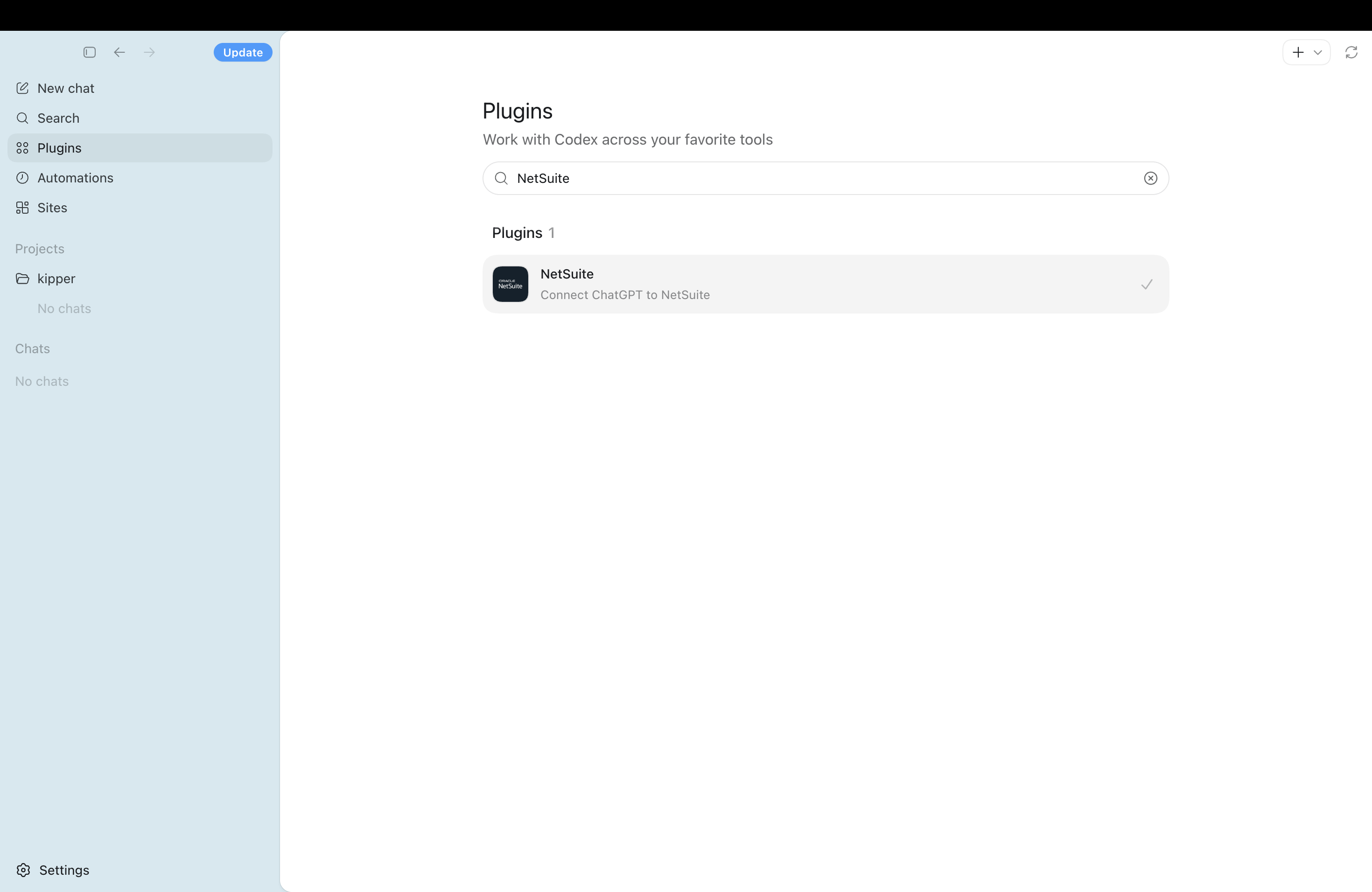 The NetSuite plugin in the Codex Plugins directory, already enabled. If your build does not list it, use the config.toml route below.
Enabling it starts the same NetSuite OAuth flow as every other path: sign in, pick the dedicated non-administrator role, approve. This route still depends on the NetSuite Prerequisites below (the SuiteApp, account features, and dedicated role all have to be in place first) so complete those before you run the first test.
What do you need in NetSuite?
Finish NetSuite setup first, whichever Codex path you take.
| Requirement | Type | Notes |
|---|---|---|
| Server SuiteScript | Account feature | Required by the AI Connector Service. |
| OAuth 2.0 | Account feature | Required by the AI Connector Service. |
| REST Web Services | Account feature | Additionally required to install the MCP Standard Tools SuiteApp. |
| MCP Standard Tools SuiteApp | SuiteApp | Supplies the record, report, saved-search, and SuiteQL tools. |
| Dedicated non-administrator role | Role design | Oracle blocks Administrator and full-permission roles. |
MCP Server Connection |
Role permission | Required setup permission. |
Log in using OAuth 2.0 Access Tokens |
Role permission | Required setup permission. |
REST Web Services |
Role permission | Only if this role should create, retrieve, or update records via the SuiteApp. Omit it for a read-only test. |
| Role assigned to the signing-in user | Role assignment | An unassigned role never appears in the OAuth role picker. |
| NetSuite account ID | Value | From Setup > Company > Company Information > Account ID. |
Use NetSuite MCP Permissions Explained before giving Codex access to production data.
Option B: Remote MCP in config.toml
Oracle documents this MCP Standard Tools endpoint shape:
https://<accountid>.suitetalk.api.netsuite.com/services/mcp/v1/suiteapp/com.netsuite.mcpstandardtoolsOracle also documents an /all endpoint for tool namespaces:
https://<accountid>.suitetalk.api.netsuite.com/services/mcp/v1/allUse the SuiteApp URL for the Standard Tools set; the /all endpoint spans tool namespaces including custom tools. If tools are missing after a successful login, the endpoint is one of the first things to check.
Add the server to ~/.codex/config.toml:
[mcp_servers.netsuite]
url = "https://<accountid>.suitetalk.api.netsuite.com/services/mcp/v1/suiteapp/com.netsuite.mcpstandardtools"
auth = "oauth"
That is the whole Codex side. The parts that vary by account, and that you should confirm on the first run rather than assume:
- Which endpoint your account exposes, SuiteApp-scoped or
/all. - Whether NetSuite requires a manually created integration record for this path, or creates one on first connection as it does for Claude’s Standard Tools route.
- The exact redirect URI Codex presents, and whether it is registered on that integration record.
- Which role is offered and selected during authorization.
If NetSuite requires a fixed callback port, pin one at the top level of config.toml, not inside the server block, and register the matching redirect URI in NetSuite:
mcp_oauth_callback_port = 8080For a remote devbox or container, Codex also supports mcp_oauth_callback_url. Register the full derived redirect URI, not just the base host; a path or port mismatch fails the callback silently from Codex’s side.
Option C: Local Bridge
Use the local bridge route when neither the plugin nor the remote MCP entry works in your environment.
The shape is:
Codex
  |
Local NetSuite MCP bridge
  |
Oracle hosted NetSuite AI Connector Service
  |
NetSuite role and tools
STDIO skeleton:
[mcp_servers.netsuite]
command = "<reviewed-command>"
args = ["<reviewed-arg-1>", "<reviewed-arg-2>"]

[mcp_servers.netsuite.env]
NETSUITE_ACCOUNT_ID = "<redacted>"
NETSUITE_CLIENT_ID = "<redacted>"
Only use concrete package names and arguments after reviewing the bridge source and version. The local bridge article shows one example: How to Set Up a Local NetSuite MCP Bridge.
First Test in Codex
Whichever path you used, inspect the server before asking it anything:
codex mcp list
codex mcp get netsuite
Then run the OAuth flow. Sign in, and pick the dedicated non-administrator role. Administrator is rejected outright, and a broader role will quietly succeed with more access than you scoped:
codex mcp login netsuite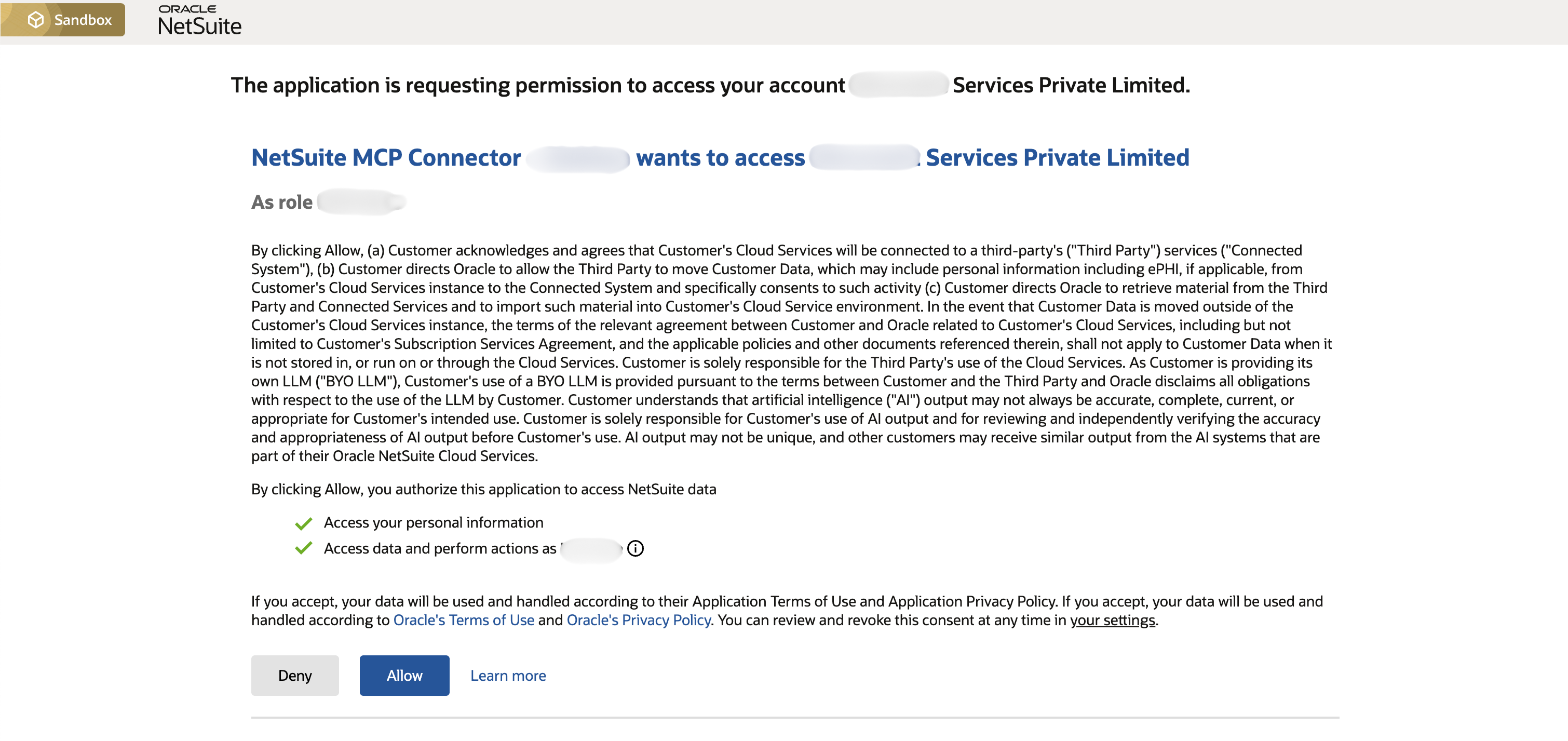 Review the NetSuite account and selected role before clicking Allow during the Codex OAuth login flow.
Then ask for tool discovery. You should see the Standard Tools set: ns_getRecord, ns_getRecordTypeMetadata, ns_listAllReports, ns_runReport, ns_listSavedSearches, ns_runSavedSearch, ns_runCustomSuiteQL, ns_getSuiteQLMetadata, plus ns_createRecord and ns_updateRecord if the role holds REST Web Services. If the two write tools appear on a role you intended to be read-only, fix the role before going further:
Use only the NetSuite MCP server.

List the available NetSuite tools. For each tool, say whether it appears read-only or write-capable based on the tool name and metadata.
Do not create, update, delete, approve, submit, or send any NetSuite records.
Then ask a narrow sandbox question:
Use only the NetSuite MCP server.
Count invoices visible to the selected NetSuite role.
Return only the count and the tool used.
Do not modify any record.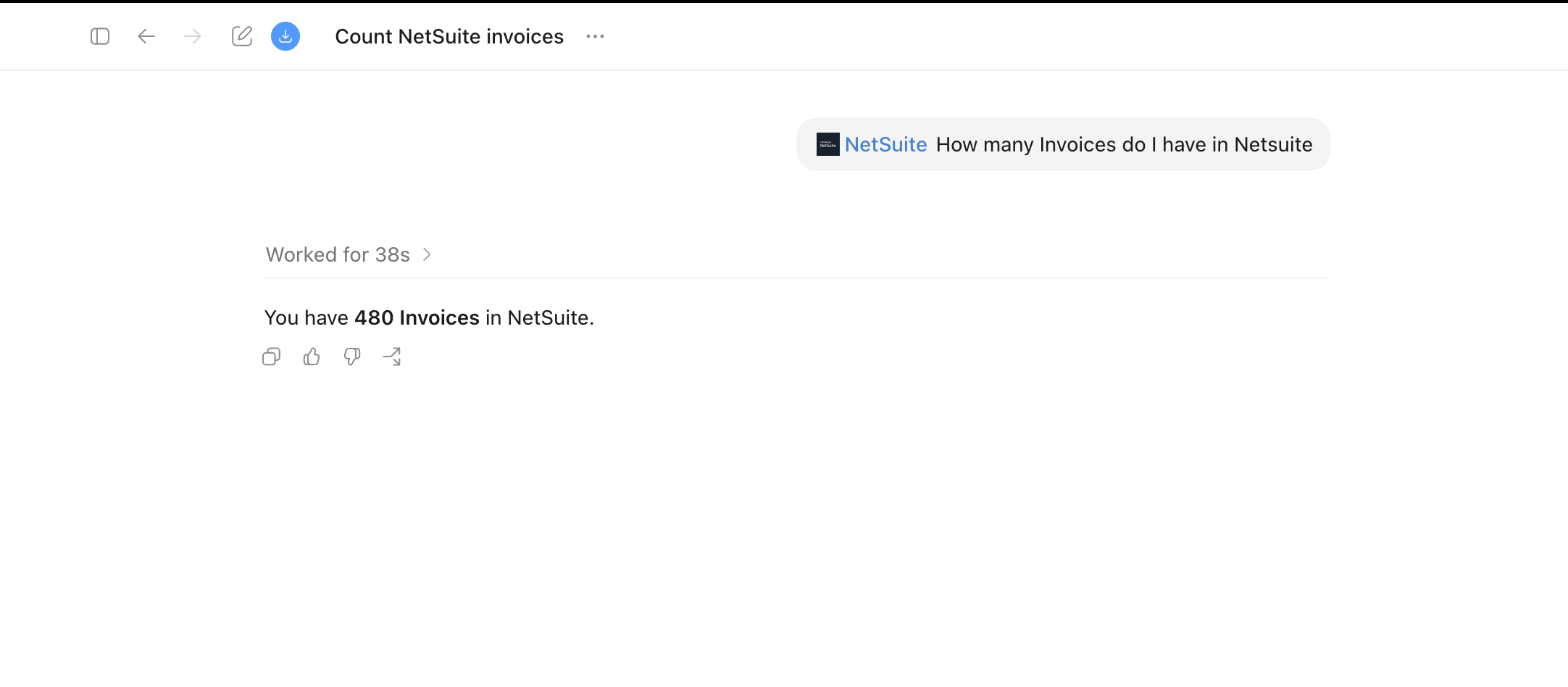 A simple count query is a good first proof. Use sandbox data or scrubbed demo data for screenshots.
What if it doesn’t work?
| Symptom | Likely cause | What to check |
|---|---|---|
| Server does not appear | Wrong config file, syntax error, disabled server, or failed process | codex mcp list, codex mcp get netsuite, session MCP status |
| OAuth browser does not open | Server does not support OAuth or transport is wrong | Remote HTTP vs STDIO, OAuth support, callback config |
| Redirect URI mismatch | NetSuite integration record does not match Codex callback | Full callback URI, callback port, callback URL |
| Tools are missing | Wrong endpoint, missing SuiteApp, role lacks permissions, stale metadata | /all vs SuiteApp URL, SuiteApp install, role permissions, reconnect |
| Record access fails | Role cannot see the record | Test the same record in NetSuite under the MCP role |
| Local bridge fails | Node, package, env vars, or source review issue | Bridge logs, node --version, environment block |
For more detail, use NetSuite MCP Troubleshooting.
Is there a managed option for teams?
Codex is a developer surface, and this guide is a developer task: a config file, an OAuth callback, a role you designed yourself. That is fine for one engineer. It does not scale to the account managers and warehouse leads who are the actual source of “can you check NetSuite for me” traffic. They will not be editing config.toml, and most do not work in NetSuite directly in the first place.
Kipper is the managed route for that group: one NetSuite connection an admin authorizes, read-only by architecture, per-user permissions, and every question and answer logged, answered in Slack, Microsoft Teams, and SMS as well as MCP-enabled AI clients. NetSuite plans start at $1,000/month with up to 20 active users included, and additional active users are $25/month (pricing as of August 2026).
Review Kipper’s NetSuite MCP connector, compare all routes in the NetSuite MCP guide, see pricing, or book a demo.
Related Reading
- How to Set Up a Local NetSuite MCP Bridge
- How to Connect NetSuite to ChatGPT Using the NetSuite App
- How to Connect NetSuite to Claude Using the NetSuite Connector
- 6 Ways to Connect AI to Your NetSuite Books
- 30 Questions You Can Ask AI About Your NetSuite Data
- NetSuite MCP Permissions Explained
- NetSuite MCP Troubleshooting
- NetSuite MCP SuiteQL Access Explained
- The NetSuite MCP guide
FAQ
Does Codex have a built-in NetSuite plugin?
Codex’s Plugins directory lists a NetSuite entry published by Oracle NetSuite, described as connecting ChatGPT to NetSuite. Availability tracks your Codex version and account, so if it is not listed, use the config.toml remote MCP route instead.
Can Codex connect directly to Oracle’s remote NetSuite MCP endpoint?
Yes in principle. Oracle’s endpoint is a remote streamable-HTTP MCP server using OAuth 2.0 Authorization Code Grant with PKCE, and Codex supports exactly that shape through a url plus auth = "oauth" entry in config.toml. Confirm the callback registration in your NetSuite integration record before relying on it.
Do I still need a local bridge for Codex?
Only if neither the plugin nor the remote MCP entry works in your environment, or if you need custom NetSuite tooling that Oracle’s hosted service does not expose. A bridge is a third-party dependency with access to business data and should be reviewed accordingly.
What is the safest first NetSuite Codex test?
Use a sandbox account, a dedicated non-administrator role without the REST Web Services permission, and one read-only question such as counting visible invoices or listing recent customers.
Sources
- Oracle: Connect to the NetSuite AI Connector Service
- Oracle: NetSuite AI Connector Service FAQ
- Oracle: Required Features and Permissions
- Oracle: MCP Standard Tools SuiteApp
- Oracle: Available Tools in the MCP Standard Tools SuiteApp
- OpenAI: Model Context Protocol in Codex
- OpenAI: Codex configuration reference