









Xero MCP Multi-Entity: Connecting to Multiple Organisations
Can one Xero MCP setup reach several organisations? Custom Connections cover one entity each; OAuth apps handle multi entity. The three routes, compared.
On this page +
See it live
Ask Kipper about your Xero data.
Invoices, supplier bills, purchase orders and credit notes.
Schedule free onboardingNo signup. Runs in your browser.
Yes, one Xero MCP setup can serve more than one organisation. The catch is that the connection you start with decides whether adding a second entity later is a five-minute job or a rebuild.
Most people hit this the same way. They wire up one company, it works, and then a second Xero organisation appears: a holding company above the trading entity, a business they just acquired, a client’s books sitting next to their own. At that point “multi-entity” stops being a buzzword and turns into a real question, does the thing I already built reach the new organisation, or do I start over?
Short answer: a single Xero Custom Connection is tied to one organisation, so genuine multi-entity access comes down to one of three routes. Here is how each one works, and where each one bites.
Xero’s connection options and limits below are accurate as of August 2026. Xero adjusts its auth models and API limits from time to time, so check the linked Xero docs if you are reading this later.
Why multi-entity is awkward in Xero
Xero gives you two very different ways to let software talk to your books, and they sit at opposite ends of the effort scale.
A Custom Connection is the quick one. It uses a machine-to-machine flow (OAuth 2.0 client credentials), so there is no login screen and no consent step: you generate a client ID and secret and you are in. The trade-off is spelled out in Xero’s own documentation, a Custom Connection is for “M2M integrations to a single organisation.” It is also a paid add-on, billed per connection, and only available for organisations in Australia, New Zealand, the UK, and the US. One connection, one entity, one subscription.
The other route is a full OAuth 2.0 app using the authorization code flow. Here a person logs in and authorises your app, and Xero can hand back access to several organisations at once. You then call the GET /connections endpoint to list every organisation the user granted, each with its own tenant ID, which you pass in the xero-tenant-id header on each request. That is what makes multi-entity possible from a single setup. The cost is complexity: you register a developer app, build the consent flow, and store and refresh tokens. Uncertified apps are also capped at 25 connected tenants until you apply to become a Xero app partner.
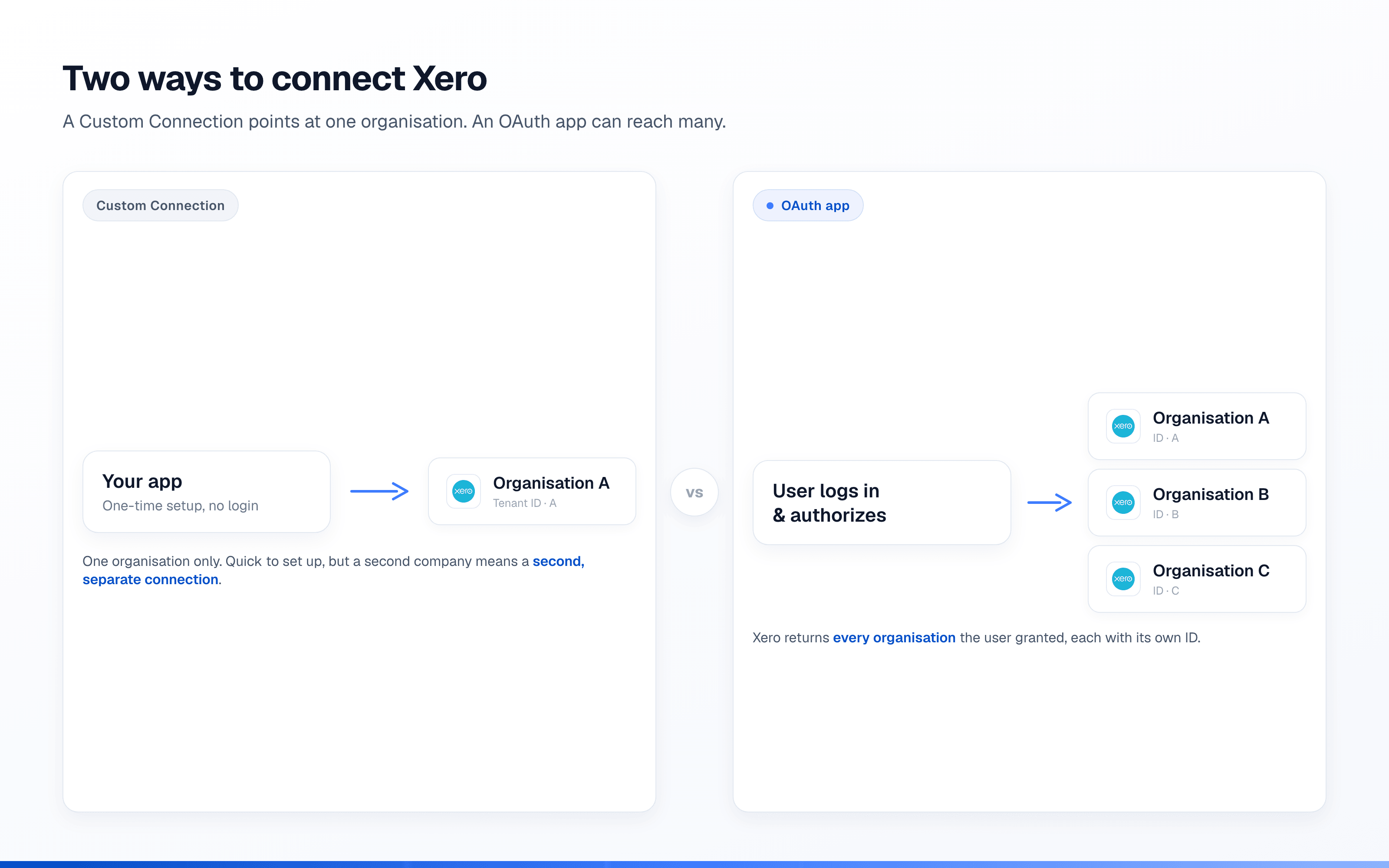
So the awkwardness is not a bug. It is that the fast, no-login option is deliberately single-entity, and the multi-entity option is the one that asks you to build more.
The three routes to multi-entity
Route 1: one Custom Connection per entity
Set up a separate Custom Connection for each organisation. It is the least conceptual overhead, and each one is quick. But the connections share nothing: separate credentials, a separate subscription charge each, and no single place that sees all of them. If you have two or three stable entities and never need to look across them, this is genuinely fine. It gets painful when the list grows, or when someone wants one answer that spans all of them.
Route 2: a single OAuth app
Build one OAuth app and let each organisation authorise it. Now every entity lives behind the same application, and switching between them is just a matter of sending a different tenant ID. This is the route Xero itself points multi-organisation builders toward, and it is the same groundwork covered in our Xero MCP developer setup guide. The price is up-front engineering: the consent flow, token storage, refresh handling, and the tenant-ID plumbing on every call. For a product that has to reach many customers’ books, it is the right answer, and Pipedream, Composio, and Zapier sell that plumbing pre-built if you would rather buy it than write it. For an internal script over two companies, it can feel like a lot.
Route 3: a hosted layer
The third option is to not build any of the above, and let a hosted service own the connection, the tokens, and the consent. How many organisations that covers depends entirely on the vendor, so it is worth asking the question directly rather than assuming. Kipper, for instance, connects one Xero organisation per workspace today, which fits teams working from a single set of books and skips all the token and tenant-ID management. Multi-entity support is in build, and what Kipper will and will not do across entities sets out the boundary before you plan around it. If you need several organisations answerable before that lands, an OAuth app is the route, with the token, tenant-ID and consent work this post describes. If you mostly need one set of books answerable in Slack, Teams, or SMS without a login, a hosted layer saves the build. (For the wider menu, we compared every way to connect AI to Xero, the Xero MCP connector page covers the hosted option in detail, and our full Xero MCP guide pulls the whole topic together.)
Can I connect more than one Xero organisation?
Yes, in two ways. Either stand up a separate Custom Connection for each organisation, or use one OAuth app that several organisations authorise. The difference is where the “more than one” lives: with Custom Connections it is several independent setups; with an OAuth app it is one setup holding several tenant IDs. For the full technical comparison of the two auth models, see our breakdown of Xero MCP Custom Connections vs OAuth apps.
Do I need a separate connection per entity?
Only if you are using Custom Connections. Because each one is bound to a single organisation, two entities means two connections, and two subscription charges. With an OAuth app you do not: one app can be granted many organisations, and you choose which one you are querying per request with its tenant ID. If you already know a second entity is coming, that fact alone is a strong argument for starting on an OAuth app rather than a Custom Connection you will later unpick. It also pays to get your Xero scopes right the first time, since re-consenting across several organisations is more annoying than doing it once.
A worked example: two organisations
Picture a small firm that keeps the books for two related businesses: a studio, and the holding company above it.
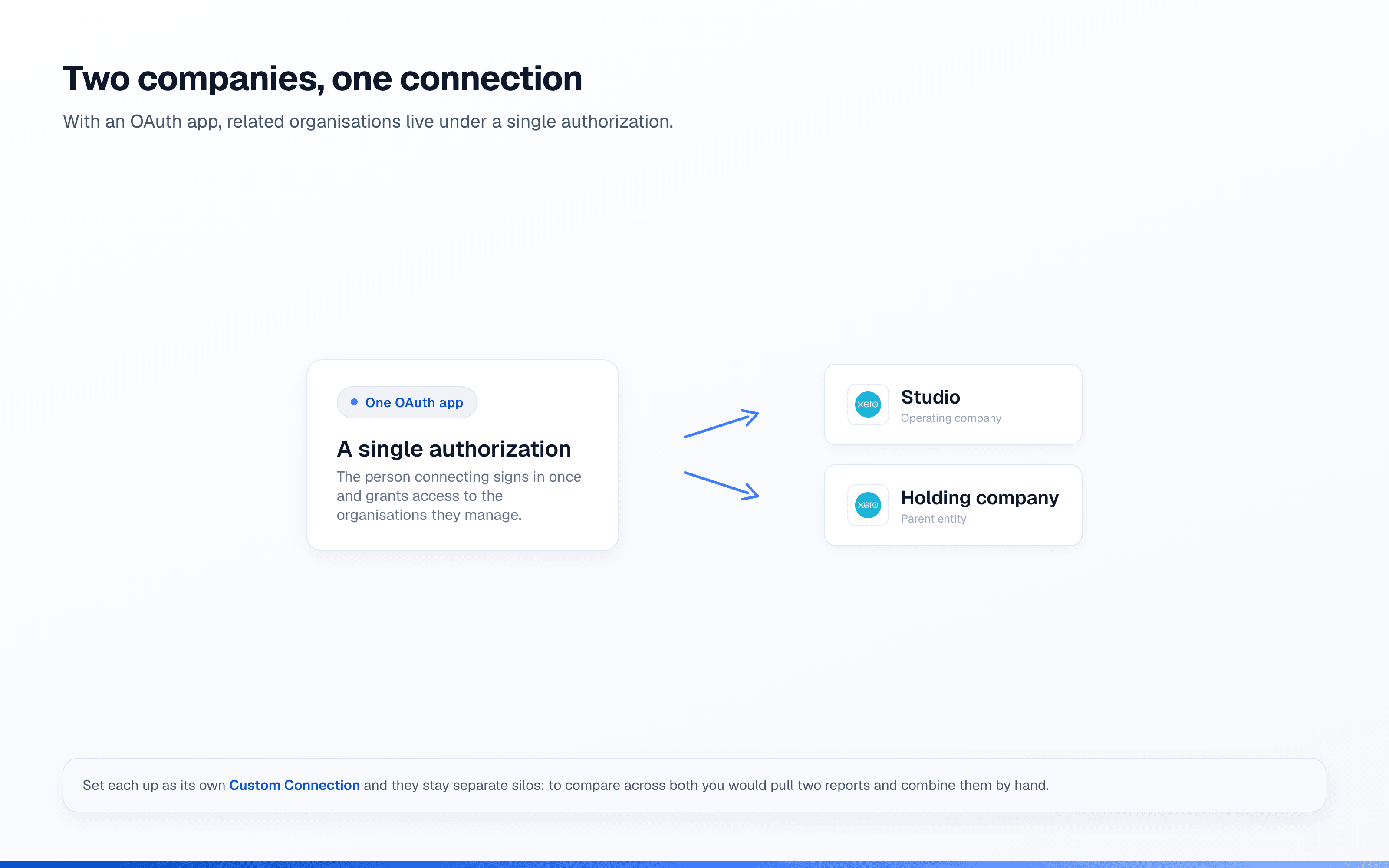
If they set each one up as its own Custom Connection, everything runs fine until the day someone wants to compare the two, say total outstanding invoices across both. At that point the siloed setup shows its edge: they either pull two separate results and add them up by hand, or go back and rebuild as a single OAuth app so both organisations sit under one authorisation. Had they started with the OAuth app, adding the second entity would have been another authorise-and-go, not another project. That is the whole lesson: the cost of multi-entity is not the second organisation, it is whether your first choice can grow into it.
Frequently asked questions
Can a Xero Custom Connection connect to multiple organisations?
No. Xero’s documentation is explicit that a Custom Connection is scoped to a single organisation. Each additional entity needs its own Custom Connection, and its own subscription, or a move to an OAuth app.
How many organisations can one Xero OAuth app connect to?
Many. A single OAuth app can be authorised by multiple organisations, and you list them through the /connections endpoint. Uncertified apps are limited to 25 connected tenants; beyond that, Xero asks you to apply for app-partner status to lift the cap.
What is a “tenant” in Xero?
A tenant is a connected Xero organisation (Xero uses the word to cover both organisations and practices). Each has a unique tenant ID, which you send in the xero-tenant-id header so Xero knows which entity a request is for.
Does Kipper support multiple Xero organisations?
Today Kipper connects one Xero organisation per workspace, so it suits teams centred on a single set of books. Multi-entity support is in build: how Kipper handles multiple entities states the boundary plainly, which is that Kipper answers across entities while statutory consolidation, with eliminations and currency translation, stays with consolidation tools and your accountant.
Until that ships, an OAuth app is how you reach several organisations at once. Worth reading the tenant-ID and consent work above before you commit to it, because that is the part teams underestimate.