









Xero MCP Scopes Explained
Understand Xero MCP scopes: read versus write access, granular Accounting API scopes, Custom Connections after April 2026, and safe first-test permissions.
On this page +
See it live
Ask Kipper about your Xero data.
Invoices, supplier bills, purchase orders and credit notes.
Schedule free onboardingNo signup. Runs in your browser.
Xero MCP scopes decide what the AI can reach. They are not a detail to clean up later. If the scope list is too broad, your assistant may have access to records or actions that the user never intended to expose.
This guide explains the practical scope choices for Xero MCP, especially when using Xero’s official MCP server. If you’d rather not manage scopes yourself, Kipper’s hosted Xero MCP connector applies a safe read-only scope for you, and the Xero Claude connector is that same scope-free route inside Claude.
Which scope is safest to start with?
Start with the narrowest read scope that proves the connection works, then widen only as needed:
accounting.settings.readThis scope is enough to test a harmless organization-details request. It should be your first Demo Company test because it proves that authentication works without opening invoice, payment, bank transaction, journal, or payroll data.
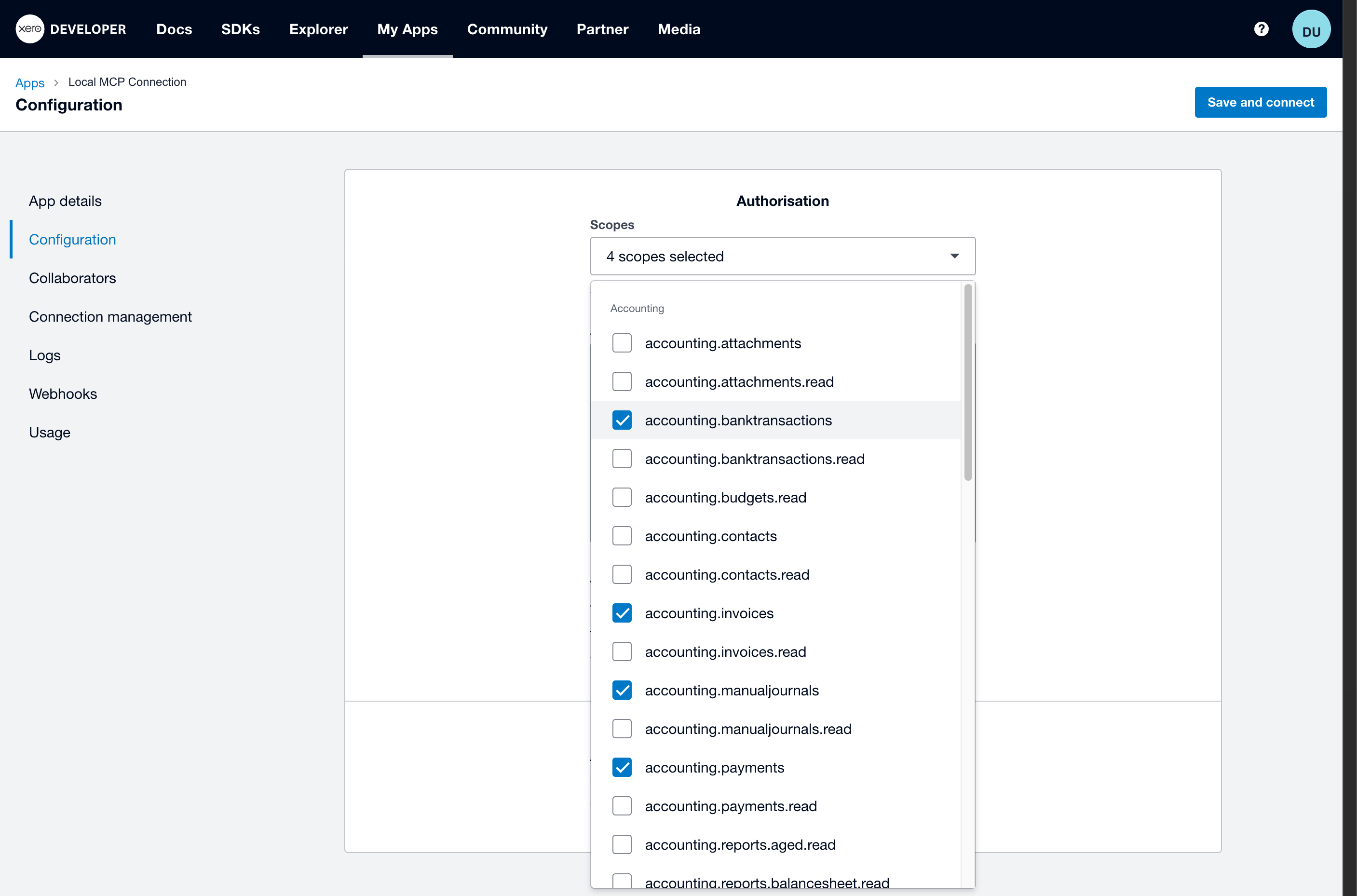 Use the scope selector deliberately. Do not copy broad or write-capable screenshots into production.
What is the difference between read and write scopes?
In Xero’s Accounting API, read scopes are usually explicit:
accounting.invoices.read
accounting.payments.read
accounting.banktransactions.read
accounting.manualjournals.read
The matching scopes without .read are broader and can support write-capable operations:
accounting.invoices
accounting.payments
accounting.banktransactions
accounting.manualjournals
For most self-serve finance Q&A, choose read scopes. Write-capable scopes belong in controlled workflows with a trusted operator, not in a broad “ask anything about Xero” rollout.
Common Scope Groups for Xero MCP
Use this as a planning map, not a copy-paste list.
| Goal | Starting scopes |
|---|---|
| Test organization details | accounting.settings.read |
| Read invoice lists and balances | accounting.settings.read accounting.invoices.read |
| Read contacts | The current contact scope required by Xero, listed in the official MCP server docs as accounting.contacts |
| Read payments | accounting.settings.read accounting.payments.read |
| Read bank transactions | accounting.settings.read accounting.banktransactions.read |
| Read reports | Add the exact report scope required by the official server, such as accounting.reports.aged.read, accounting.reports.balancesheet.read, accounting.reports.profitandloss.read, or accounting.reports.trialbalance.read |
| Payroll tests | Add payroll scopes only for the supported country and approved user group |
The exact scope names available to your app can vary with Xero’s granular-scope rollout and the type of connection. Always confirm in Xero Developer before publishing setup instructions internally.
What Scopes Do Not Control
Scopes decide which endpoints an app can call. They do not decide which rows inside those endpoints the app can see.
This catches people out because a name like accounting.invoices.read sounds narrow. It is narrow in one direction only. Look at how the names are built: a resource area, then an access level. That is the entire vocabulary a scope has. There is nowhere in accounting.invoices.read to express which invoices, so it restricts the app to reading invoices rather than editing them or touching payroll, and stops there.
The authorizing user is the other half of it. Xero’s permissions FAQ says the user connecting an integration has to be a Standard, Adviser, or Administrator level user with the Connected Apps permission, and that apps using the API have “the access of a Standard or Advisor role user.” Xero sums the relationship up this way:
The API essentially works on behalf of the user that authorised it to connect.
Note the hedge in “essentially.” The same FAQ ties particular endpoints to that user’s own permissions: Reporting APIs and the /ManualJournals and /Journals endpoints require the authorizing user to have Reports access, and the Payroll APIs require them to be a Payroll Admin. What Xero does not publish is a precise rule for how that user’s access maps to the rows a given endpoint returns. If your design depends on that mapping, test it against your own connection rather than reasoning it out.
The planning point holds regardless of where that line falls: do not treat a read scope as a way to limit which records are visible. “Read-only” constrains the verb, not the record set. If you need different people to see different subsets of the ledger, the scope list is the wrong lever. That has to happen in the layer between your users and the Xero connection.
This is a limit of Xero’s permissions model rather than of the scope system, and it shows up in the interface too: Xero still has no safe read-only role works through why, and Xero user roles and permissions is the role-by-role reference.
Granular Scopes: Two Dates, Two Triggers
Xero’s granular Accounting API scopes arrived in 2026 behind two separate cutoffs, and mixing them up is a common source of confusion. One is about when the app was created. The other is about when the connection was created.
| Trigger | Cutoff | Effect |
|---|---|---|
| App creation | On or after 2 March 2026 | Web and PKCE apps use the new granular scopes |
| App creation | Before 2 March 2026 | Until September 2027 to move from broad to granular scopes |
| Calendar date | From 29 April 2026 | All Custom Connections have access to granular scopes |
| Connection creation | From 29 April 2026 | New Custom Connections do not get accounting.journals.read for the general-ledger Journals endpoint |
The journal detail matters more than it looks, and it is narrower than “no journals.” The removed scope is accounting.journals.read, which covers the general-ledger Journals endpoint. Manual journals remain in the granular set through accounting.manualjournals and accounting.manualjournals.read.
Xero’s FAQ also notes that existing broad scopes can continue in use until September 2027. Removed broad scopes cannot be re-added.
That means two Xero MCP setups can behave differently:
- An older Custom Connection may still have broad scopes.
- A newer Custom Connection uses granular scopes and lacks the general-ledger Journals scope.
- Changing an activated Custom Connection can require re-authorization.
When troubleshooting a scope problem, always check when the Custom Connection was created and whether it was edited after activation.
The Official Xero MCP Server Scope Behavior
The official Xero MCP server supports two auth modes:
- Custom Connections with Client ID and Client Secret
- Bearer token mode for clients that handle OAuth at runtime
The server documentation says Custom Connections require different scope sets depending on when the connection was created. It also allows overriding scopes with the XERO_SCOPES environment variable.
Example:
XERO_SCOPES=accounting.settings.read accounting.invoices.readKeep XERO_SCOPES aligned with the scopes actually authorized in Xero Developer. If they do not match, expect invalid_scope or missing tools.
Which scopes should you avoid in a first test?
Scopes are only one of the things that can go wrong here. The other risks of connecting AI to your books are worth reading first.
Do not use these for the first connectivity check:
- Invoice write scopes
- Payment write scopes
- Bank transaction write scopes
- Manual journal write scopes
- Payroll scopes
- Deprecated broad scopes unless you are maintaining an existing connection
First prove the server can read organization details. Then add exactly one data area at a time.
A Practical Scope Review Checklist
Before using Xero MCP against real data, answer these:
- Which tools will users actually need?
- Which scopes does each tool require?
- Does any scope allow create, update, approve, or delete behavior?
- Is this a Custom Connection or a multi-tenant OAuth app?
- Who can edit the scope list later?
- Will changes force re-authorization?
- Where is the final approved scope list documented?
FAQ
What scope should I use first for Xero MCP?
Use accounting.settings.read for the first Demo Company test. It lets the server read basic organization details without granting invoice, payment, bank transaction, or write access.
Are Xero MCP scopes read-only by default?
No. Xero scopes are explicit permissions. Read scopes usually end in .read. Scopes without .read often allow create or update behavior for that area.
What changed for Xero Custom Connection scopes in 2026?
Two different dates apply, and they are easy to confuse. Web and PKCE apps created on or after 2 March 2026 use the new granular scopes. All Custom Connections have granular-scope access from 29 April 2026. New Custom Connections from that date do not get accounting.journals.read for the general-ledger Journals endpoint, but manual journal scopes remain available. Existing broad scopes can continue until September 2027.
Next, see Xero MCP Custom Connections vs OAuth Apps or the full Xero MCP guide.