









QuickBooks MCP Troubleshooting
Fix QuickBooks MCP errors: invalid_client, no tools appearing, dist/index.js not found, production callbacks, expired refresh tokens, and read-only flags.
On this page +
See it live
Ask Kipper about your QuickBooks data.
Invoices, payments, vendor bills and purchase orders.
Schedule free onboardingNo signup. Runs in your browser.
Broken QuickBooks MCP setups almost always break at one of four layers: the process never launched, the file path is wrong, the environment variables never reached the server, or Intuit rejected the OAuth handshake. Work out which layer failed before you touch credentials or scopes, because changing keys to fix a launch problem just adds a second problem.
One thing to settle first. “QuickBooks MCP” now gets used for several different paths, and they share almost no failure modes.
Which QuickBooks path are you on?
| Path | What it is | Where problems live |
|---|---|---|
| Intuit’s MCP server | Code you clone, build, and run locally over stdio | Node, file paths, .env, Intuit Developer app, OAuth |
| Intuit’s official connector | Hosted by Intuit, added inside Claude or ChatGPT | Your assistant account, QuickBooks eligibility, sign-in |
| Kipper’s QuickBooks connector | Hosted, read-only, answers in Slack, Teams, and SMS | Kipper workspace permissions, connection health |
If you never ran git clone or npm run build, skip the whole local server section below. Nothing there applies to you.
Quick diagnostic table
For the local server, match the symptom first.
| Symptom | Likely cause | First fix |
|---|---|---|
| No QuickBooks tools appear | Client never launched the process | Check command, absolute path, env block, then fully restart |
Cannot find module .../dist/index.js |
Server was never built | Run npm install then npm run build |
invalid_client |
Mismatched or wrong-environment keys | Confirm both keys come from one app, on the right side of the toggle |
| Redirect URI error during auth | Registered URI does not match byte for byte | Re-register the exact protocol, host, port, and path |
| Production refuses the callback | Intuit blocks localhost in production | Use a temporary HTTPS tunnel for the one-time handshake |
| Worked yesterday, fails today | Refresh token rotated, expired, or was never saved | Re-run auth, then set QUICKBOOKS_TOKEN_STORE_PATH |
| Data returns from the wrong company | Realm ID belongs to a different company | Re-authorize against the intended company |
| Create and delete tools are present | Disable flags absent or not true |
Set all three disable flags before touching real books |
| Works in a terminal, not in a desktop app | GUI apps do not inherit your shell environment | Put every value in the client’s env block, use absolute paths |
No QuickBooks tools appear
The server produces no output of its own and there is nothing to visit in a browser. The MCP client spawns node dist/index.js, talks to it over stdio, and kills it afterward. So silence is normal, and an empty tool list means the spawn failed rather than that the server is idle.
Check these in order:
- The client was fully quit and reopened. Closing the window is not enough on macOS.
commandisnode, or an absolute path to Node if the client cannot resolve it. A GUI app started from Finder or the Dock does not see the PATH your shell sees, which is also why a version manager like nvm often works in a terminal and fails in the app.- The config file is valid JSON with a single
mcpServersobject. A secondmcpServerskey silently discards the first. - Every QuickBooks value sits in the client’s
envblock. The server reads.envfrom its own working directory, and the client does not necessarily launch it from the project folder.
For the exact config shape, see the Claude Desktop guide or the Codex guide.
dist/index.js or module not found
Intuit’s server is TypeScript. The client runs the compiled output, not the source, so the build has to happen before the client can launch anything.
npm install
npm run build
ls -l dist/index.js
If that last command prints nothing, the client had nothing to run. Two habits prevent the repeat: point at an absolute path rather than ./dist/index.js, and rebuild after every git pull, since a pulled change to src/ does not update dist/.
invalid_client
Intuit returns this when the Client ID and Secret are not a pair it recognizes. The usual causes, roughly in order of how often they turn up:
- The ID and Secret came from two different apps, or from two different sessions on the Keys and credentials page.
- Development keys are being used against a real company. Development keys authorize sandbox companies only, and production keys authorize live ones only. Neither substitutes for the other.
- The secret was rotated in the Intuit portal and updated in
.envbut not in the MCP client’senvblock, or the reverse. - A trailing space or a line break rode along with a copy and paste.
Both keys live on one page in the Intuit Developer Portal, behind a Development and Production toggle, so it is easy to read an ID from one side and a secret from the other. Copy both from the same view.
Redirect URI mismatch
Intuit compares the redirect URI exactly: protocol, host, port, and path all have to match what you registered under Settings, Redirect URIs. http://localhost:8000/callback and http://localhost:8000/callback/ are two different URIs.
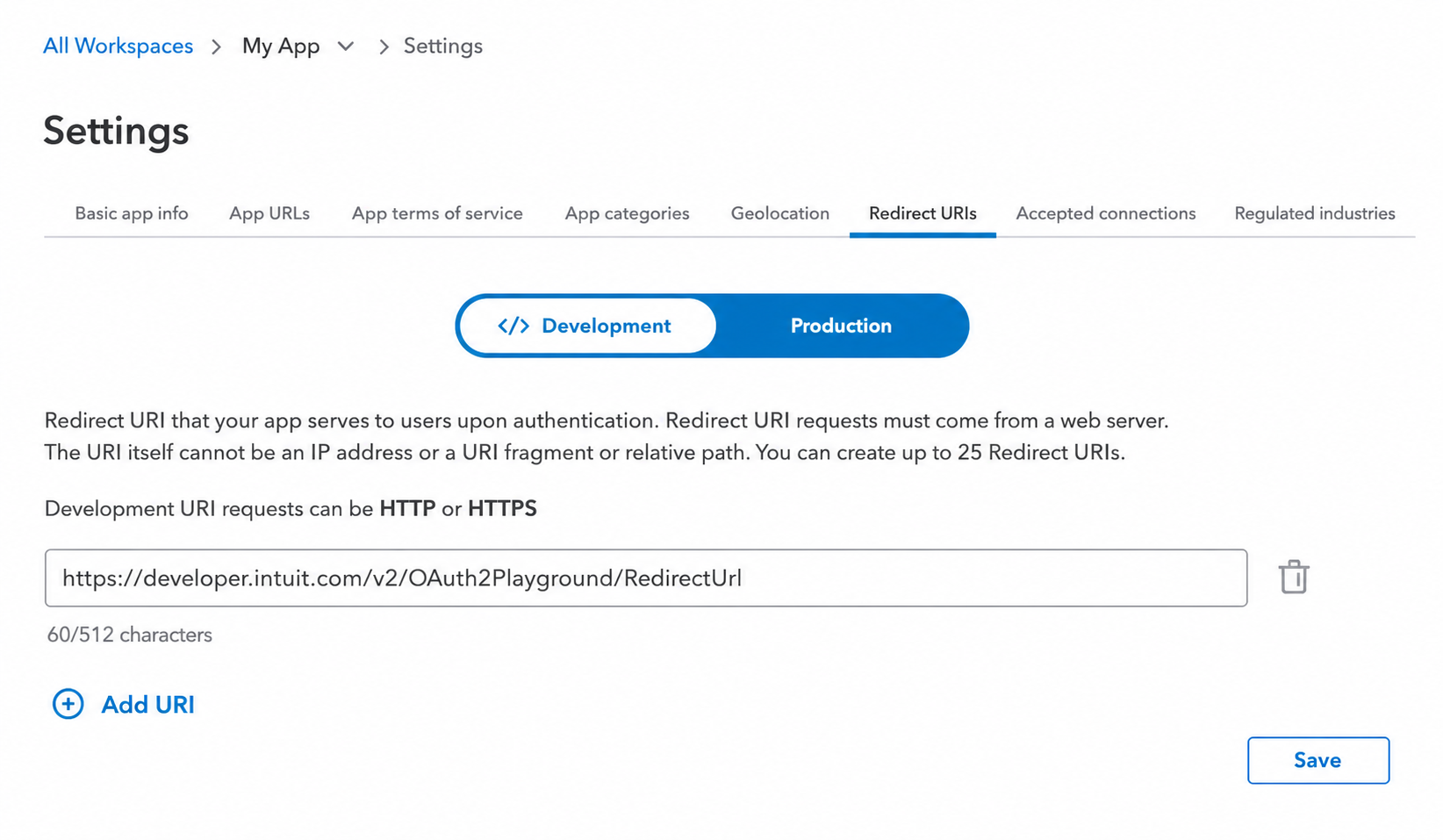 The Redirect URIs page holds more than one entry, and it has its own Development and Production toggle. Register the URI on the side you are actually authorizing against.
Three specifics catch people out. The bundled auth helper listens on http://localhost:8000/callback, so that exact string has to be registered. The OAuth 2.0 Playground uses its own redirect URI, https://developer.intuit.com/v2/OAuth2Playground/RedirectUrl, and registering one does nothing for the other. And a URI registered on the Development side does not exist as far as a production authorization is concerned.
Production will not accept your localhost callback
This is not a misconfiguration. Intuit’s OAuth flow rejects http://localhost redirect URIs in production mode, and the README says so directly. Production needs a public HTTPS callback.
The common workaround is a temporary tunnel:
ngrok http 8000Register the generated https://<id>.ngrok-free.app/callback on the Production side, run the handshake once, then remove it. The public URL is only needed for that authorization, because day to day the client talks to the server over stdio on your own machine.
Before any of that, production keys have to exist at all. Intuit gates them behind an App details checklist and a Compliance checklist that both need approval, even for a private app connected only to your own company. The local setup guide walks through both.
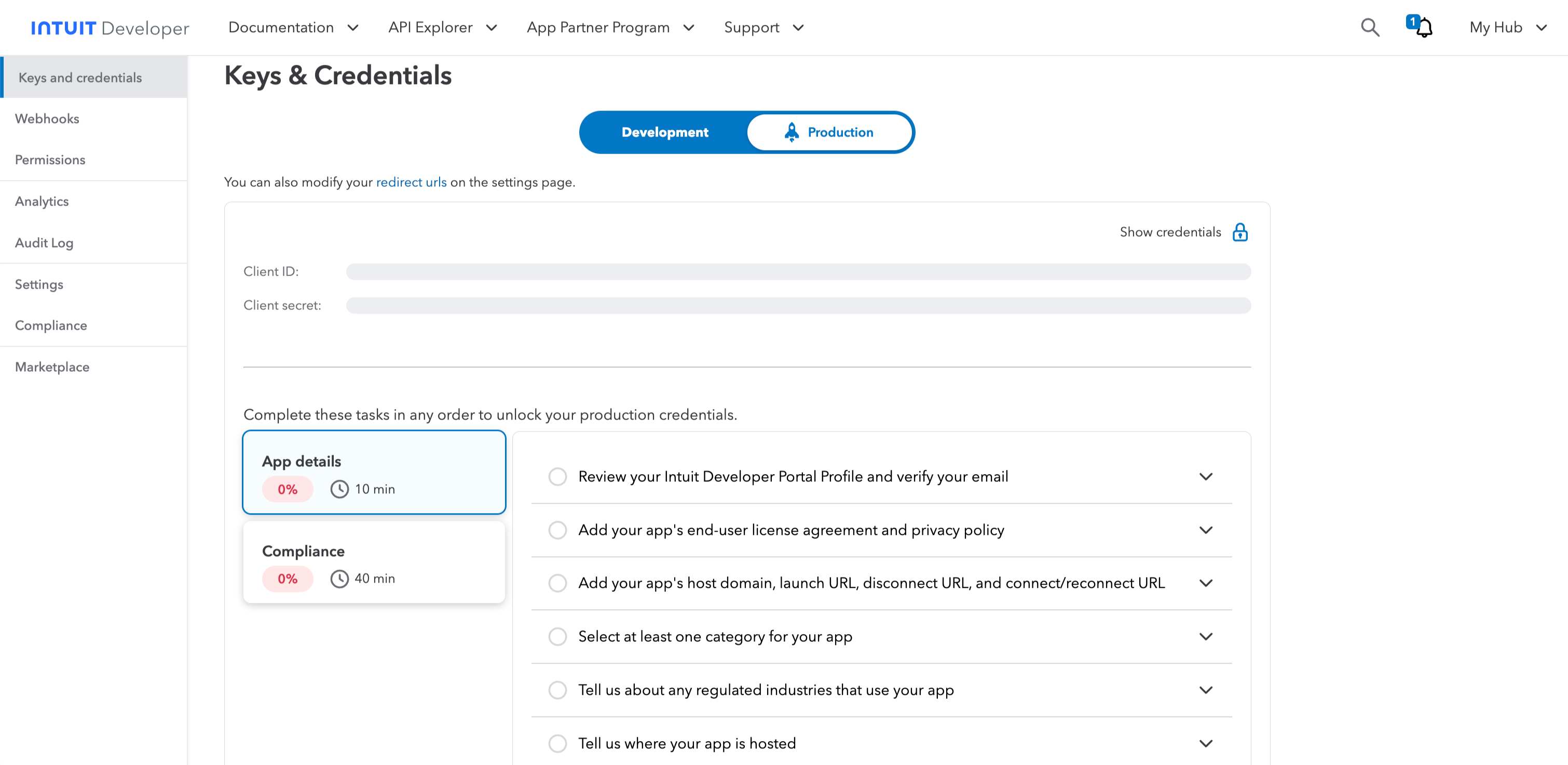 Production credentials stay locked until both checklists are approved, so an
 invalid_client here can simply mean the keys were never issued.
Refresh token problems
Tokens rotate on refresh, and a refresh token that goes roughly 100 days without use stops working. Re-running the auth flow fixes the immediate failure. The more interesting question is why it went stale.
The server writes refreshed tokens back to storage. If it cannot, every session starts from the same aging token until that token dies. That happens with a globally installed package, a read-only filesystem, or a container where the working directory is not writable.
The fix is QUICKBOOKS_TOKEN_STORE_PATH, pointed at an absolute writable path. One detail matters more than the variable itself: per Intuit’s README it has to be set in the host process environment, such as the env block of your MCP client config, because “setting it inside .env has no effect, because the path is resolved before .env is read.” Putting it in .env looks like a fix and changes nothing.
Sandbox and production mixups
Three things have to agree, and any one of them can be the odd one out:
QUICKBOOKS_ENVIRONMENTissandboxorproduction.- The Client ID and Secret come from the matching side of the Intuit toggle.
- The realm ID is the company you actually signed into during the handshake.
The realm ID is the company ID, so a sandbox company hands you a sandbox realm ID and a real company hands you a production one. They are not interchangeable, and pasting a leftover sandbox realm ID into a production config produces empty or wrong-looking results rather than a clean error. When numbers look implausible, check the realm ID before you doubt the query.
Making the local server read-only
Intuit’s server ships read-write. It covers create, update, and delete alongside read and search, which means an assistant connected to a live company can change your books. Three variables suppress the write families:
QUICKBOOKS_DISABLE_WRITE=true
QUICKBOOKS_DISABLE_UPDATE=true
QUICKBOOKS_DISABLE_DELETE=true
The README describes these as suppressing the create_*, update_*, and delete_* tools. Read and search tools stay available, so a read-only setup loses nothing you need for asking questions. Set all three before the first connection to a real company, not after.
This is a configuration you chose, in a server that can write, which the next person to edit a config file can undo. That is a different guarantee from a system that has no write path at all. We wrote about that distinction in QuickBooks read-only access.
Intuit’s official connector for Claude and ChatGPT
Intuit also runs its own hosted QuickBooks connector for Claude and a plugin for ChatGPT, expanded in a July 28, 2026 announcement, so a good share of “QuickBooks MCP not working in Claude” is really about this and not about a local server. If you set yours up by searching a directory inside your assistant, you are here.
Per Intuit’s announcement, setup lives in the assistant account rather than a config file. In Claude you open Connectors under the Customize tab and search for QuickBooks. In ChatGPT you find Plugins, search for Intuit QuickBooks, and sign in. There is no JSON to debug, and editing a Claude Desktop config file will not affect this connector at all.
Where this connector actually lives: a directory listing inside Claude’s own settings, connected with one button. If this is your setup, there is no local file to fix.
When it misbehaves, the things to check are account-level rather than technical:
- Whether the connector appears in the directory for your account at all. Intuit says eligibility criteria may apply, and features are subject to change.
- Which QuickBooks company you signed into. If you have several, the connector answers for whichever one the sign-in landed on.
- Subscription and region. Intuit attaches “Subscription to QuickBooks Online required” and “Not available in U.S. territories or outside the U.S.” to the payment link capabilities specifically.
- Re-authorization after a password change or a revoked connection, which is a sign-in flow rather than a fix in the assistant.
This connector is not a read-only layer. It creates and sends invoices and generates payment links, on the QuickBooks credentials of whoever connected it. For what it does and where it stops, see QuickBooks AI.
ChatGPT cannot reach a local QuickBooks MCP server
A local server speaks stdio to a process on your machine. ChatGPT has no way to spawn that process, so no amount of configuration connects the two directly. It needs a remote HTTPS endpoint instead, which means Intuit’s plugin above, a hosted connector, or hosting your own server and taking on everything that implies. The server comparison covers those deployment shapes.
Kipper-managed connection issues
Kipper’s QuickBooks connector is hosted, and it cannot write to QuickBooks. Creating, editing, or deleting records through Kipper is not a setting an admin can switch on. There is no dist/index.js, no .env, and no Intuit app to maintain, so troubleshooting happens in the Kipper workspace instead.
| Symptom | Likely cause | Fix |
|---|---|---|
| A user cannot ask QuickBooks questions | The user or team has no access granted | Grant access in the admin portal |
| One person sees less than another | Permissions are scoped per user, team, or channel | Review the scope before widening it |
| A question comes back unanswerable | It needs data outside the connected objects | Check what Kipper reads from QuickBooks |
| Connection health warning | The QuickBooks authorization changed | Reconnect, or send support the question and timestamp |
Kipper reads Customer, Invoice, Payment, Line Item, Vendor, Bill, Bill Payment, Inventory, Credit Memo, Vendor Credit, and Purchase Order records, and answers direct questions about them in Slack, Microsoft Teams, and SMS. A question needing anything outside that set comes back empty, which reads like a failure and is not one. Every question and answer lands in the admin portal audit trail, so a report of “it did not work” can be looked up rather than reconstructed.
See Kipper’s QuickBooks MCP connector for how the hosted route is set up.
Clean restart checklist
When too many things have changed to reason about, rebuild the local setup in this order:
- Decide whether you are targeting sandbox or production, and say it out loud.
- Confirm the Client ID and Secret both come from that side of the Intuit toggle.
- Confirm the redirect URI you are about to use is registered on that same side.
- Re-run the auth flow, signing into the company you actually want.
- Run
npm installandnpm run build. - Confirm
dist/index.jsexists. - Put an absolute path to it in the MCP client config.
- Put every credential in the client’s
envblock, includingQUICKBOOKS_TOKEN_STORE_PATH. - Set the three disable flags to
true. - Fully quit and reopen the MCP client.
- Ask for one small read, such as a short customer list, before trying anything real.
If step 11 works and a specific question does not, the connection is fine and the problem is the question or the data.
Related reading
- How to set up the QuickBooks Online MCP server locally
- How to connect the QuickBooks Online MCP server to Claude Desktop
- How to connect the QuickBooks Online MCP server to Codex
- Set up QuickBooks MCP with Claude
- QuickBooks MCP servers compared
- QuickBooks read-only access
- QuickBooks AI: Intuit Intelligence, the agents, and the connector
- QuickBooks Desktop MCP
- The QuickBooks MCP guide
- Kipper’s QuickBooks MCP connector
FAQ
Why do no QuickBooks MCP tools appear?
In most cases the MCP client never launched the server. Check that the command points at node, that the argument is an absolute path to a built dist/index.js, that credentials are in the client’s env block, and that you fully quit and reopened the app rather than closing the window.
Why does QuickBooks MCP return invalid_client?
The Client ID and Secret are not the pair Intuit expects. Usually they come from different apps, or development keys are being used against a production company, or the secret was rotated and only one place was updated.
Can QuickBooks MCP use a localhost redirect URI in production?
No. Intuit accepts http://localhost:8000/callback on the Development side only. Production authorization needs a public HTTPS callback, which is why a temporary ngrok tunnel is the common workaround for the one-time handshake.
How do I make the QuickBooks MCP server read-only?
Set QUICKBOOKS_DISABLE_WRITE, QUICKBOOKS_DISABLE_UPDATE, and QUICKBOOKS_DISABLE_DELETE to true. Intuit’s README describes these as suppressing the create_*, update_*, and delete_* tools. Read tools stay available.
Why did my QuickBooks MCP setup stop working after it worked once?
Refresh tokens rotate, and a stale one goes bad after roughly 100 days without use. If the server refreshed a token but could not write it back, set QUICKBOOKS_TOKEN_STORE_PATH in the host process environment so the new token has somewhere to land.
Is Intuit’s official Claude and ChatGPT connector the same thing as the MCP server?
No. The connector is hosted by Intuit and set up inside your assistant account under Connectors or Plugins. The MCP server is code you clone, build, and run on your own machine. They fail in completely different places, so fix the one you are actually using.