









QuickBooks AI: What Intuit Gives You, and What It Doesn't
QuickBooks AI explained: Intuit Intelligence, the AI agents, and the new Claude and ChatGPT connector. What each does, its limits, and the alternatives.
On this page +
See it live
Ask Kipper about your QuickBooks data.
Invoices, payments, vendor bills and purchase orders.
Schedule free onboardingNo signup. Runs in your browser.
QuickBooks uses AI, and it does considerably more than categorize your transactions. Intuit has built a real platform here: an AI system inside QuickBooks that answers questions about your books in plain English, a set of named agents that chase invoices and run payroll, and an official QuickBooks connector for Claude and ChatGPT that Intuit expanded in July 2026.
That last one matters because a lot of comparison articles still assume QuickBooks AI only works inside QuickBooks. That’s no longer true.
What hasn’t moved is the access model. Every one of those routes authenticates as a QuickBooks user, against a QuickBooks Online subscription, and most of them can write to your books. That’s a sensible design for the people who do accounting. It’s also why sales, support, and operations staff still message finance when they need to know whether an invoice was paid.
This post covers what Intuit gives you, where its limits are in 2026, and the main ways teams extend AI access to QuickBooks data.
Covered in this post:
- The QuickBooks AI feature and agent list as of August 2026
- What Intuit’s AI does well, described without spin
- The new Claude and ChatGPT connector, and what it changes
- Who can actually use QuickBooks AI, now that the interface isn’t the limit
- Four alternative approaches, Kipper being one option in one of them
Does QuickBooks use AI?
Three names circulate, so briefly:
Intuit Intelligence is the current answer. Announced October 28, 2025, it’s Intuit’s built-in AI system for QuickBooks Online and Intuit Enterprise Suite: it answers questions about your data, points out things worth knowing, and does tasks when you ask in plain English, like “run my payroll.” Intuit Assist is the earlier name for the generative-AI assistant, launched September 2023, and it still appears throughout Intuit’s documentation and in older announcements. If you arrived searching for Intuit Assist, or for QuickBooks Online AI generally, the capabilities you’ll actually meet in the product today are presented under Intuit Intelligence and its specialized agents.
The agents are the specialized workers underneath, rolled out from July 1, 2025:
| Agent | What Intuit says it does |
|---|---|
| Accounting Agent | Categorizes transactions and assists reconciliation for more complete, accurate books |
| Payments Agent | Predicts late payments, drafts proactive reminders, suggests late fees; Intuit reports payment an average of 5 days sooner |
| Customer Agent | Sources and qualifies leads, drafts personalized replies, schedules meetings, tracks opportunities |
| Finance Agent | Reports, key numbers, forecasts, and “what if” planning; compares you to similar businesses |
| Payroll Agent | Collects time and attendance data, runs payroll, flags anomalies |
| Sales Tax Agent | Checks that the right tax is being charged |
| Business Tax Agent | Business tax workflows (beta) |
| Project Management Agent | Turns contracts into projects, tracks milestones and budgets, analyzes profitability |
| Marketing Agent | Audience management, campaigns, and content via Mailchimp |
Intuit’s headline claim for the set is up to 12 hours a month saved, with 78% of surveyed customers reporting easier operations. Available AI features vary by plan, with more advanced features in QuickBooks Online Advanced and Intuit Enterprise Suite.
On top sits Intuit Intelligence Chat, which is what most people mean when they search for “QuickBooks AI.” Intuit’s own example questions show the range:
- “Show me overdue invoices from 2025”
- “How does cash flow compare to this time last year?”
- “What are the largest expenses of the past six months?”
- “Are there any discrepancies between the general ledger and the payroll register for the last quarter?”
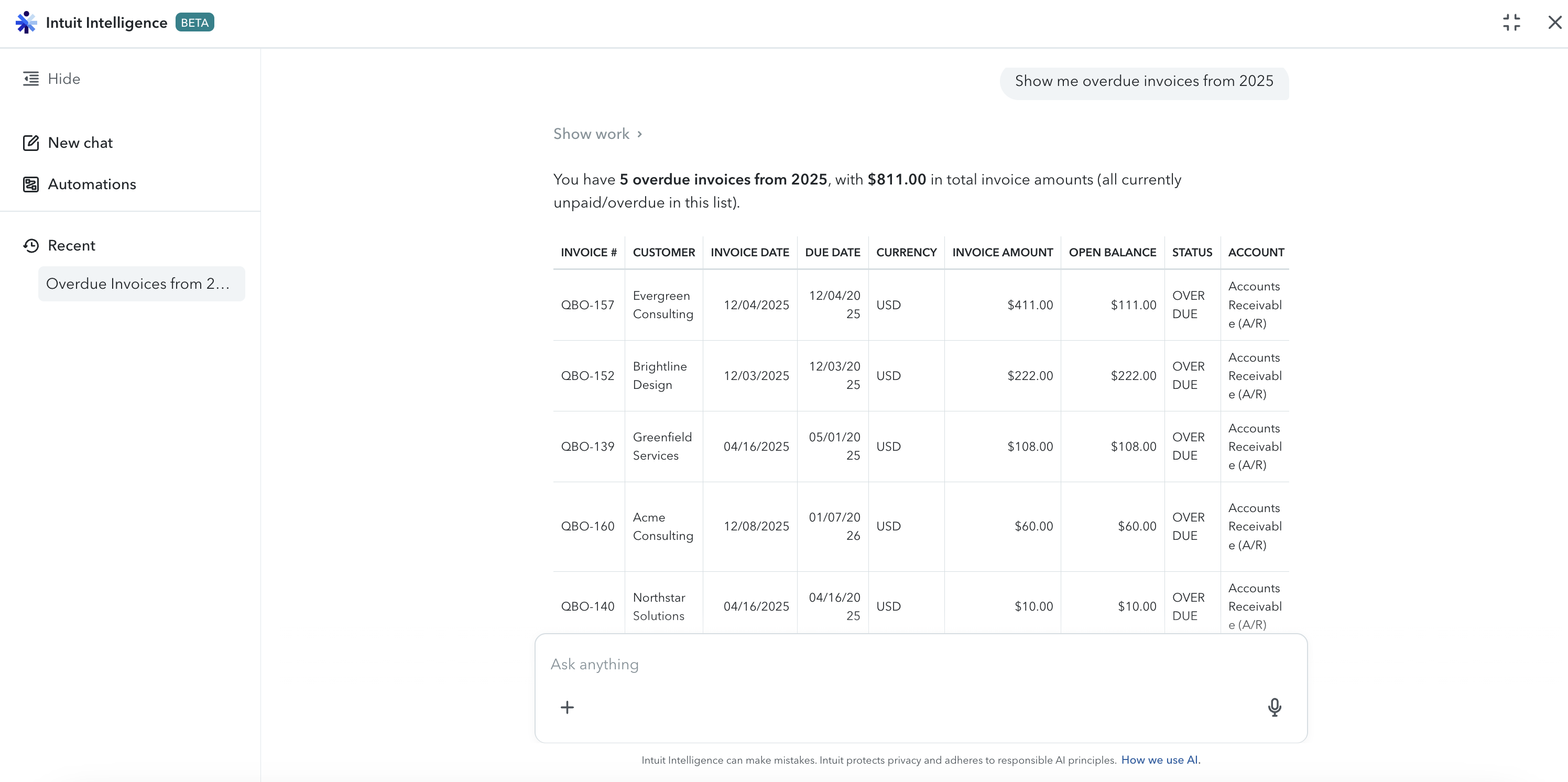 Intuit Intelligence answering one of those questions in QuickBooks Online, on a sandbox company. Note the BETA badge: the chat experience is still rolling out.
The answers come from your current books, and it suggests what to do next. It’s in beta for eligible QuickBooks Online, QuickBooks Online Advanced, and Intuit Enterprise Suite customers, with caps during beta (Intuit Accountant Suite’s Core tier is limited to 200 questions a month, Accelerate to 1,000). The rollout is US-first.
What Intuit’s AI does well
Credit where it’s due.
The big one: it can act on your books. It can categorize transactions, assist with reconciliation, send invoice reminders, and run payroll directly in QuickBooks. Because Intuit Intelligence is part of QuickBooks, it can do accounting work that read-only tools from other companies simply can’t. If your goal is fewer bookkeeping hours, this is the kind of tool that gets you there, and a read-only layer is no substitute.
It also sees more of your data than anything else can. Intuit’s AI reaches across the general ledger, bank feeds, payroll registers, and tax data together, because it’s all part of the same product. Outside tools only see what the QuickBooks API gives them, which is less, and only what that particular tool was built to do.
Some AI features are included with QuickBooks. Intuit’s wording is that Intuit Assist and certain other AI features are available at no additional cost to certain QuickBooks customers. For customers whose plan includes it, there may be no extra vendor or contract to add. That’s a genuine advantage and a reason to try it before buying anything else.
And it’s improving quickly. The 2026 releases added chat-based reporting, quote-to-invoice workflows, more payroll questions, wider bill pay and reconciliation, lending information, and the Claude and ChatGPT connector below.
If you’re a bookkeeper, controller, or accountant who works primarily in QuickBooks, Intuit’s built-in AI is the natural place to start.
QuickBooks AI has already left the QuickBooks UI
This is one of the biggest changes to QuickBooks AI in 2026, and it’s worth being precise about.
On July 28, 2026, Intuit announced an expanded official QuickBooks connector for Claude and ChatGPT. Setup takes about a minute: open Claude or ChatGPT, go to Connectors or Apps, find QuickBooks, and sign in with your QuickBooks account. Once connected, you can:
- Sales and invoicing: create, update, send, and delete invoices and estimates; duplicate one as a starting point; filter them or pull a batch to review; download PDFs; add products and manage customers
- Payments: generate payment links, list and filter existing ones, email them to customers, and chase overdue balances with reminders
- Payroll: look up employees, payslip history, benefits, time-off policies, and payroll readiness
- Lending: compare loan terms and rates against similar businesses, check loan payment dates
Intuit’s own description of the connector in Claude’s directory confirms the approval step: payment links and reminders go out only “with a clear preview and your confirmation.”
The guardrails are real and worth noting: AI drafts of estimates, invoices, payment links, and reminders don’t go out without your approval; sending is limited to US organizations; payment links require an approved QuickBooks Payments account; and the whole thing requires a QuickBooks Online subscription. Intuit also states your data stays within Intuit systems and is never used to train foundation models.
So the familiar claim that QuickBooks AI only works inside QuickBooks is no longer accurate.
What it doesn’t change is who can use it. The connector is a personal connection, authenticated with your own QuickBooks credentials, in your own Claude or ChatGPT account, with the ability to create and send invoices to your customers. That works for a small number of trusted QuickBooks users, but not for every sales, support, or operations employee. The interface moved. The access model didn’t.
Who can actually use QuickBooks AI?
Companies deliberately restrict direct access to their accounting system. That’s not a QuickBooks flaw, it’s normal financial control, and every route above sits behind that same restriction.
The scale of that restriction is easy to underestimate. QuickBooks Online includes 1 billable user on Solopreneur and Simple Start, 3 on Essentials, 5 on Plus, and 25 on Advanced. (Intuit changed Essentials, Plus, and Advanced pricing effective August 1, 2026, so check current rates.) Even if you hand out every seat you have, most of a mid-sized company is still left out.
And the people outside it still need answers. Typical questions include:
- An account manager needs to know whether Acme paid invoice 1042 before a renewal call
- A support rep is fielding “why was I charged twice”
- An operations lead is checking which bills for a vendor are still unpaid
- A regional manager wants this month’s payments against last month’s for their Class
Today those questions land in finance’s inbox and someone looks them up by hand. Across a growing team, those questions add up and create more work for finance.
The fair objection: reports-only users. QuickBooks Online Plus and Advanced allow unlimited free reports-only users, which does take care of the cost side of this. It’s the strongest argument against what I just said, and it deserves a straight answer. But three limitations remain:
- It’s still a QuickBooks login. Someone has to create it, someone has to remove it later, and the person still has to sign in to QuickBooks to use it.
- It’s still QuickBooks’ UI. A warehouse supervisor with a reports-only login has to know which report answers their question and how to filter it. Most won’t, so they’ll ask finance anyway. Training people on the finance system is the barrier.
- You can’t easily control what each person can see. Reports-only is roughly all-reports access. It isn’t “this rep sees only their own accounts’ invoices.” (QuickBooks read-only access works through the whole permissions model, roles and API scope alike.)
And there’s still no answer in the conversation. Intuit doesn’t offer a general way to ask QuickBooks questions in Slack or Microsoft Teams. It does send text messages, but only for specific tasks, not for open questions from anyone in the company. So even someone with a login has to leave the thread where the question came up, open QuickBooks or their AI assistant, and ask there.
None of this makes Intuit’s AI bad. It makes it a tool for the people who work in the books, which is what it was built to be.
QuickBooks AI alternatives: four approaches
If broader access is the problem, there are four main approaches. They’re genuinely different tools, not four brands of the same thing.
1. MCP servers: raw API tools in an AI client
Intuit publishes an official QuickBooks Online MCP server: 140+ tools across 29 entity types and 11 financial reports as of September 2026, free and open source, with credible community builds alongside it. Point an MCP client at it and your assistant can query QuickBooks directly.
The catch is upkeep: it runs on your own machine, so someone creates the Intuit developer app, manages the credentials, and keeps the process running, and it can write to your books by default until you disable those tools. Host it on a server instead and sign-in, permissions, and logging are all yours to build. Our step-by-step setup guide walks through it.
Choose it when: you’re a developer who wants direct QuickBooks API access and full control over the setup. If you just want QuickBooks in Claude or ChatGPT and you have a login, Intuit’s own connector is the shorter path.
More detail: QuickBooks MCP servers compared, all 7 options and the complete QuickBooks MCP guide.
2. Automation platforms: agents that take actions
Zapier, Composio, and Pipedream let an AI agent use QuickBooks without you running any software: they handle OAuth, and QuickBooks becomes one of thousands of apps your agent can reach. All three are built for doing things, so most of what they offer creates or changes records, which is good for automating a task but not for safe answers.
Choose it when: you’re building an agent that acts across QuickBooks and other apps. We compare them in Zapier vs. Composio vs. Pipedream.
3. SQL and BI routes: QuickBooks as queryable data
CData and similar tools turn QuickBooks into tables you query with SQL, through an open-source MCP server or a paid cloud platform, and the same shape applies if you already pipe QuickBooks into a warehouse with BI on top.
Choose it when: you think in SQL, or QuickBooks is one source among several. Details: CData QuickBooks MCP: SQL access compared.
4. Hosted layers: answers for people without a login
Hosted read-only layers are built for exactly the access problem described above. They all work much the same way: connect QuickBooks once, keep it read-only, control what each person can see, log every question, and answer in Slack, Teams, or SMS instead of making people sign in to QuickBooks.
The trade-offs are consistent too. These tools can’t take actions, they’re limited to what the QuickBooks API exposes, and they’re a paid product on top of your QuickBooks subscription. If your problem is bookkeeping hours rather than access, this is the wrong category and Intuit’s agents are the right one.
Not every hosted QuickBooks option is read-only, though, and that distinction matters more than the word “hosted” suggests. DeepLedger is a hosted layer built the other way around: it connects through Intuit OAuth like the rest, but its agent can record bills, invoices, payments, and journal entries, with duplicate checks before a write lands and a portal task for anything it cannot resolve on its own. That makes it a bookkeeping product with a review step rather than a read-only answer layer, so it sits in this category by shape and in Intuit’s agents category by job. The complete QuickBooks MCP guide compares the two models side by side.
General-purpose Slack and Teams assistants like Viktor can also field finance questions if you connect them to the right data. They’re cheaper and reach far more apps, but they aren’t built around a finance system’s data model and they aren’t read-only, so scope them carefully before pointing one at your books.
Choose it when: the people with questions don’t have QuickBooks logins, shouldn’t have them, or wouldn’t know what to do with one.
Where Kipper fits
Kipper is one option in that fourth category. It’s a hosted, read-only layer for QuickBooks, Xero, and NetSuite: it cannot write to your books at all, that isn’t a setting someone can switch on; permissions are set per person or team in an admin portal; and every question and answer is logged. It answers QuickBooks questions in Slack, in Microsoft Teams, and by text message, and its MCP beta brings the same controlled access to QuickBooks lookups in Claude, the same records in ChatGPT, and in Gemini.
It reads customers, invoices, payments, vendors, bills, purchase orders, and related records, and can break results down by Class. It runs against a synced copy of your data rather than live API calls, which matters for questions comparing two date ranges, something the QuickBooks API can’t do in one request. $200/month includes 10 users and 2,000 questions, with a 14-day free trial (pricing as of August 2026).
The honest limits: it can’t take a single action in QuickBooks, it doesn’t do bookkeeping, close, or forecasting, and it’s a paid subscription. For AI that works on your books, Intuit’s tools are the better answer. Kipper is for the questions everyone else has about those books.
Choose it when: read-only access, per-user permissions, an audit trail, and answers in Slack, Teams, or SMS are requirements rather than nice-to-haves.
QuickBooks AI options compared
| Approach | Primary job | Can take actions | Setup effort | Where you ask | QuickBooks login |
|---|---|---|---|---|---|
| Intuit Intelligence | Accounting work and insights in the books | Yes | None, it’s built in | QuickBooks web and mobile | Required |
| Claude / ChatGPT connector | Sales, invoicing, payroll and lending workflows | Yes, with approval | About a minute | Claude, ChatGPT | Required |
| MCP server | Connect an AI client to the QuickBooks Online API | Yes by default, can be disabled | High, developer project | Your MCP client | Owner’s OAuth app |
| Automation platform | Cross-app agent workflows | Yes, action-first | Medium | Your agent | Platform connection |
| SQL / BI | Analytics and reporting | Usually read-oriented | Medium to high | BI or SQL tools | Driver or platform auth |
| Hosted read-only layer | Self-service Q&A for non-finance staff | No | Low | Slack, Teams, SMS, AI clients | Not required |
| Hosted write-capable agent | AI-drafted bookkeeping with human approval | Yes, with review tasks | Low | Claude, ChatGPT, MCP clients, portal | Owner’s Intuit OAuth |
Intuit rows from Intuit’s own documentation and announcements, linked below. Intuit details as of August 2026; third-party options re-verified September 2026. This category moves monthly, so re-verify. How permissions and logging work for MCP servers, automation platforms, and BI tools depends on which one you pick and how it’s set up.
Which QuickBooks AI approach fits?
Forget features for a moment and ask one question: does the person with the question have a QuickBooks login?
If yes, start with Intuit’s own tools: built-in AI for work inside the books, or the Claude and ChatGPT connector if they’d rather work from their assistant. If no, changing the interface doesn’t solve it, because the connector still needs QuickBooks access, and “give everyone a login” rarely passes since reports-only is close to all-reports. You need a read-only model scoped per person.
These aren’t competing purchases: run Intuit’s AI for the accounting work and a read-only layer for everyone else. Not sure what you’d ask? 30 questions you can ask AI about your QuickBooks data is a useful test set for comparing options side by side.
FAQ
Does QuickBooks use AI?
Yes. Intuit Intelligence is the built-in AI system in QuickBooks Online, with named agents for accounting, payments, payroll, customers, and more. Intuit says the set saves up to 12 hours a month. The older Intuit Assist name still appears in its documentation.
Can I use QuickBooks inside Claude or ChatGPT?
Yes. Intuit offers an official QuickBooks connector for Claude and ChatGPT, expanded in July 2026. It can create and send invoices, generate payment links, and answer payroll and lending questions. Sensitive sends need your approval, payment-link features require QuickBooks Payments and are not available in U.S. territories or outside the U.S., and the connector requires a QuickBooks Online subscription.
Can I ask QuickBooks questions in plain English?
Yes. Intuit Intelligence Chat answers questions like “show me overdue invoices from 2025” with visual answers and suggested next steps. It’s in beta for eligible QuickBooks Online and Intuit Enterprise Suite customers, US-first.
What’s the main limitation of QuickBooks’ built-in AI?
The access model, not the interface. Every route authenticates as a QuickBooks user against a QuickBooks Online subscription, and companies keep that access narrow (1 to 25 billable users by plan), so staff outside finance are left out by design.
What AI tools work best with QuickBooks?
It depends on the job: Intuit’s own agents for bookkeeping and payroll, the official Claude and ChatGPT connector for a licensed user, an MCP server for developers, an automation platform for cross-app agents, and a hosted read-only layer like Kipper for company-wide questions in Slack, Teams, or SMS.
How do I connect AI to QuickBooks?
Five routes: turn on Intuit Intelligence inside QuickBooks; add the official Claude and ChatGPT connector; use a hosted read-only layer; connect through Zapier, Composio, or Pipedream; or run Intuit’s MCP server yourself. Only the last two involve developer work.
Is QuickBooks AI read-only?
No, by design. Intuit’s agents and the Claude and ChatGPT connector can act on your books, with an approval step in front of sensitive actions. A read-only layer is the opposite, which is exactly what makes it safe to give to more people.
Do QuickBooks reports-only users solve the access problem?
Partly. QuickBooks Online Plus and Advanced allow unlimited free reports-only users. But they still need a login, still have to navigate QuickBooks’ reports, and reports-only is closer to all-reports than to per-person scoping.
Should I replace Intuit’s AI with something else?
No. They solve different problems: Intuit’s AI for accounting work, a read-only layer for everyone else’s questions. Swapping one for the other would give up the automation that makes Intuit’s AI valuable.
QuickBooks now has serious AI of its own. The question isn’t whether QuickBooks has AI, it’s whether Intuit’s access model matches where and how your team needs to use the data.
Want QuickBooks answers where your team already works? See Kipper for QuickBooks in Slack.
Need the document, not just the number? See QuickBooks invoice PDFs in Slack and Teams.
Weighing every connection method? Start with the complete QuickBooks MCP guide.
Sources
- Intuit: QuickBooks expands into Claude and ChatGPT with new features (July 28, 2026)
- Intuit: QuickBooks Online new features and updates, August 2026
- Intuit: Use Claude to enter transactions and get insights in QuickBooks
- Intuit: Ask Intuit Intelligence for help with common tasks
- Intuit press release: Intuit Unveils System of Intelligence (October 28, 2025)
- Intuit press release: Virtual Team of AI Agents (July 1, 2025)
- Intuit Tax Pro Center: You ask, and QuickBooks with Intuit Intelligence answers
- Intuit: QuickBooks Online user roles and access rights
- Intuit QuickBooks Online MCP Server (GitHub)