









30 Questions You Can Ask AI About Your QuickBooks Data
Real questions finance, sales, and ops teams ask AI about QuickBooks: AR, invoices, expenses, and vendor spend. What comes back, and what to try first.
On this page +
See it live
Ask Kipper about your QuickBooks data.
Invoices, payments, vendor bills and purchase orders.
Schedule free onboardingNo signup. Runs in your browser.
Once an AI assistant is connected to QuickBooks Online through an MCP server, it can answer questions your data can support: overdue invoices, spend by category, top customers, vendor bills, and customer payment behavior. The list below is drawn from what real teams ask in their first weeks, grouped by who’s asking. Every one of these returns specific numbers from your books, not a general explanation.
A note on safety before the list: these are all read questions. With a read-only connection like Kipper’s, that’s the only kind possible. The AI can look at your books but never touch them. If you set up a server with write access instead, treat this list as the safe subset. (How the two setups differ.)
What can a business owner ask about money in and out?
Owners can check AR, collections, revenue, and spend without waiting on a report. These five cover the headline numbers.
- What’s our total outstanding AR right now, and how much is over 60 days?
- How much did we collect in payments last month versus the month before?
- How does our revenue this quarter compare to the same quarter last year?
- Who are our ten largest customers by invoiced amount this year?
- Are we spending more with contractors this year than last year?
- What did we pay in merchant fees last quarter?
What comes back: totals with breakdowns. Ask the AR question and you’ll get the full figure, the aging buckets, and the specific invoices driving the over-60 number.
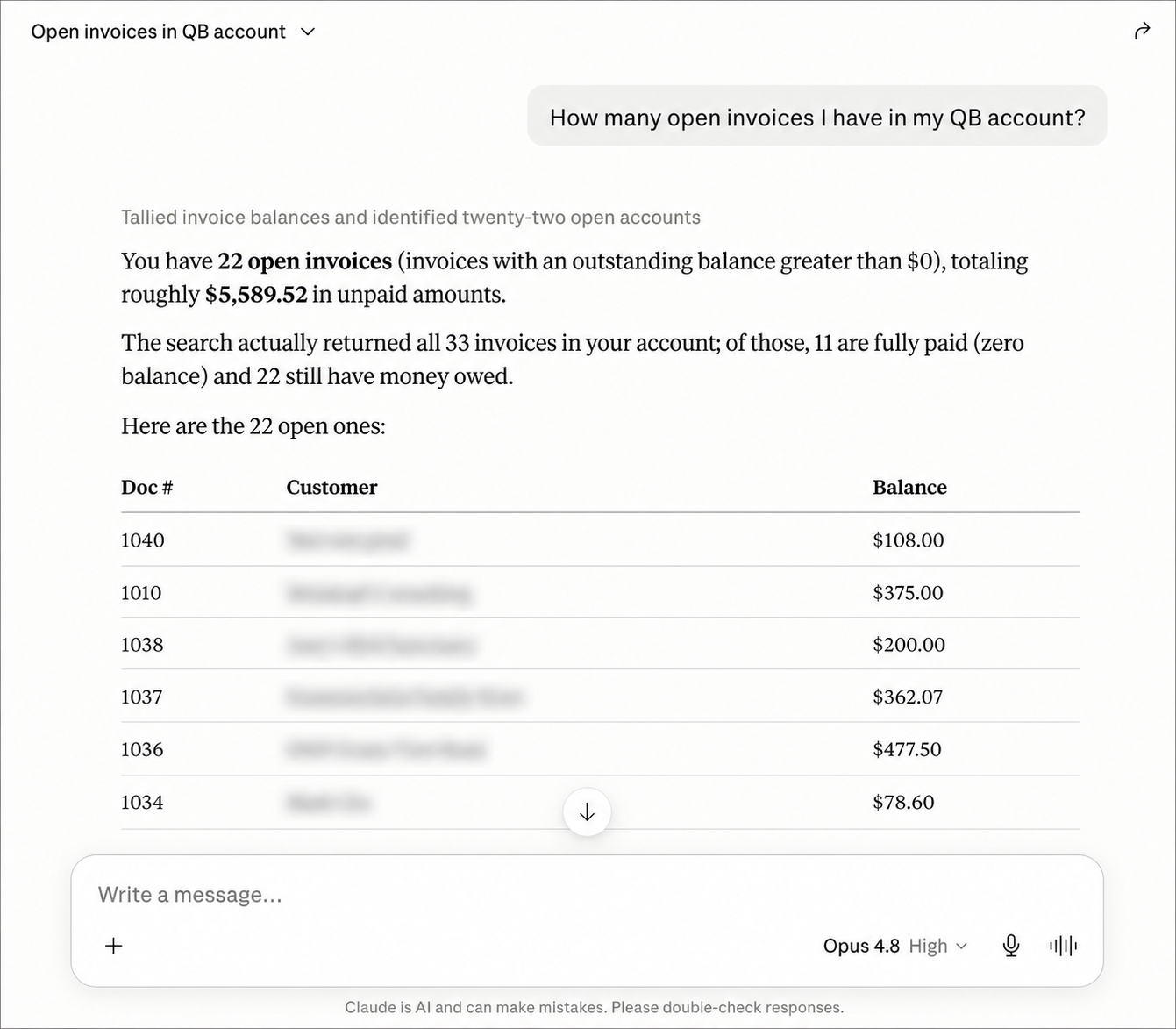 A read-only question answered from real QuickBooks records: the total, plus the individual invoices behind it.
What can sales managers ask about customer status?
Sales and account managers can check payment status and history themselves, without asking finance. These five cover the common account questions.
- Has [customer] paid their last invoice?
- Which of my accounts have overdue balances?
- What’s [customer]’s total purchase history with us?
- What payment terms does [customer] have?
- What’s the price of [product] in our catalogue right now?
- Which of my accounts have invoices due in the next two weeks?
This group is where teams feel the change first. The pattern before: message the bookkeeper, wait, follow up, get the answer after the call it was needed for. The pattern after: ask, get the number, use it. It’s the same QuickBooks data everyone else digs for, available where sales already works. (Why that matters in Slack specifically.)
For operations: vendors, bills, and spend
Operations can track bills, AP balance, and vendor spend directly. These five cover the recurring payables questions.
- Which vendor bills are due in the next two weeks?
- What’s our total AP balance, and how much is overdue?
- What did we spend with [vendor] this year?
- Which vendors did we pay the most this year?
- What did our expenses by category look like over the last six months?
- Which purchase orders are still open?
Which fast lookups replace digging through QuickBooks?
These are lookups anyone can run from Slack, Teams, or SMS without opening QuickBooks or interrupting the bookkeeper.
- List the credit memos issued this quarter, with amounts and customers.
- Which customers received credit memos in the last 90 days?
- What’s the average time customers take to pay, longest first?
- Which items sold the most this quarter, by amount?
- Which unpaid invoices are over $5,000, oldest first?
- What has [customer] bought from us this year, by item?
When a lookup lands on one specific invoice, Kipper can hand back the document too: see QuickBooks invoice PDFs in Slack and Teams.
For comparisons and breakdowns
These pull together many records at once. Because the MCP connection works from your complete QuickBooks data, not a sample you pasted into a chat window, the totals and comparisons come back exact.
- What did we spend on travel by quarter over the last two years?
- How do this month’s expenses break down by class?
- How did payments received this month compare to the same month last year?
- What did each of our top customers contribute to invoiced amount this quarter?
- What’s our AR aging breakdown right now (current, 30, 60, and 90-plus)?
- How did our top expense categories this quarter compare to last quarter?
This is where an MCP connection beats pasting exports into a chat: the AI reads complete records, so a “compare by quarter” question uses every transaction, not the rows that fit in a paste. (Setup, step by step.)
Which three questions should I try first?
- “What’s our total outstanding AR right now?” Instant proof the connection works, and a number everyone cares about.
- “Which customers have overdue balances over $5,000?” Shows filtering and ranking, and usually surfaces something actionable in the first minute.
- “What were our expenses last month by category?” Shows aggregation, and it’s the question owners repeat monthly.
If those three come back with real amounts and names, everything above will work too. The same list works from Claude, or from a ChatGPT thread, through the Kipper MCP beta.
What you can’t ask (and why that’s the point)
A read-only connection will decline anything that changes data: create an invoice, void a payment, edit a customer record. It also won’t answer beyond its permissions. If your admin scoped a team to AR only, payroll questions return a polite refusal, not a number. Both behaviors are features. The goal is the whole team asking freely, and that’s only safe when asking can’t break anything. (How permissions work. Why QuickBooks itself has no read-only scope.)
FAQ
What questions can AI answer from QuickBooks data? Anything the underlying records support: invoices, payments, AR and AP aging, expenses by category or class, product sales, vendor spend, credit memos, and customer payment history. The AI translates a plain-English question into a query against real QuickBooks records and returns the specific figures.
Do I need to know SQL or QuickBooks reports to ask? No. You ask in plain English. The MCP connection handles turning the question into a query, and the AI explains the result in plain English with the actual numbers included.
Can the AI change anything in QuickBooks while answering? Not through a read-only connection like Kipper, where writing is architecturally impossible. Some MCP servers do include write tools, so check the configuration before connecting one to production books.
Where can my team ask these questions? Depends on the setup. Through Kipper, the same connection answers in Claude, ChatGPT, and Gemini, plus Slack, Microsoft Teams, and SMS, so non-technical teammates can ask where they already work.
Connect QuickBooks and try the list on your own books. See Kipper’s QuickBooks MCP server, or read how QuickBooks MCP works end to end first.