








Get QuickBooks Invoice PDFs in Slack & Teams: No Login Needed
Get a QuickBooks invoice PDF without a QuickBooks login. Kipper delivers the real document in Slack, Teams, or web chat, read-only and permission-checked.
On this page +
See it live
Ask your finance system anything.
Invoices, AR aging, unpaid bills, payments.
Schedule free onboardingNo signup. Runs in your browser.
Your team asks Kipper a quick question, something like “what’s the total on invoice 1039?”, and gets a clean, accurate answer in seconds. That’s the everyday value. But sometimes the number isn’t enough: someone needs the actual invoice document. To attach it to a customer email. To check the branding and formatting before it goes out. To drop it into a ticket or a deal record.
Until now, getting that PDF meant leaving the conversation, logging into QuickBooks Online, hunting down the invoice, and downloading it by hand, assuming the person even has a QuickBooks login. Most of the people who need the document (sales, support, ops, account managers) don’t, and shouldn’t have to pester finance for it.
Now they don’t have to. Kipper can hand you the real QuickBooks invoice PDF right inside the chat, in Slack, Microsoft Teams, or the web app, with no QuickBooks login of their own.
How do you get an invoice without logging in?
The flow is deliberately simple. When your question resolves to one specific invoice, Kipper answers as usual and then offers the source document:
- Ask: Query by invoice number, for example, “Can you provide me the PDF for invoice 1009?”
- Confirm: Kipper replies with the invoice’s details and asks whether you’d like the PDF retrieved from QuickBooks. Click the suggestion, or just reply “yes.”
- Download: Kipper fetches the real PDF from QuickBooks and gives you a Download PDF button. That’s the genuine document, not a re-creation.
Here’s the whole thing in the Kipper web chat: answer, offer, and the download button.
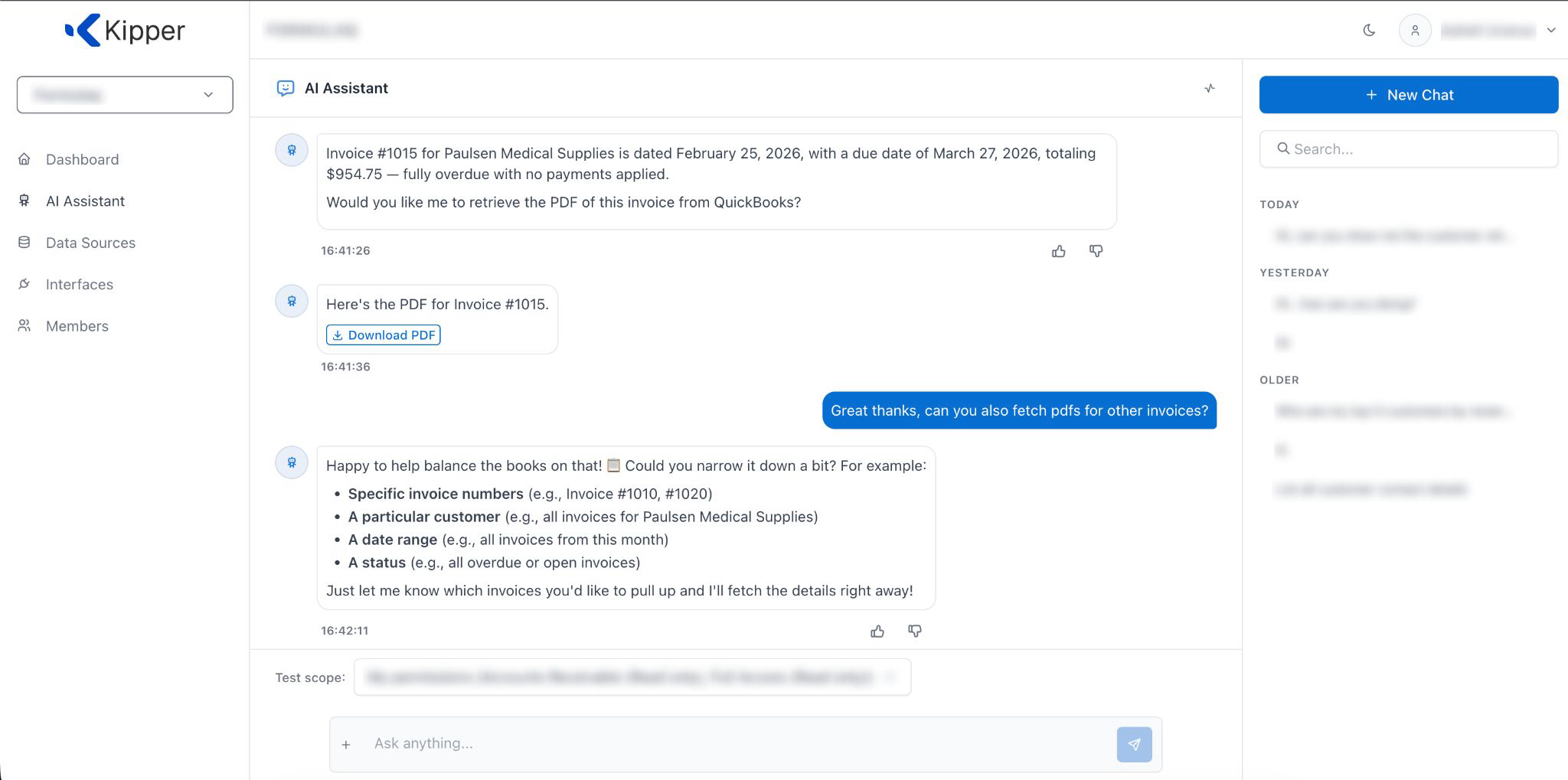
Notice the second half of that screenshot: when the user asks to “fetch PDFs for other invoices,” Kipper asks them to narrow it down to a specific invoice. That’s intentional. The PDF hand-off is for one invoice at a time, identified by number, so nobody accidentally triggers a giant export.
It works where your team already is
The same confirm-and-download flow works in the tools your team lives in, with no separate portal and no context switch.
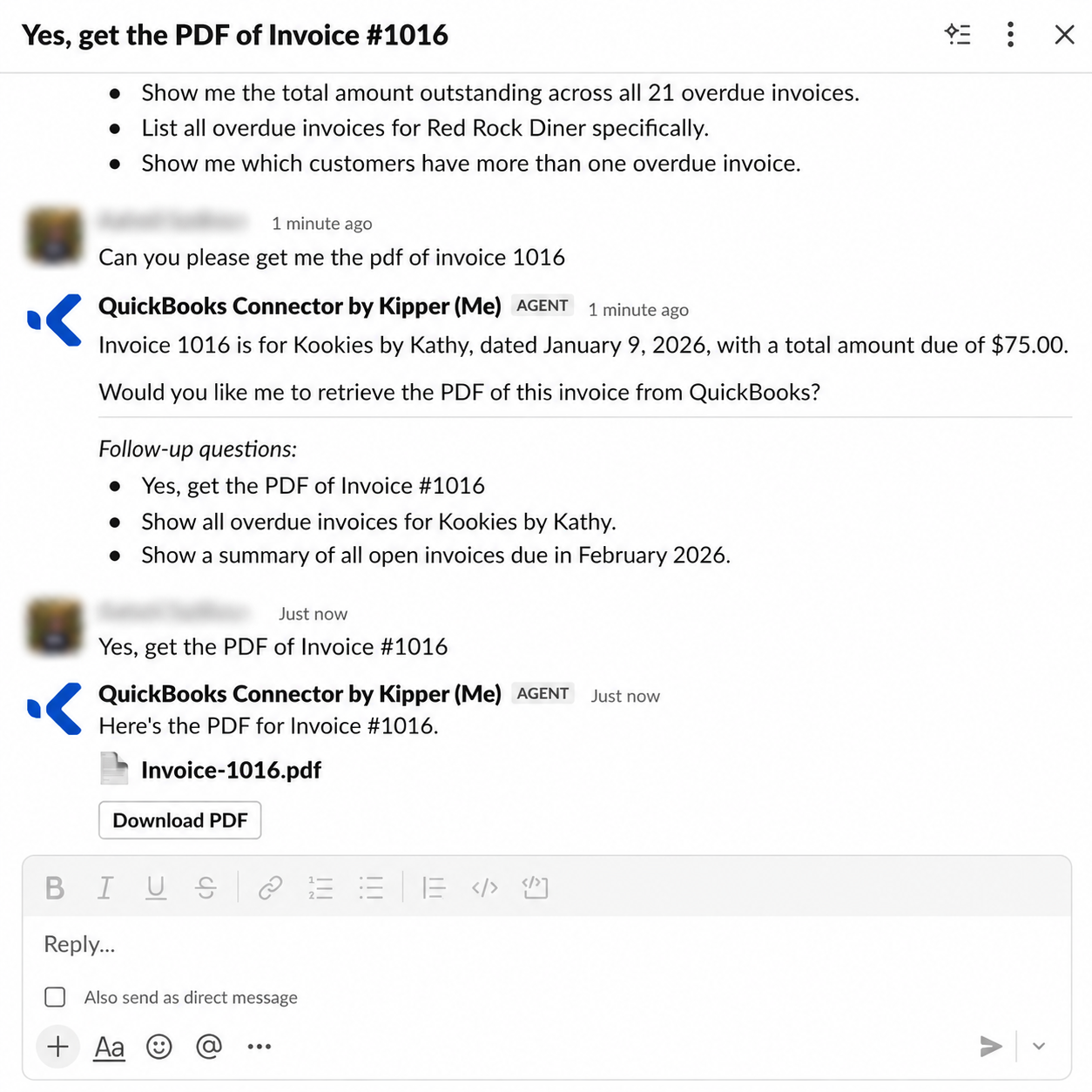
Slack: ask the Kipper connector for an invoice, say yes, and the file comes back with a Download button right in the thread.
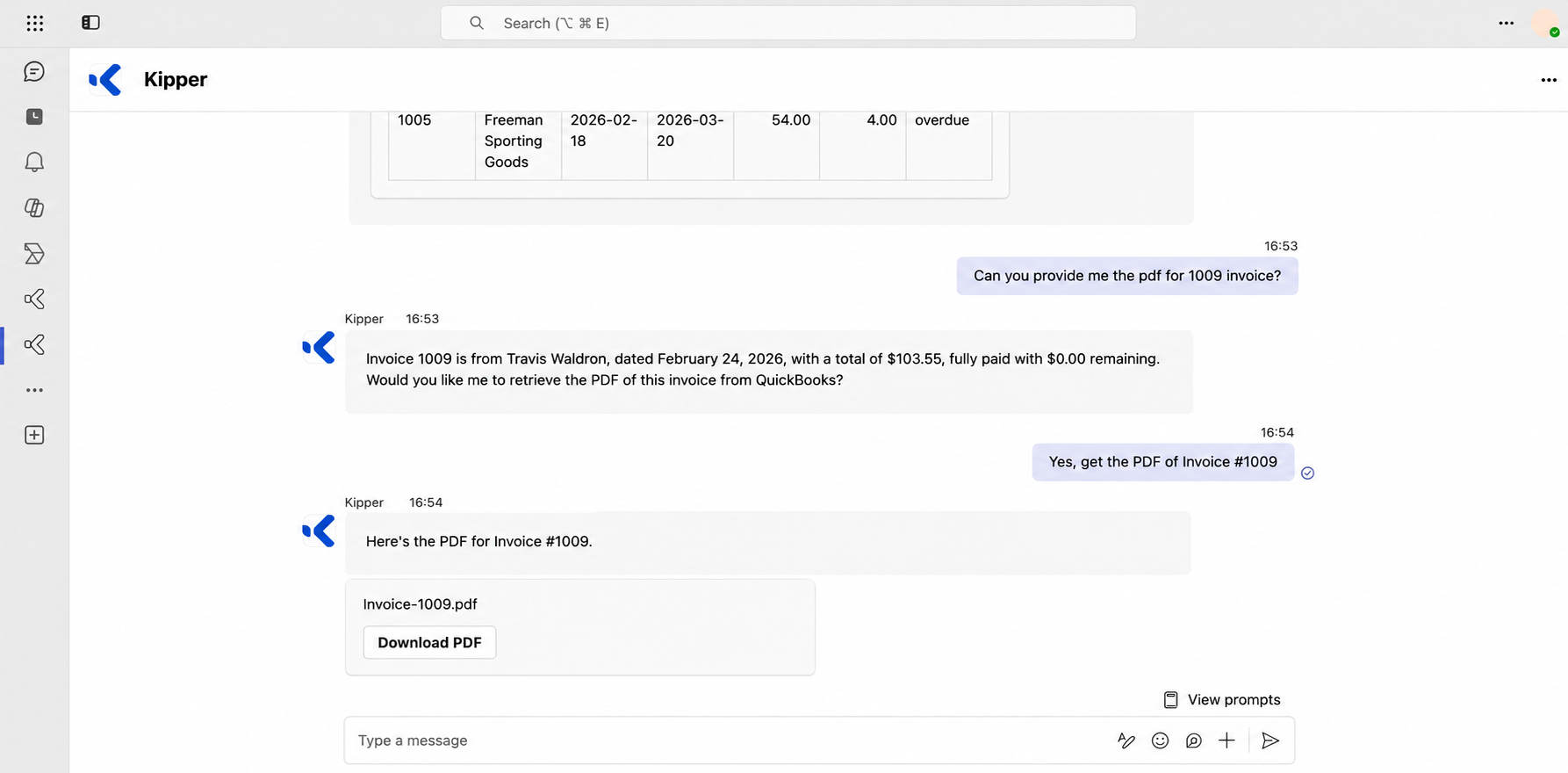
Microsoft Teams: identical experience. Ask, confirm, download, without leaving the channel.
Is it secure?
Handing finance documents to people who don’t have a finance login only works if it’s tightly controlled. It is:
- Read-only. Kipper can retrieve the invoice PDF, but it can’t create, edit, or delete anything in QuickBooks. There’s no write path to turn on.
- Permission-checked, twice. The PDF offer only appears for people you’ve granted access to invoices or accounts-receivable data. Permission is then re-checked a second time at the moment of download, so if you revoke someone’s access, it takes effect immediately, even for a link they were already offered.
- Scoped to your workspace. A download can only ever serve an invoice from the requester’s own connected QuickBooks data.
- Short-lived links. Each Download PDF link is single-purpose and expires a few minutes after it’s created. Nothing sits around as a permanent, shareable URL.
In other words: the people who are allowed to see an invoice can grab it in one message; everyone else never even sees the offer.
Who is this for?
This is built for the people who need a document but don’t need a QuickBooks seat, or shouldn’t have one:
- Sales and account reps attaching an invoice to a customer email.
- Support and success teams answering a “can you send me my invoice?” request without a hand-off to finance.
- Operations and project owners pulling the paperwork for a specific order.
- Executives who just want the document on their phone, without learning QuickBooks.
Every one of them gets the real PDF in the tool they already use, and finance stops being a document-retrieval service for the rest of the company.
The details worth knowing
- QuickBooks Online. This works with invoices in QuickBooks Online today. If a document isn’t available for a given connection, Kipper says so plainly rather than returning the wrong file.
- One invoice at a time. The offer appears when your question points to a single, specific invoice by number, not for lists, totals, or customer summaries.
- The genuine document. The PDF is fetched live from QuickBooks, so it matches exactly what you’d download from QuickBooks itself: same layout, same branding.
Try it
If your team already asks Kipper about QuickBooks data in Slack or in Microsoft Teams, invoice PDFs are ready to use. Just ask for one by number and say yes. If you’re not connected yet, the QuickBooks MCP connector is where it starts: one read-only connection, and your whole team can get the answer and the document, without another login.
Invoice PDFs are one slice of what the same connection answers. See the QuickBooks records Kipper reads and 30 Questions You Can Ask AI About Your QuickBooks Data. Setting up QuickBooks MCP covers how the connection is made.
FAQ
Do I need a QuickBooks login to download an invoice PDF?
No. An admin connects QuickBooks Online to Kipper once. After that, anyone you’ve approved can ask for an invoice in Slack, Microsoft Teams, or the Kipper web chat and get the real PDF without needing their own QuickBooks seat or login.
Is this read-only? Can the AI change my books?
It’s strictly read-only. Kipper can fetch and hand over the invoice PDF, but it cannot create, edit, or delete anything in QuickBooks. There is no setting that turns on write access.
Which version of QuickBooks does this work with?
QuickBooks Online. If an invoice lives in a system Kipper doesn’t support the PDF for yet, Kipper tells you plainly instead of guessing or returning the wrong document.
Can I download several invoices at once?
The PDF offer is for one specific invoice at a time, identified by its number. If you ask for several at once, Kipper will ask you to narrow it down to a single invoice. It won’t bulk-export.
Who is allowed to get an invoice PDF?
Only people you’ve granted access to invoices or accounts-receivable data. The offer only appears for permitted users, and permission is re-checked again at the moment of download, so revoking someone’s access takes effect immediately.
Does the PDF link stay valid forever?
No. Each download link is a short-lived, single-purpose link that expires a few minutes after it’s created. If it expires, just ask again to get a fresh copy.