








Client Accounting Services (CAS): The Practice and Its Tech Stack
What client accounting services are, the tech stack firms run them on, and which pieces you actually need. Kipper covered as one option among the real ones.
On this page +
See it live
Ask your finance system anything.
Invoices, AR aging, unpaid bills, payments.
Schedule free onboardingNo signup. Runs in your browser.
Client accounting services, usually shortened to CAS, is a CPA firm doing a business’s bookkeeping, month-end close, and financial reporting every month, then adding advisory work on top of that, things like budgeting, forecasting, KPI tracking, sometimes a fractional controller or CFO. It’s a standing relationship, billed on a recurring basis, not a project that ends when a return is filed. It also isn’t an audit, and for firms that do audit work, it can’t be performed for the same client at the same time.
The AICPA and CPA.com’s most recent CAS Benchmark Survey, published in December 2024 using 2023 calendar-year data from 206 participating firms, found a median CAS revenue growth rate of 17%, with respondents projecting a further 15% the following year. That’s why so many firms are building or expanding a CAS practice right now, and why the tooling question below matters.
What client accounting services actually covers
CAS work spans a real range, from basic bookkeeping to something close to an outsourced finance department. Intuit’s own description of the practice frames it as tiered rather than fixed: a client can start with transaction categorization and bank reconciliation, add payroll coordination and accounts payable and receivable management, then move up to monthly financial statements, budgeting, forecasting, and ongoing advisory conversations built around the client’s actual numbers.
What it doesn’t include is the audit itself. Independence rules bar a firm from performing both the bookkeeping and the financial statement audit for the same client.
Two practical pieces sit either side of the work itself: how to get bookkeeping clients covers where they come from, and onboarding bookkeeping clients is the checklist for taking one on without redoing steps later.
Intuit also sells a version of this work directly, which matters if you are pricing against it or being compared to it. QuickBooks Live versus your own bookkeeper covers what Intuit’s service includes and, more usefully, what it leaves out.
CAS, CAAS, and client advisory services are one practice
The keyword variants aren’t different services. Some firms split the acronym on purpose. CAS covers the accounting production, the books, the close, and the reporting; CAAS adds the advisory layer on top. Other firms use the terms without distinguishing them at all. The AICPA’s own current name for the practice area is Client Advisory Services, using the CAS abbreviation, and its course and certificate programs describe it as spanning everything from basic outsourced accounting to virtual CFO work under that one name. If you’re searching for “client accounting services,” “client advisory services,” or “client accounting and advisory services,” you’re looking for the same practice by three names.
The tech stack a CAS practice actually runs
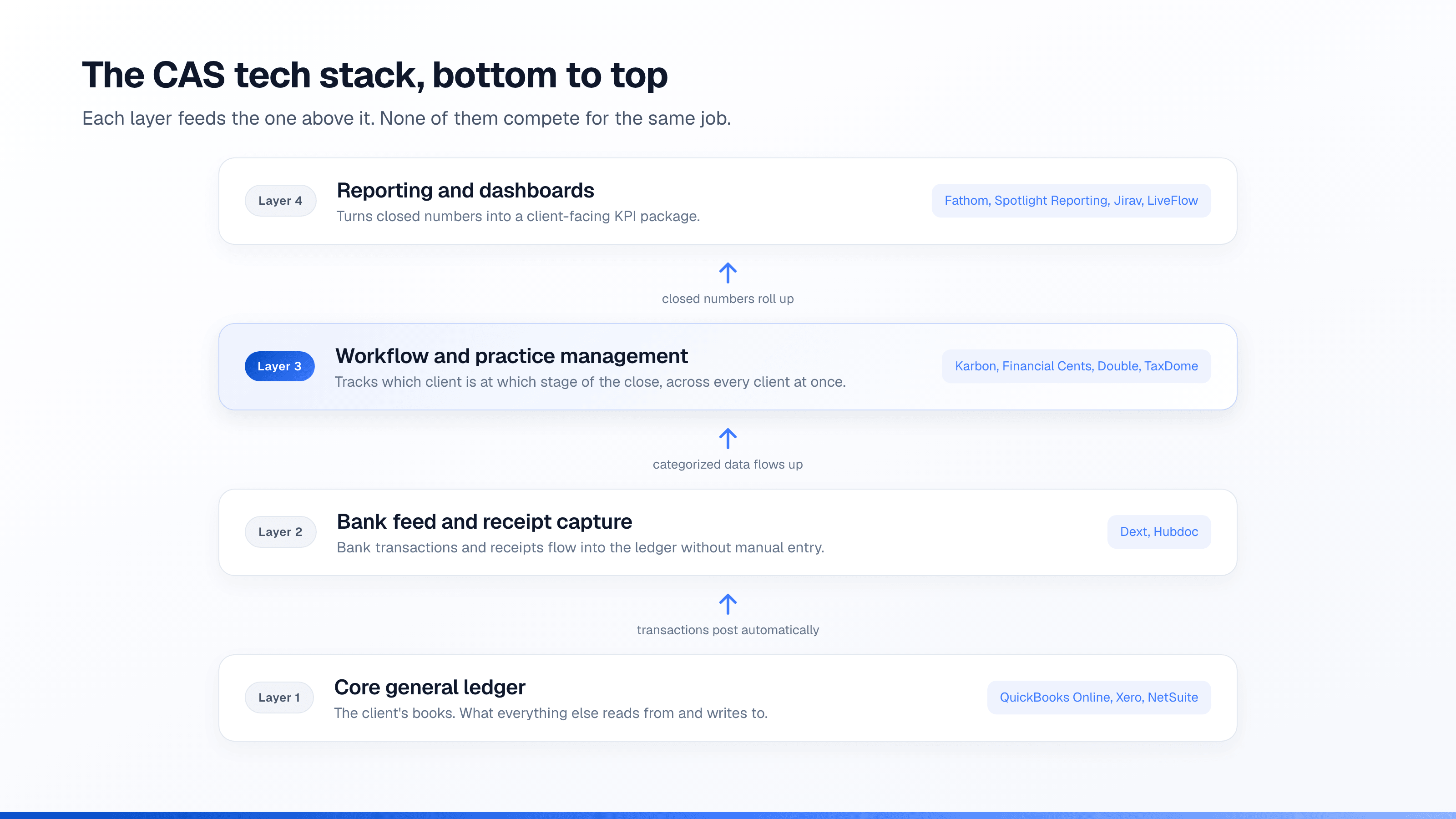
A CAS engagement is live infrastructure, not a once-a-year project, so it touches more software than a typical tax return does. The categories below are what a working CAS stack is actually built from. None of these tools compete with each other for the same job; each one does something the others don’t. Which parts of this stack genuinely run themselves, and which still need a person, is the subject of automating client accounting services.
The books themselves
The client’s general ledger is the center of the stack, and for most CAS clients that’s QuickBooks Online. Xero shows up often enough to be a second standard, and NetSuite tends to appear once a client has multiple entities or outgrows QuickBooks and Xero’s transaction volume. Firms generally pick one or two platforms to support well rather than trying to be equally fluent in all three.
Bank feed and receipt capture
Tools like Dext and Hubdoc pull bank transactions, receipts, and bills into the general ledger automatically, so a bookkeeper is categorizing and reviewing rather than typing every line by hand. This is usually the highest-leverage category in the stack, because it’s the one doing the most repetitive work at scale.
Accounts payable and payments
When a CAS engagement includes running the client’s bill pay, tools such as Bill, Melio, Airbase, or Ramp handle approval routing and payment execution outside the general ledger’s own AP features. Firms that only reconcile a client’s existing AP process, rather than running it, can often skip this category entirely.
Close, workflow, and practice management
Karbon, Financial Cents, Double (formerly Keeper), Jetpack Workflow, Canopy, and TaxDome all serve some version of the same job. Each tracks which client is at which stage of the monthly close, assigns tasks, and keeps a firm from missing a deadline across dozens of clients at once. This is the category that scales a practice past a handful of clients tracked in someone’s head or a spreadsheet. Choosing among them, and what the free partner tools from QuickBooks and Xero already cover, is in bookkeeping software for multiple clients.
Reporting and dashboards
Native QuickBooks, Xero, and NetSuite reports cover a lot, but firms delivering advisory work usually add a dedicated reporting layer, tools like Fathom, Spotlight Reporting, Jirav, LiveFlow, or Syft Analytics, to build client-facing dashboards and KPI packages that don’t require the client to open the accounting system at all.
Client communication and document collection
Content Snare, Copilot, SmartVault, and ShareFile replace the email thread of “here’s my bank statement” attachments with a portal that tracks what’s been requested and what’s been received. This matters more as a firm scales, because chasing documents by email doesn’t scale the same way a checklist does.
Payroll
When CAS scope includes running payroll rather than just recording payroll entries, firms add Gusto, ADP RUN, or Rippling. Firms that only book payroll journal entries from a client’s existing provider usually don’t need a payroll platform of their own.
Which pieces you actually need to start
Most of the tech stack guides aimed at CAS firms list every category above as though a firm needs all of them on day one. It doesn’t. A new or small CAS practice can run on a general ledger, one bank feed and receipt capture tool, and one practice management tool to track deadlines and status across clients. That covers the core loop: get the transactions in, categorize them, close the month, keep track of who’s due for what.
The other categories earn their subscription once volume makes the manual version too slow. A dedicated reporting tool is worth it once you’re building the same KPI package for several clients by hand. A client portal is worth it once document chasing by email is eating real time every week. AP tooling is worth it once you’re actually running payment approvals rather than reviewing a client’s own. Adding all of it upfront, before any category is the actual bottleneck, is how firms end up paying for software nobody logs into. Before buying anything new, it is worth knowing what the software you already run does on its own: AI for bookkeepers covers what is already built into QuickBooks and Xero, and where it stops.
Where a question-answering layer fits, and where it doesn’t
CAS is the bookkeeping, the close, and the advisory work. None of it is what Kipper does, and it isn’t meant to be part of the stack above.
What a CAS firm’s inbox actually fills with, alongside the real accounting work, is a steady stream of small questions from people who aren’t accountants: a client’s sales rep asking whether an invoice got paid, someone in operations checking a vendor’s outstanding balance, an owner away from their desk wanting a quick number before a call. None of that is bookkeeping. All of it lands on whoever’s covering the account anyway, because the client doesn’t have a QuickBooks, Xero, or NetSuite login, or shouldn’t have one, or has one and still finds it faster to just ask. That stream is measurable: a log of 253 questions typed into a bookkeeping demo grouped into 18 recurring asks, split between what a lookup answers and what genuinely needs the firm.
Kipper connects read-only to the same QuickBooks, Xero, or NetSuite connection a firm or its client is already running, and lets the people they approve ask about invoices, bills, payments, customers, and vendors in Slack, Microsoft Teams, by text message, or in a web chat, without a seat in the accounting system and with no path to write anything back. It doesn’t touch the general ledger, the close, or reporting, so it isn’t replacing anything in the stack above. It’s removing the volume of factual lookups that reach the CAS team despite having nothing to do with the actual accounting work. Handing an AI tool read access to a client’s books is a fair thing to want checked before connecting anything, including this.
For a firm running this across a client base, Kipper for Firms prices per client per month, billed to the firm. A company buying Kipper for its own team pays per active user instead, and the pricing page has those numbers.
The short version
Client accounting services, client advisory services, and client accounting and advisory services all describe the same practice: a firm running a client’s books, close, and reporting on a recurring basis, with advisory work layered on for clients who want it. The tech stack behind that practice is real and mostly settled, a general ledger, a bank feed tool, a practice management tool, and a reporting layer, added roughly in that order as a firm grows. A question-answering layer sits outside that stack entirely. It doesn’t do the accounting work; it just keeps the people who aren’t accountants from having to ask an accountant for a number they could have gotten themselves.
FAQ
What is client accounting services (CAS)?
Client accounting services is a CPA firm doing a business’s bookkeeping, month-end close, and financial reporting on an ongoing basis, then adding advisory work such as budgeting, forecasting, and KPI review on top of it. It’s a recurring, subscription-style relationship rather than a once-a-year engagement, and it doesn’t include tax filing or an audit.
What’s the difference between CAS and CAAS?
Some firms use CAS to mean the accounting production itself, the books, the close, and the reporting, and CAAS to mean that same production plus the advisory layer on top of it. In practice most firms use the terms interchangeably, and the AICPA’s own current term for the whole practice area is Client Advisory Services, using the same CAS abbreviation.
What software do most CAS firms run?
A general ledger platform, almost always QuickBooks Online, sometimes Xero or NetSuite for larger clients, plus a bank feed and receipt capture tool, a practice management tool for tracking workflow across clients, and a reporting tool for client-facing dashboards. Firms handling payments or payroll directly add tools for those too. Most firms run one tool per category rather than several competing ones.
Is Kipper a client accounting services tool?
No. Kipper doesn’t do bookkeeping, the close, or reporting, so it isn’t part of a CAS tech stack in the way a general ledger or a practice management tool is. It sits on top of a firm’s existing QuickBooks, Xero, or NetSuite connection and answers read-only questions, so the accounting work stays exactly where it already happens.
How many tools does a CAS practice need to get started?
Fewer than most new tech stack lists suggest. A general ledger, one bookkeeping automation tool for bank feeds and receipts, and one practice management tool to track deadlines and status across clients cover most of what a small CAS practice needs on day one. Dedicated AP tools, client portals, and reporting dashboards earn their subscription once client volume makes the manual version too slow, not before.