








Download Xero Invoice PDFs Without a Xero Login
Need a Xero invoice PDF without a Xero login? Kipper hands over the real document in Slack, Teams, or web chat, and it stays read-only and permission-checked.
On this page +
See it live
Ask your finance system anything.
Invoices, AR aging, unpaid bills, payments.
Schedule free onboardingNo signup. Runs in your browser.
Introduction
Your sales or customer support team asks a quick question in Slack or Teams:
Can you give me the PDF for Xero invoice INV-0002?
Normally, getting that official document means leaving your chat app, logging into Xero, navigating through menus, and downloading the PDF by hand, assuming you even have a Xero seat. If you don’t, it means pestering your finance team to pull the document for you.
Now, there’s a much smoother path. Kipper lets your team fetch authentic Xero invoice PDFs directly inside Slack, Microsoft Teams, or web chat, without handing out extra Xero logins or cluttering up your finance team’s inbox.
How It Works: Ask, Confirm, Download
- Ask: Query by a specific Xero invoice number, for example “Can you get the PDF for invoice INV-0002?”
- Confirm: Kipper replies with the invoice’s details and asks whether you’d like the PDF retrieved from Xero. Click the suggestion, or just reply “yes.”
- Download: Click the generated link to get the exact, branded Xero PDF file.
Here’s the whole thing in the Kipper web chat: answer, offer, and the download button.
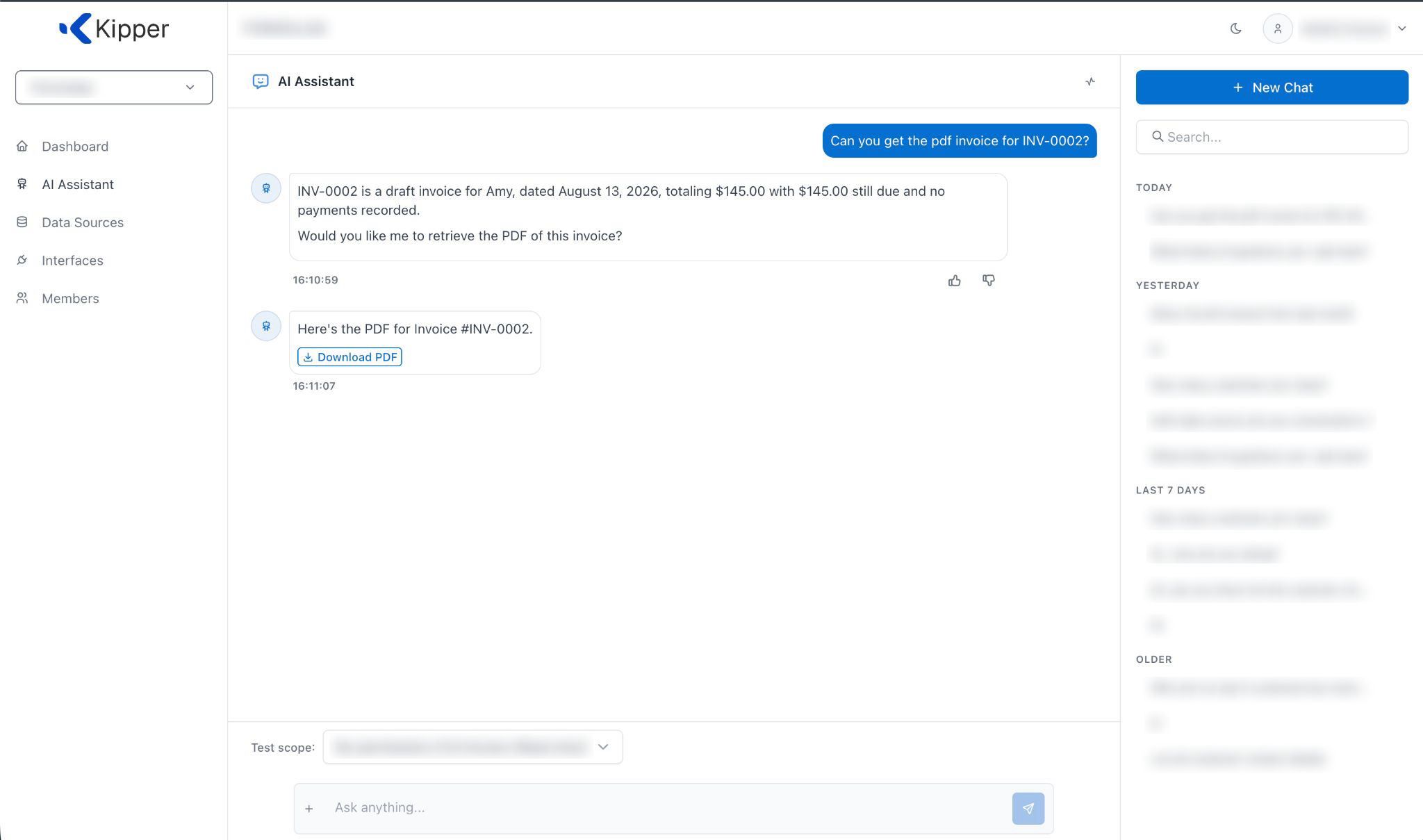
Ask, confirm, download, all in the same thread.
The offer only appears for a single, specific invoice identified by number, not for lists, totals, or contact summaries. Ask for “all my overdue invoices” and Kipper will still answer the question, but it’ll ask you to name one invoice before it offers a PDF. That way nobody accidentally triggers a bulk export.
Bring Xero Documents Into Slack & Microsoft Teams
The same confirm-and-download flow works in the tools your team already lives in, with no separate portal and no context switch:
- Slack: Direct thread responses with download buttons. Ask the Kipper connector for an invoice, say yes, and the file lands right in the thread.
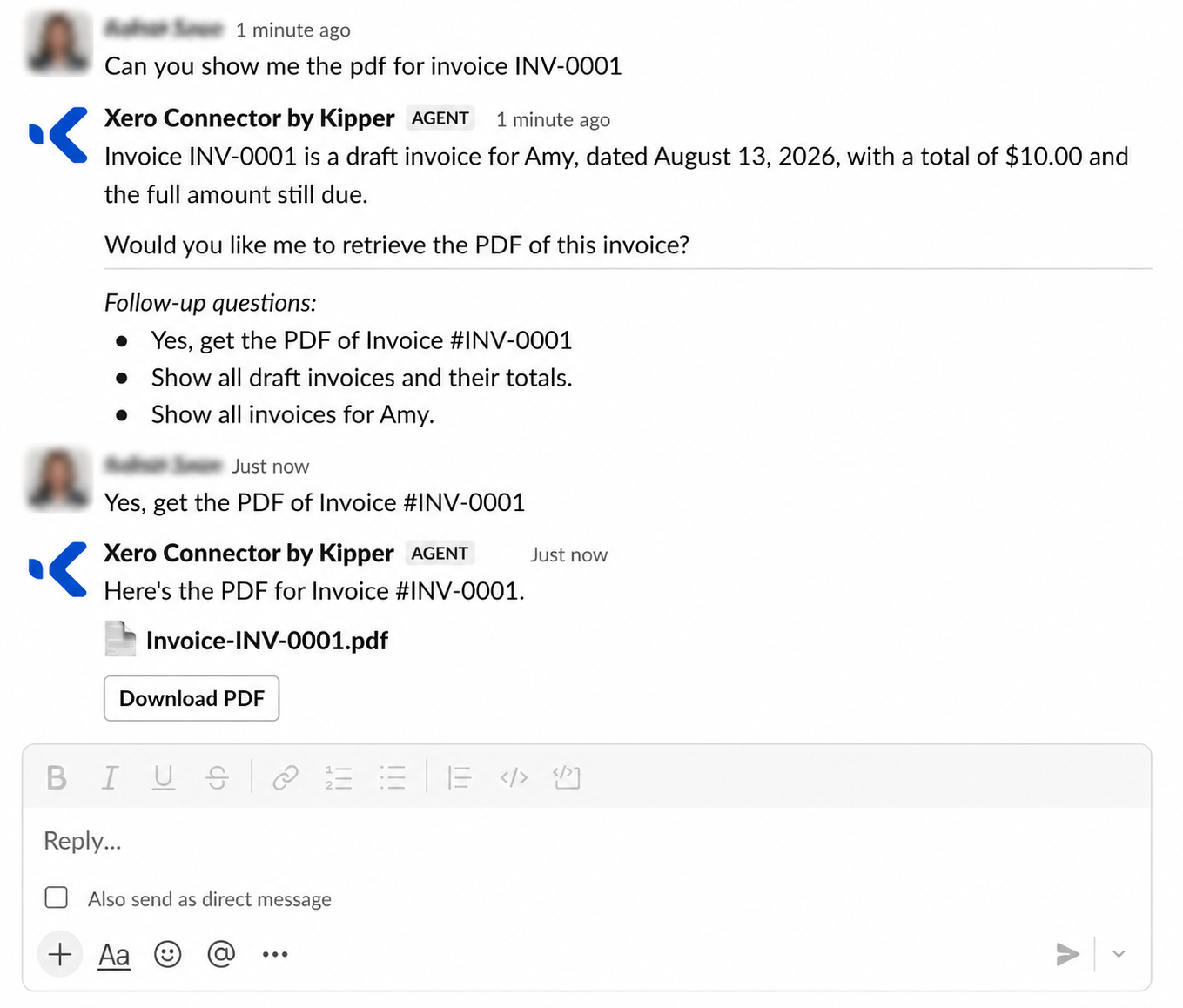
Ask, confirm, download, right in the Slack thread.
- Microsoft Teams: Seamless channel and direct-message interactions, without leaving Teams. It’s the same ask, confirm, download flow whether you’re in a shared channel or messaging Kipper directly.
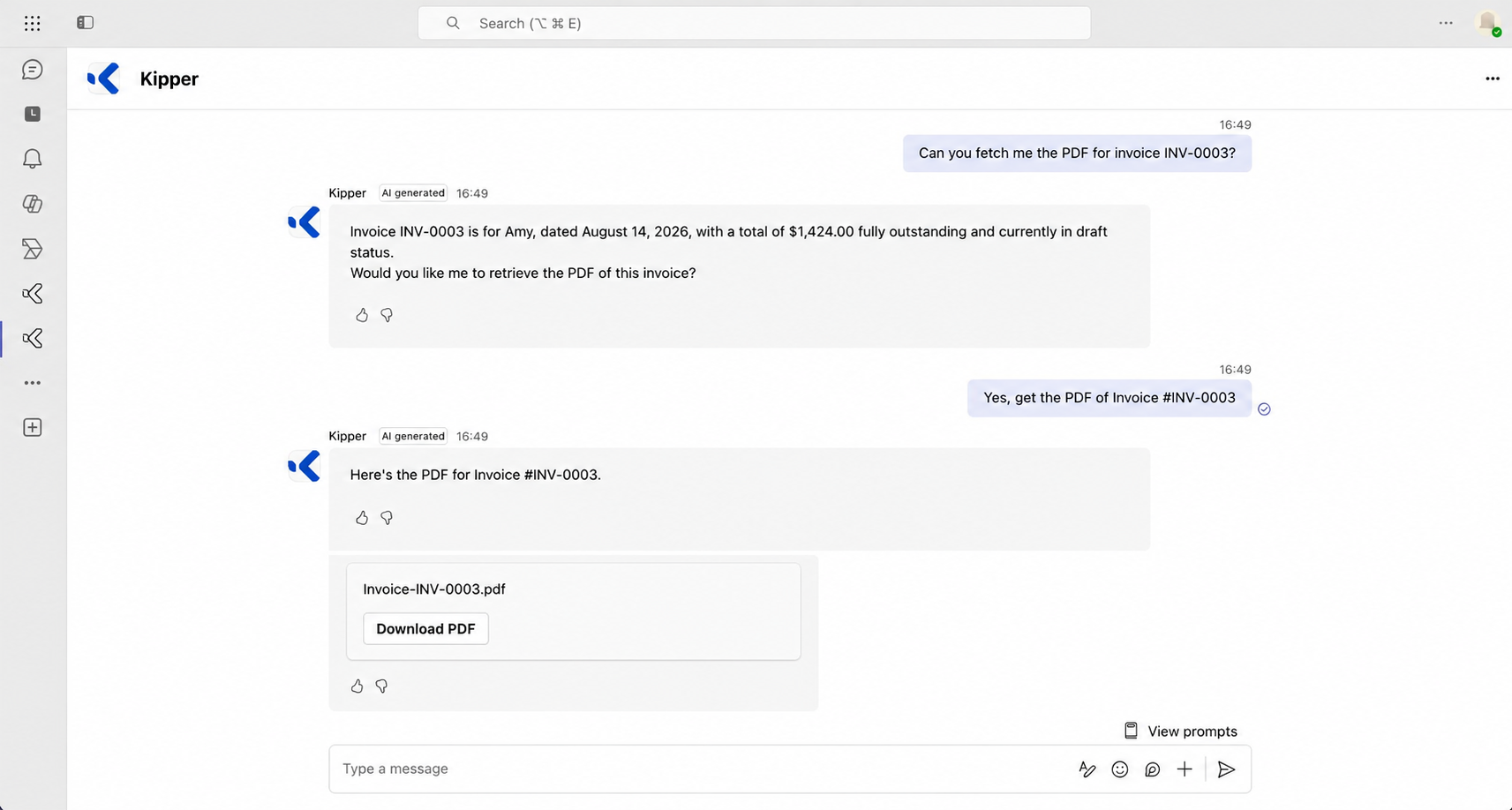
Ask, confirm, download, without leaving Teams.
Enterprise Security & Read-Only Permissions
Handing finance documents to people who don’t have a finance login only works if it’s tightly controlled:
- Read-Only Endpoints: Zero write permissions. Kipper cannot create, alter, or delete Xero data, and there’s no write path to turn on.
- Real-Time Permission Checks: User permissions are verified before a link is generated, and checked again at the moment of download, so revoking someone’s access takes effect immediately, even for a link they’d already been offered.
- Short-Lived Download Links: Temporary URLs expire within minutes to prevent unauthorized sharing, so a link never turns into a permanent, forwardable copy of your invoice.
In other words: the people who are allowed to see an invoice can grab it in one message; everyone else never even sees the offer.
Why not just give them a Xero login?
Because the native option is broader than the request. If someone needs to see an invoice and change nothing, the Xero role that fits is Viewer, and Viewer is an organization-wide role. It can view sales, purchases, contacts, classic expense claims, fixed assets, reports, budgets and manual journals, and it can see bank balances and account transactions in Xero. There is no way to narrow it to one invoice, one customer, or one project, because Xero’s permissions are organized by functional area rather than by record.
So the choice in Xero is a seat that sees most of the organization or no access at all. Kipper is the third option: the person asks for the invoice they need, Kipper checks their permission when the link is generated and again at download, and nothing else in the books is exposed by the request. For the full picture on what each Xero role can reach, see Xero user roles and permissions, or why Xero has no safe read-only role for the reasoning behind this gap.
Built for Sales, Support & Operations
This is for the people who need the document but don’t need a Xero seat, or shouldn’t have one:
- Sales & Account Managers: Attach official invoices to client emails quickly, without a hand-off to finance.
- Customer Support: Resolve client billing questions immediately without logging internal support tickets for accounting.
- Operations & Leadership: Access documents on mobile or desktop without navigating Xero interfaces.
Every one of them gets the real PDF in the tool they already use, and the accounting team stops being a document-retrieval service for the rest of the company.
Key Features & Guardrails
- Single-Invoice Focus: Prevents accidental bulk data exports by restricting queries to specific invoice numbers, one at a time.
- Authentic Xero Formatting: Serves the actual Xero-rendered PDF, complete with company branding and tax details. It’s the same file you’d get downloading it straight from Xero.
Get Started with the Xero Connector
If your team already asks Kipper about Xero data in Slack or in Microsoft Teams, try querying an invoice by number today: ask, confirm, and download. If you’re not connected yet, the Xero MCP connector is where it starts. Connect your Xero organization for a free trial, and your whole team can get the answer and the document, without another login.
Documents are only part of it. The same connection answers questions about everything else Kipper reads from Xero, and 30 Questions You Can Ask AI About Your Xero Data is a good place to start. For how the whole Xero MCP picture fits together, see our Xero MCP guide.
FAQ
Do I need a Xero login to download an invoice PDF?
No. An admin connects your Xero organization to Kipper once, and after that anyone you’ve approved can ask for an invoice in Slack, Microsoft Teams, or the Kipper web chat and get the real PDF without needing their own Xero seat or login.
Is this read-only? Can the AI change my books?
It’s strictly read-only. Kipper can fetch and hand over the invoice PDF, but it cannot create, edit, or delete anything in Xero. There is no setting that turns on write access.
Does this work with our Xero organization?
Yes, this works with any connected Xero organization. If an invoice lives in a system Kipper doesn’t support the PDF for yet, Kipper tells you plainly instead of guessing or returning the wrong document.
Can I download several invoices at once?
The PDF offer is for one specific invoice at a time, identified by its invoice number. If you ask for several at once, Kipper will ask you to narrow it down to a single invoice. It won’t bulk-export.
Who is allowed to get an invoice PDF?
Only people you’ve granted access to invoices or accounts-receivable data. The offer only appears for permitted users, and permission is re-checked again at the moment of download, so revoking someone’s access takes effect immediately.
Does the PDF link stay valid forever?
No. Each download link is a short-lived, single-purpose link that expires a few minutes after it’s created. If it expires, just ask again to get a fresh copy.