









Xero MCP Troubleshooting: invalid_scope & invalid_client
Fix common Xero MCP errors: invalid_scope, invalid_client, missing tools, local stdio issues, and Custom Connection re-authorization.
On this page +
See it live
Ask Kipper about your Xero data.
Invoices, supplier bills, purchase orders and credit notes.
Schedule free onboardingNo signup. Runs in your browser.
Xero MCP setup usually fails in a small number of places: scopes, credentials, app type, local stdio configuration, or the wrong Xero organization. A hosted Xero MCP server sidesteps most of these by handling credentials and configuration for you.
Use this guide as a checklist. Start with the safest test: Xero’s built-in Demo Company and one read-only organization-details request.
Quick Diagnostic Table
| Error or symptom | First thing to check |
|---|---|
invalid_scope |
XERO_SCOPES matches Xero Developer exactly |
invalid_client |
Client ID and Secret are from the authorized Custom Connection |
| No Xero tools appear | MCP client command, args, environment variables, restart |
| Server shows no terminal output | Normal for stdio; test from the MCP client |
| ChatGPT cannot connect | ChatGPT needs remote HTTPS MCP, not local stdio |
| Subscription required | Confirm Demo Company or Custom Connection eligibility |
| Worked before, fails now | Scopes, credentials, and whether the authorizing user still qualifies |
invalid_scope
This usually means the scope list in your MCP configuration does not match the scopes authorized in Xero Developer.
Check:
- Spaces between scopes, not commas
- No quotes copied into a UI field unless the UI adds them itself
- The Custom Connection has been authorized after scope changes
- You are using read scopes for read tests
- The connection was created before or after Xero’s April 2026 Custom Connection scope change
For the first test, simplify to:
XERO_SCOPES=accounting.settings.readThen authorize the same scope in Xero Developer and restart your MCP client.
When the requested scopes do not match what the Custom Connection is authorized for, Xero stops the authorization flow on its own error page. The page reports Error: unauthorized_client with the detail Invalid scope for client, which is Xero’s way of saying the scope request itself was rejected rather than the credentials.
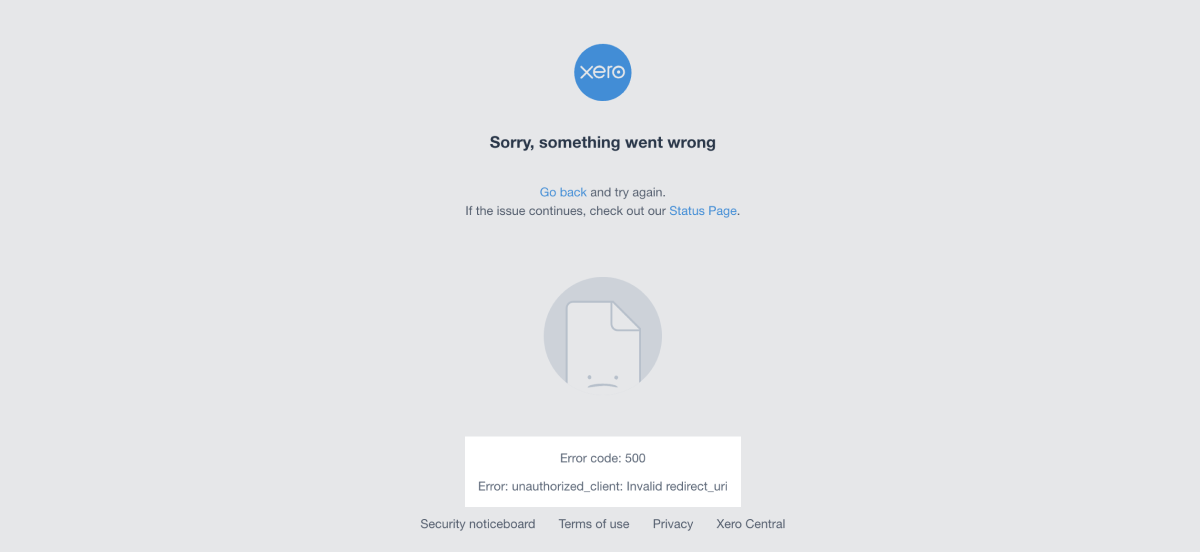 Xero’s authorization error page reporting
 unauthorized_client with Invalid scope for client, the response shown when the requested scopes do not match the scopes authorized on the Custom Connection.
invalid_client
This means the server cannot authenticate with Xero using the credentials you supplied.
Check:
- The Client ID and Client Secret are copied from the same Xero app.
- The secret has not been rotated.
- There are no leading or trailing spaces.
- The values are stored as environment variables, not pasted into the wrong config field.
- You are not mixing credentials from a different Custom Connection.
Use placeholders in docs and screenshots:
XERO_CLIENT_ID=YOUR_XERO_CLIENT_ID
XERO_CLIENT_SECRET=YOUR_XERO_CLIENT_SECRET
Never commit real values to source control.
No Xero Tools Appear
If your MCP client opens but no Xero tools appear, the client may not be launching the server.
For local clients, confirm:
- Node.js and npm are installed.
- The command is
npxor the absolute path tonpx. - The args are separate values:
-yand@xeroapi/xero-mcp-server@latest. - Environment variables are present in the MCP client config.
- The app was fully restarted after saving the MCP config.
For a cloned local build, confirm:
npm install
npm run build
ls -l dist/index.js
Then use an absolute path to dist/index.js.
ChatGPT Cannot Connect to the Xero MCP Server
ChatGPT does not directly launch a local stdio server from your computer. It needs a remote MCP endpoint over HTTPS, or a supported secure tunnel for development.
If you only have this local config, it is for clients like Claude Desktop or Codex:
{
  "command": "npx",
  "args": ["-y", "@xeroapi/xero-mcp-server@latest"]
}
For ChatGPT, use How to Connect Xero MCP to ChatGPT. A hosted remote endpoint avoids the problem altogether, which is the route the Xero ChatGPT connector takes.
Subscription required to connect
For first tests, confirm you selected Xero’s built-in Demo Company, not a normal organization renamed “Demo Company.” Xero says Custom Connections can be tested with the demo company at no charge.
For a real organization, this message can mean the required Custom Connection setup or subscription is not available for that organization.
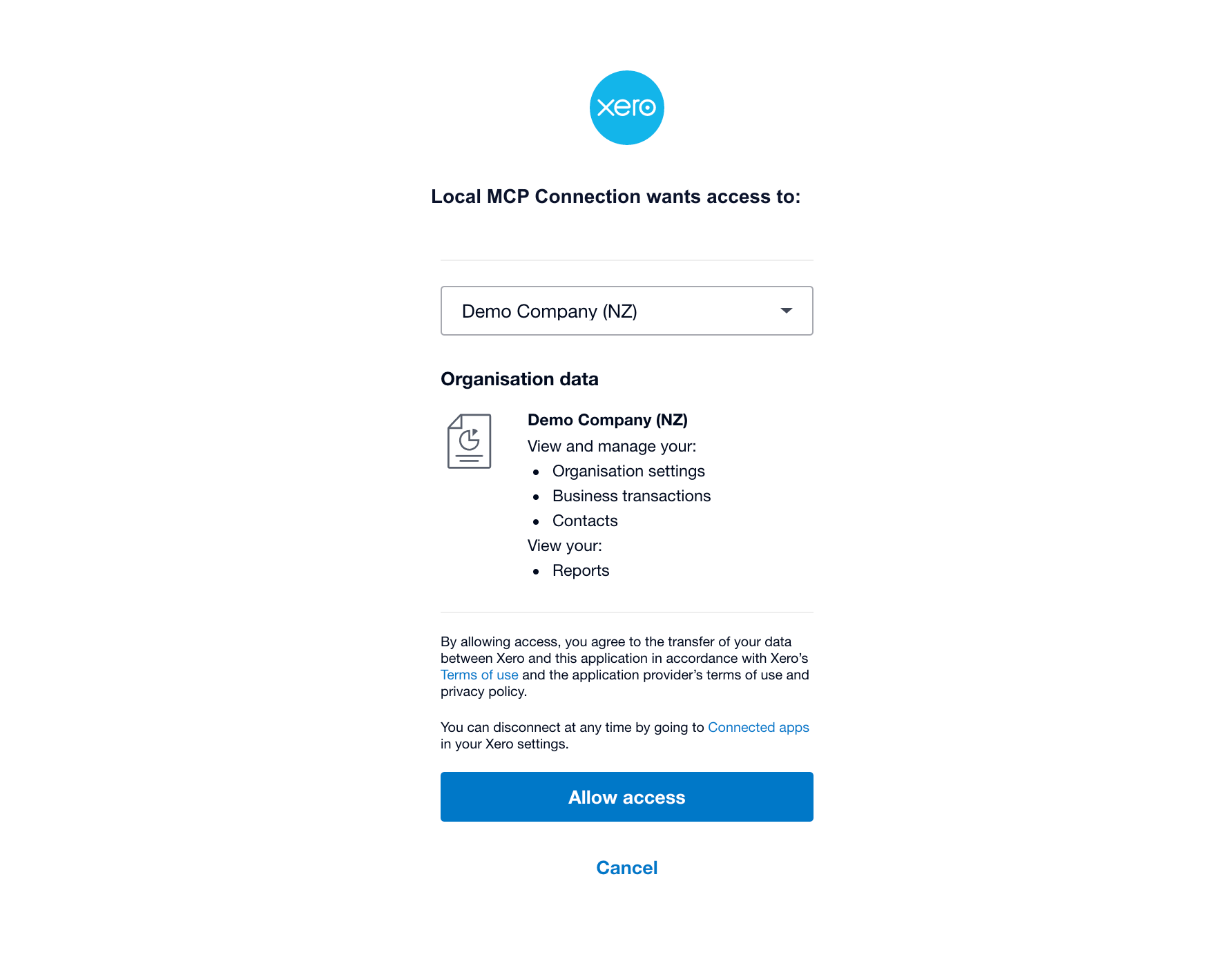 Confirm the organization during authorization. Use the built-in Demo Company for the first test before connecting production books.
Custom Connection Re-Authorization Problems
Changing a Custom Connection can deactivate it until it is re-authorized. This often appears after:
- Adding scopes
- Removing old broad scopes
- Changing the authorizing user
- Switching connection details
If the connection worked yesterday and fails today, check whether someone changed the Custom Connection in Xero Developer.
Check the Authorizing User’s Xero Role
A Xero connection is tied to the person who approved it, so a staffing change can look like a technical fault. Xero’s developer FAQ is explicit about who may connect an integration:
The user that connects the integration has to have either Standard, Adviser, or Administrator level user with the Connected Apps permission.
The same FAQ says “the API essentially works on behalf of the user that authorised it to connect,” and that some endpoints depend on that user’s own permissions: Reporting APIs and the /ManualJournals and /Journals endpoints need Reports access, and the Payroll APIs need Payroll Admin.
So when a previously working connection starts failing, and the scopes and credentials have not changed, check the human side before the configuration:
- Identify which Xero user authorized the connection.
- Confirm they are still a user in that Xero organization.
- Confirm they still hold Standard, Adviser, or Administrator level access with the Connected Apps permission.
- If any of that has changed, re-authorize the connection with a user who qualifies.
The same requirement explains a setup-time symptom: Xero will not list an organization in the authorization dropdown if you do not have Standard or Adviser level permissions in it, or if that app is already connected to it. An organization that “isn’t there” is usually a permissions problem, not a missing organization.
Xero does not publish exactly what happens to a live connection when the authorizing user is removed or demoted, so treat the steps above as a diagnostic to run rather than a documented failure mode. If you depend on the answer, test it against a connection you control.
Payroll Tools Do Not Work
Payroll support depends on the region and the scopes available to the organization. The official Xero MCP README notes that payroll-specific queries should use a Demo Company region where payroll is supported, such as NZ or UK.
Do not use payroll scopes in a general finance Q&A pilot unless payroll access has been explicitly approved.
Reports Return Errors
Reports need the matching report scope. Xero also adds and changes API validation over time. For example, Xero enforces a 200 tracking-column limit on the Profit and Loss report, and requests that exceed it return a 400 error. If a report fails, narrow the request and check whether the selected tracking options or report parameters are too broad.
Clean Restart Checklist
When in doubt:
- Reduce scopes to
accounting.settings.read. - Re-authorize the Xero Custom Connection.
- Replace the Client ID and Client Secret in the MCP client.
- Fully quit and reopen the MCP client.
- Test only
list-organization-details. - Add one scope group at a time.
FAQ
Why does Xero MCP return invalid_scope?
The scopes in XERO_SCOPES usually do not match the scopes authorized in Xero Developer, or the Custom Connection is using a different scope model than expected.
Why does Xero MCP return invalid_client?
The Client ID or Client Secret is wrong, belongs to a different app, was rotated, or is not from the Custom Connection you authorized.
Why does Xero show Subscription required to connect?
For first tests, confirm you are using Xero’s built-in Demo Company. Real organizations may need the required Custom Connection subscription or eligible setup.
For a clean setup path, go back to How to Set Up Xero MCP Server (Developer Guide). For scope planning, read Xero MCP Scopes Explained. For client-specific walkthroughs, see Claude Desktop and Codex. To skip local configuration in Claude entirely, see the Xero Claude connector. For everything in one place, start from the complete guide to Xero MCP.
What should I check if a previously working Xero connection fails?
Check scopes, credentials, and whether the authorizing user still qualifies. Xero requires the user who connects an integration to be a Standard, Adviser, or Administrator level user with the Connected Apps permission, and Xero describes the API as working on behalf of the user who authorized it. Xero does not document exactly what happens to a live connection after a staffing or role change, so verify the user’s access and re-authorize with a qualifying user if needed.